In This Article
Introduction
A Heldup is a condition that can prevent a Ticket from being closed. There are two types of Heldups: Manual Heldups and System Generated Heldups.
Manual Heldups
Manual Heldups are created by a user and placed on a Ticket. These must be resolved before the Ticket can be closed.
System Generated Heldups
System Generated Heldups are triggered automatically by the system when specific conditions are not met, such as a missing Purchase Order or Unapproved Labor.
System Generated Heldups can be either a hard stop or a soft stop:
- Hard stops prevent a Ticket from being closed. These are noted with a checkbox. A Ticket cannot be closed until all hard stop reasons are resolved.
- Soft stops are notifications of an existing condition but do not prevent a Ticket from being closed.
System Generated Heldups are also categorized into the following categories: Header, Labor, Misc, Parts, Segments/Operations, and Warranty.
Viewing Heldups
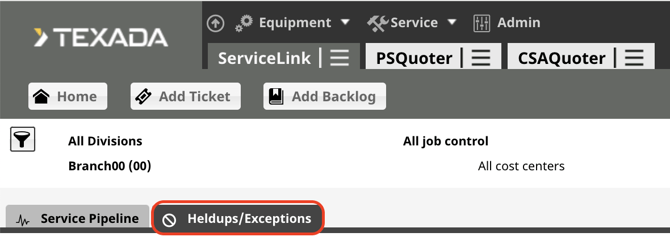
Select the Divisions/Job Controls/Branches from the filter, then select the Heldups/Exceptions Tab.
Heldups are categorized first by the status of the Ticket: Work in Progress versus Finalizing. There are different Heldups depending on the status of the ticket.
Next, they are categorized by type: System Generated vs Manual.
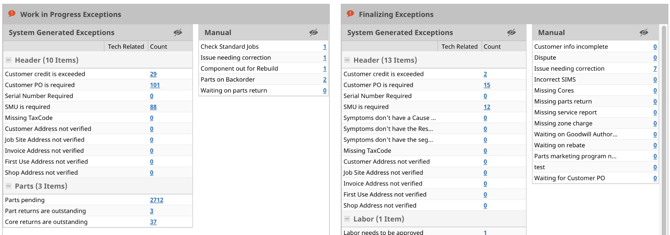
You can see a hyperlinked number next to each Heldup.
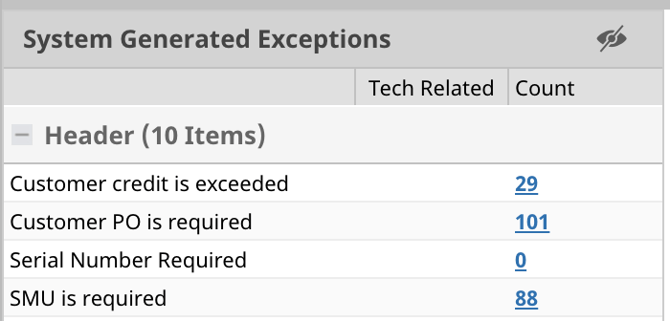
Select the number to view a list of Tickets that have that Heldup.

Select the hyperlinked Ticket number from the list to go into the ticket to see more details.
You can Also select different Heldups from the ticket view as well.