
In This Article
Introduction
On October 26th, 2026, Caterpillar will be updating the authentication method for all of their API services from PingFederate to Microsoft Entra. This migration will require Caterpillar to issue new credentials to all organizations who integrate with API services such as Cat Configurator, Cat Interact, and VisionLink.
If your organization’s Texada system integrates with one or more of Caterpillar’s API services, you may need to take action as a result of this change. Keep reading to learn more.
What You Need To Do
In order to continue using Caterpillar’s API services with your Texada system after October 2026, your organization will need to take the following steps.
Caterpillar API credentials undergo annual rotation. This means that you will need to complete the following process once per year to maintain access. Texada recommends bookmarking this guide and scheduling a recurring renewal event to ensure that your access does not lapse.
1. Contact Caterpillar for new API credentials
Most sets of API credentials consist of three values:
- Scope: The specific data or actions your application is allowed to access.
- Client ID: The unique ID that identifies your application.
- Client Secret: A private key your application uses to prove its identity.
All three of these values can be obtained via the CAT Digital Marketplace (DMP). To do this, follow the instructions below.
- Log in to the CAT Digital Marketplace at https://digital.cat.com/.
- Select APIs → API Catalog from the top menu.
- Locate the API for which you would like to receive credentials and click the “Subscribe Now” button on the right side of the screen.
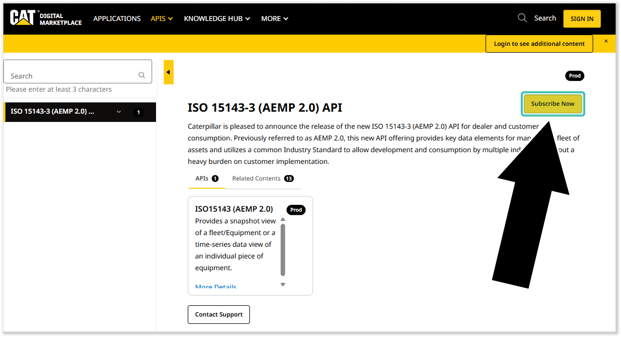
- Complete the API subscription form.
- Once you’ve completed and submitted the form, your API credentials will be sent to you via email. Standard turnaround time for new credentials is 5-7 days.
- Repeat steps 3-5 for each API your organization uses.*
* Each API service offered by Caterpillar requires its own set of credentials. For example, if you use both VisionLink and Prime Product+, you will need a separate Scope, Client ID, and Client Secret for each of these services.
If you are already subscribed to an API but have not received credentials, raise a support ticket with Caterpillar by navigating to the API Catalog and clicking the “Contact Support” button under the API in question.
2. Update credentials in CloudLink Console
In your Texada system, credentials for Caterpillar’s API services are stored using configuration keys.
Once Caterpillar has provided you with new credentials for the API services your organization uses, you will need to update the corresponding configuration keys in CloudLink Console. See “Manage Configuration Keys” for more information.
Refer to the “Affected APIs” section below for the specific configuration keys to be updated.
For APIs that include an API Scope configuration key, entering a value for that key will trigger the system to start using the new Entra authentication method for that API. In other words:
- If API Scope is blank, the old PingFederate authentication method will be used.
- If API Scope has a value, the new Microsoft Entra authentication method will be used.
As such, setting the value of this key is an effective way to test the new configuration in advance of the switchover date.
Where applicable, Texada recommends testing the new configuration in your Sandbox environment as soon as you receive new API credentials from Caterpillar. This will provide you with sufficient time to troubleshoot prior to the October 26th, 2026 cutoff date.
Affected APIs
In this section, you will find a list of Caterpillar – Texada APIs affected by this migration, including the relevant configuration keys for each API.
Aftermarket Prioritized Service Events (PSE) Unite
Aftermarket Prioritized Service Events (PSE) Unite is Caterpillar’s service intelligence platform that aggregates machine health data and applies prioritization logic to identify and rank actionable service opportunities. For equipment dealers, it provides a structured, data-driven queue of recommended service events, enabling proactive customer outreach, improved service planning, and integration with dealer service management systems through APIs.
For information on how PSEs are used in Equipment CRM, see “SalesLink PSE Integration”.
CAT PSE API Scope
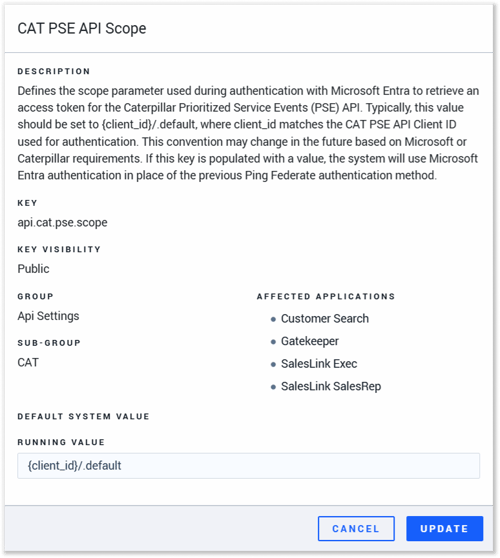
- Key: api.cat.pse.scope
- Description: Defines the scope parameter used during authentication with Microsoft Entra to retrieve an access token for the Caterpillar Prioritized Service Events (PSE) API. Typically, this value should be set to {client_id}/.default, where client_id matches the CAT PSE API Client ID used for authentication. This convention may change in the future based on Microsoft or Caterpillar requirements. If this key is populated with a value, the system will use Microsoft Entra authentication in place of the previous Ping Federate authentication method.
CAT PSE API Client ID
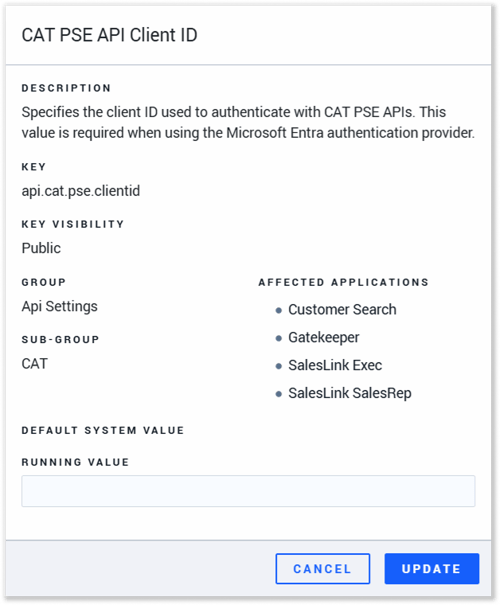
- Key: api.cat.pse.clientid
- Description: This key specifies the client ID used to authenticate with CAT PSE APIs. This value is required when using the Microsoft Entra authentication provider.
CAT PSE API Client Secret
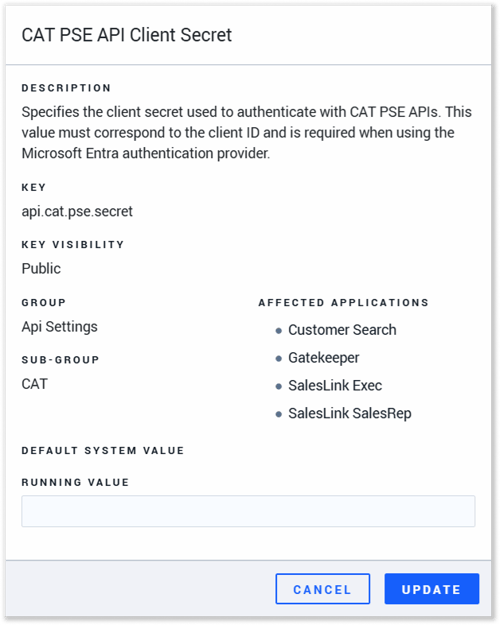
- Key: api.cat.pse.secret
- Description: This key specifies the client secret used to authenticate with CAT PSE APIs. This value must correspond to the client ID and is required when using the Microsoft Entra authentication provider.
Prime Product+ Lead API
Caterpillar Prime Product+ is Caterpillar’s centralized product data service that provides enriched, standardized information about CAT machines, including specifications, features, and commercial attributes. For equipment dealers, it serves as an authoritative source of product master data that can be integrated into dealer systems to support sales, quoting, digital experiences, and downstream operational workflows via APIs.
For information on how Equipment CRM integrates with Prime Product+, see “Equipment CRM - Prime Product+ Integration”.
CAT Prime Product API Version
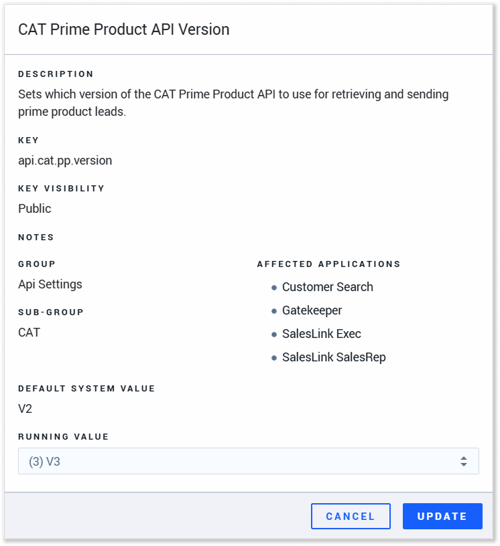
- Key: api.cat.pp.version
- Description: This key determines the version of the Prime Product+ API used by your system.
- Value: This key has two possible values:
- (2) V2: Version 2 of the API will be used.
- (3) V3: Version 3 of the API will be used.
CAT Prime Product API Scope
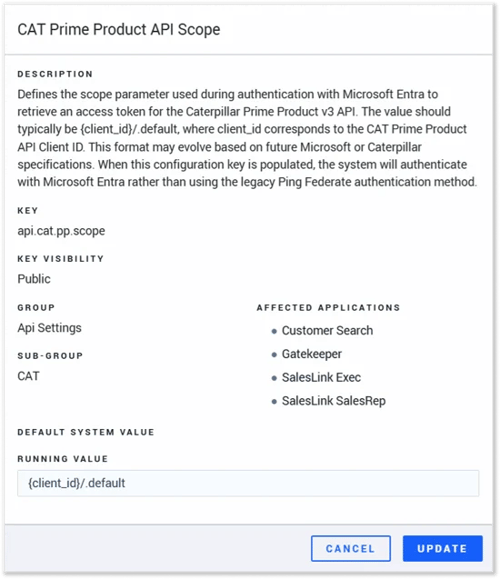
- Key: api.cat.pp.scope
- Description: Defines the scope parameter used during authentication with Microsoft Entra to retrieve an access token for the Caterpillar Prime Product v3 API. The value should typically be {client_id}/.default, where client_id corresponds to the CAT Prime Product API Client ID. This format may evolve based on future Microsoft or Caterpillar specifications. When this configuration key is populated, the system will authenticate with Microsoft Entra rather than using the legacy Ping Federate authentication method.
- Value: Provided by Caterpillar.
CAT Prime Product API Client ID
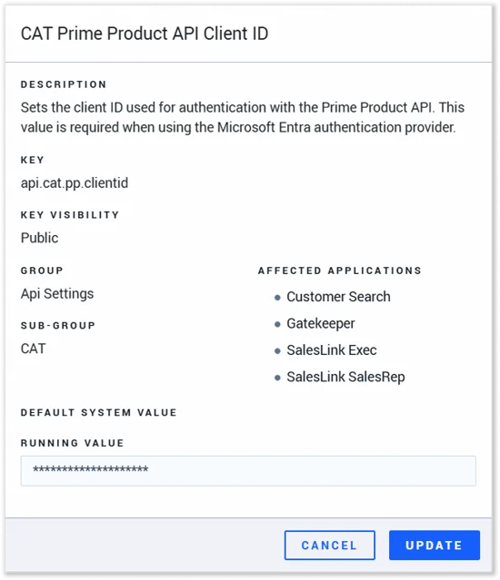
- Key: api.cat.pp.clientid
- Description: Sets the client ID used for authentication with the Prime Product API. This value is required when using the Microsoft Entra authentication provider.
- Value: Provided by Caterpillar.
CAT Prime Product API Client Secret
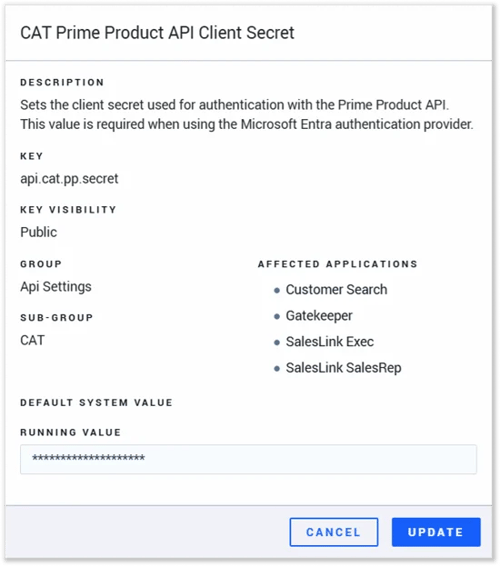
- Key: api.cat.pp.secret
- Description: Sets the client secret used for authentication with the Prime Product API. This value is required when using the Microsoft Entra authentication provider.
- Value: Provided by Caterpillar.
Basic Daily API
Caterpillar’s Basic Daily API provides standardized daily snapshots of equipment telematics data, including key metrics such as location, hours, and machine status. For equipment dealers, it serves as a reliable integration point for ingesting CAT machine data into dealer systems, supporting reporting, fleet visibility, and downstream service and operational workflows.
CAT Basic Daily API Scope
- Key: CAT.BasicDaily.API.Entra.Auth.Scope
- Description: Sets the Scope used for authentication with the CAT Basic Daily API. This value is required when using the Microsoft Entra authentication provider.
- Value: Provided by Caterpillar.
CAT Basic Daily API Client Id
- Key: CAT.BasicDaily.API.Entra.Auth.ClientId
- Description: Sets the ClientId used for authentication with the CAT Basic Daily API. This value is required when using the Microsoft Entra authentication provider.
- Value: Provided by Caterpillar.
CAT Basic Daily API Client Secret
- Key: CAT.BasicDaily.API.Entra.Auth.ClientSecret
- Description: Sets the ClientSecret used for authentication with the CAT Basic Daily API. This value is required when using the Microsoft Entra authentication provider.
- Value: Provided by Caterpillar.
CAT Basic Daily API Scope - Second Source
- Key: CAT.BasicDaily.API.Entra.Auth.Scope_2ndSource
- Description: Sets the Scope of the second source used for authentication with the CAT Basic Daily API. This value is required when using the Microsoft Entra authentication provider.
- Value: Provided by Caterpillar.
CAT Basic Daily API Client Id - Second Source
- Key: CAT.BasicDaily.API.Entra.Auth.ClientId_2ndSource
- Description: Sets the ClientId of the second source used for authentication with the CAT Basic Daily API. This value is required when using the Microsoft Entra authentication provider.
- Value: Provided by Caterpillar.
CAT Basic Daily API Client Secret - Second Source
- Key: CAT.BasicDaily.API.Entra.Auth.ClientSecret_2ndSource
- Description: Sets the ClientSecret of the second source used for authentication with the CAT Basic Daily API. This value is required when using the Microsoft Entra authentication provider.
- Value: Provided by Caterpillar.
Cat Interact Dealer Integration API
Cat Interact (formerly Modern) is Caterpillar’s digital platform that provides centralized access to customer, equipment, and operational data across CAT systems. For equipment dealers, it acts as a connected ecosystem that surfaces machine and account insights, enabling integration with dealer systems and supporting workflows such as fleet management, service, and customer engagement through APIs.
See “Cat Interact” for an overview of Service Management CD’s integration with Cat Interact.
Texada’s Cat Interact implementation is NOT affected by the switch to Microsoft Entra. You do not need to take any action to update your credentials for this API.
VisionLink
Caterpillar VisionLink is Caterpillar’s cloud-based telematics platform that provides equipment location, utilization, health, and maintenance data for CAT and supported third-party machines. For equipment dealers, VisionLink serves as the upstream data source for machine insights, enabling dealers to monitor customer fleets, support service operations, and integrate equipment data into their own systems via APIs.
As of June 2023, Caterpillar has deprecated their VisionLink v1 APIs and instructed all dealers and partners to migrate to v3. See “Upgrade VisionLink to v3” for more information.
ClientScope for VisionLink V3 Integration
- Key: Integration.VisionLink.V3.ClientScope
- Description: Configures ClientScope for VisionLink V3 Integration.
- Value: Provided by Caterpillar.
ClientId for VisionLink V3 Integration
- Key: Integration.VisionLink.V3.ClientId
- Description: Configures ClientId for VisionLink V3 Integration.
- Value: Provided by Caterpillar.
ClientSecret for VisionLink V3 Integration
- Key: Integration.VisionLink.V3.ClientSecret
- Description: Configures ClientSecret for VisionLink V3 Integration.
- Value: Provided by Caterpillar.
ClientScope for VisionLink V3 Integration - Second Source
- Key: Integration.VisionLink.V3.ClientScope_2ndSource
- Description: Configures ClientScope of the Second Source for VisionLink V3 Integration.
- Value: Provided by Caterpillar.
ClientId for VisionLink V3 Integration - Second Source
- Key: Integration.VisionLink.V3.ClientId_2ndSource
- Description: Configures ClientId of the Second Source for VisionLink V3 Integration.
- Value: Provided by Caterpillar.
ClientSecret for VisionLink V3 Integration - Second Source
- Key: Integration.VisionLink.V3.ClientSecret_2ndSource
- Description: Configures ClientSecret of the Second Source for VisionLink V3 Integration
- Value: Provided by Caterpillar.
CAT Inspect Partner API
Cat Inspect Partner API enables authorized partners and dealers to programmatically access and exchange inspection data captured through Caterpillar’s Cat Inspect platform. For equipment dealers, it provides a secure integration point to retrieve inspection results, statuses, and related equipment details, allowing inspection workflows and condition data to flow directly into dealer service, maintenance, and asset management systems.
CAT Inspect Partner API Scope
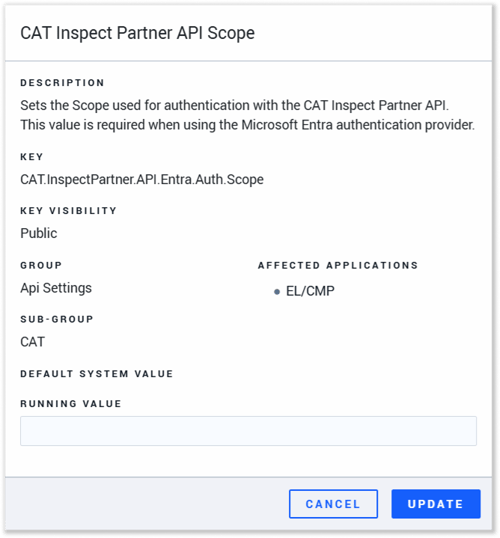
- Key: CAT.InspectPartner.API.Entra.Auth.Scope
- Description: Sets the Scope used for authentication with the CAT Inspect Partner API. This value is required when using the Microsoft Entra authentication provider.
- Value: Provided by Caterpillar.
CAT Inspect Partner API Client Id
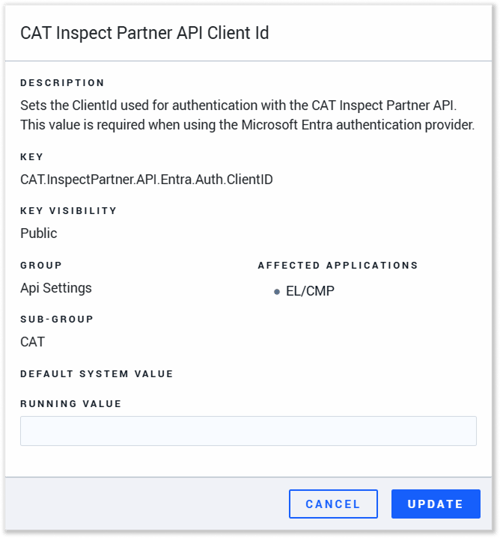
- Key: CAT.InspectPartner.API.Entra.Auth.ClientID
- Description: Sets the ClientId used for authentication with the CAT Inspect Partner API. This value is required when using the Microsoft Entra authentication provider.
- Value: Provided by Caterpillar.
CAT Inspect Partner API Client Secret
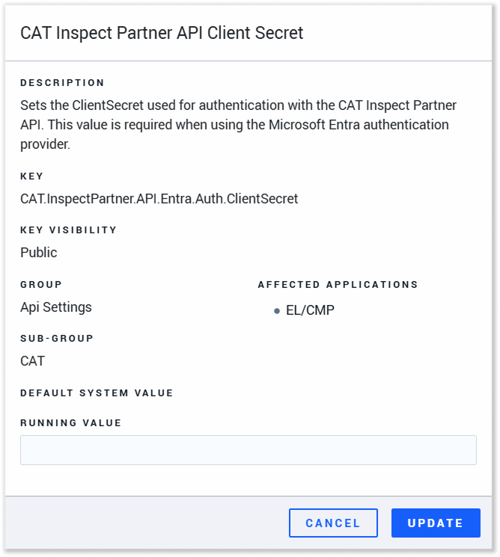
- Key: CAT.InspectPartner.API.Entra.Auth.ClientSecret
- Description: Sets the ClientSecret used for authentication with the CAT Inspect Partner API. This value is required when using the Microsoft Entra authentication provider.
- Value: Provided by Caterpillar.
CAT Inspect Partner API Scope - Second Source
- Key: CAT.InspectPartner.API.Entra.Auth.Scope_2ndSource
- Description: Sets the Scope of the second source used for authentication with the CAT Inspect Partner API. This value is required when using the Microsoft Entra authentication provider.
- Value: Provided by Caterpillar.
CAT Inspect Partner API Client Id - Second Source
- Key: CAT.InspectPartner.API.Entra.Auth.ClientID_2ndSource
- Description: Sets the ClientId of the second source used for authentication with the CAT Inspect Partner API. This value is required when using the Microsoft Entra authentication provider.
- Value: Provided by Caterpillar.
CAT Inspect Partner API Client Secret - Second Source
- Key: CAT.InspectPartner.API.Entra.Auth.ClientSecret_2ndSource
- Description: Sets the ClientSecret of the second source used for authentication with the CAT Inspect Partner API. This value is required when using the Microsoft Entra authentication provider.
- Value: Provided by Caterpillar.
Customer Solutions Quoter (CSQ)
Caterpillar Customer Solutions Quoter (CSQ) is Caterpillar’s centralized service contract and lifecycle management platform that enables the configuration, pricing, and assembly of Customer Value Agreements (CVAs) and extended equipment coverage plans. For equipment dealers, it serves as the authoritative source for standardized maintenance intervals, factory-approved parts kits, and localized labor rules, enabling sales and service teams to generate uniform, comprehensive solution quotes that flow seamlessly into downstream dealer invoicing and fleet management workflows through APIs.
CSQ API OAuth Scope
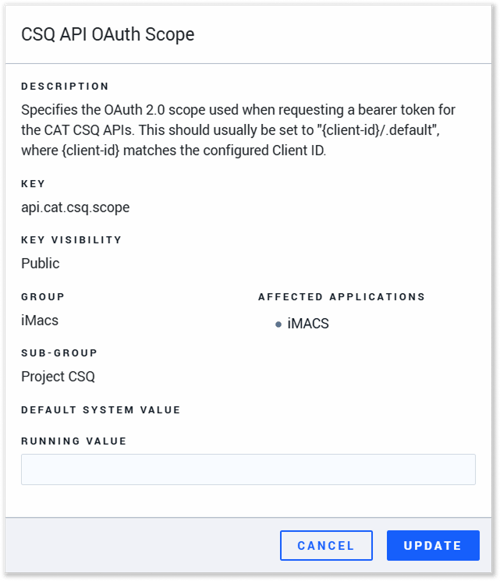
- Key: api.cat.csq.scope
- Description: Specifies the OAuth 2.0 scope used when requesting a bearer token for the CAT CSQ APIs. This should usually be set to "{client-id}/.default", where {client-id} matches the configured Client ID.
- Value: Provided by Caterpillar.
CSQ API Client ID
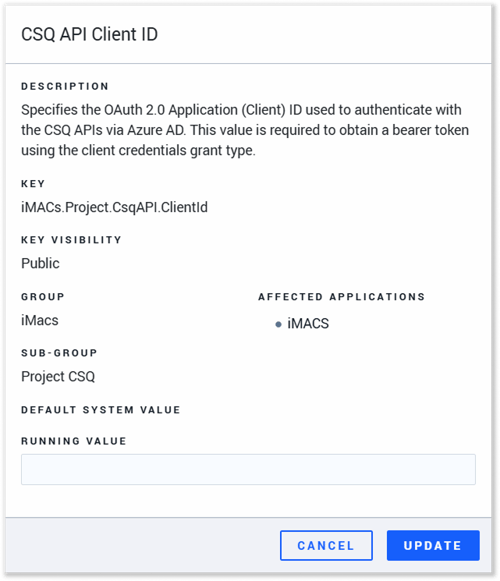
- Key: iMACs.Project.CsqAPI.ClientId
- Description: Specifies the OAuth 2.0 Application (Client) ID used to authenticate with the CSQ APIs via Azure AD. This value is required to obtain a bearer token using the client credentials grant type.
- Value: Provided by Caterpillar.
CSQ API Client Secret
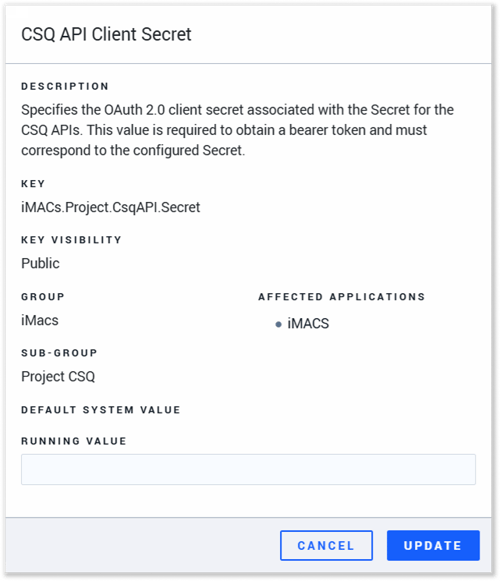
- Key: iMACs.Project.CsqAPI.Secret
- Description: Specifies the OAuth 2.0 client secret associated with the Secret for the CSQ APIs. This value is required to obtain a bearer token and must correspond to the configured Secret.
- Value: Provided by Caterpillar.
CSQ API BaseUrl
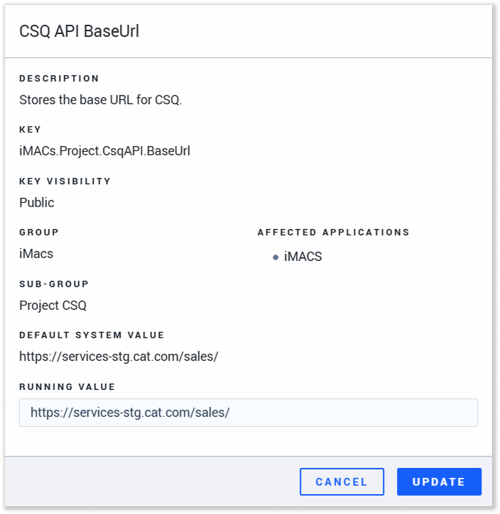
- Key: iMACs.Project.CsqAPI.BaseUrl
- Description: Stores the base URL for CSQ.
- Value:
- Sandbox: https://services-stg.cat.com/sales/
- Production: https://services.cat.com/sales/
CAT Callable Configurator
CAT Configurator is Caterpillar’s equipment configuration platform that enables dealers to build and price CAT machines with approved options, attachments, and specifications. For equipment dealers, it serves as the authoritative source for machine configuration data, ensuring quotes and orders align with Caterpillar’s factory-supported builds and enabling integration with dealer sales and ERP systems via APIs.
The below configurations were put into effect as of 2024, and are NOT impacted by this update. If your organization is currently successfully using the CAT Callable Configurator API, you do not need to make any further changes.
CAT Callable Configurator API OAuth Scope
- Key: api.cat.cc.scope
- Description: Specifies the OAuth 2.0 scope used when requesting a bearer token for the CAT Callable Configurator APIs. This should usually be set to "{client-id}/.default", where {client-id} matches the configured Client ID.
- Value: Provided by Caterpillar.
CAT Callable Configurator API Client ID
- Key: ckSystem.CATConfigurator.ClientID
- Description: Specifies the OAuth 2.0 Application (Client) ID used to authenticate with the CAT Callable Configurator APIs via Azure AD. This value is required to obtain a bearer token using the client credentials grant type.
- Value: Provided by Caterpillar.
CAT Callable Configurator API Client Secret
- Key: ckSystem.CATConfigurator.Secret
- Description: Specifies the OAuth 2.0 client secret associated with the Client ID for the CAT Callable Configurator APIs. This value is required to obtain a bearer token and must correspond to the configured Client ID.
- Value: Provided by Caterpillar.
Testing API Changes
Once you have updated the credentials for the affected APIs, it is recommended to perform some tests to ensure the migration was successful. These tests involve either verifying that data is successfully being imported into the appropriate Texada applications, or that the expected API-related functionality is available.
After updating an API’s credentials, wait for approximately 24 hours to give it sufficient time to run, then validate its performance using the appropriate test below.
|
API |
How to Test |
|
Aftermarket Prioritized Service Events (PSE) Unite |
Log in to Equipment CRM and look for any PSE Leads dated after the API change.
If one exists, the API is functional. |
|
Prime Product+ Lead API |
Log in to Equipment CRM and look for any Prime Product+ Leads dated after the API change.
If one exists, the API is functional. |
|
Basic Daily API |
Log in to any application that tracks machine hours and location and look for changes made to these fields.
If any machine’s hours or location have been automatically updated since the API change, the API is functional. |
|
Cat Interact Dealer Integration API |
Log In to Service Management CD and send a message from the Cat Interact tab of any Work Order.
If the message’s recipient receives the message and can respond, the API is functional. |
|
VisionLink |
Log in to Condition Monitoring Portal (CMP) or Service Management CD (Equipment tab of a Work Order) and look for any piece of equipment with an electronic alert dated after the API change.
If one exists, the API is functional. |
|
CAT Inspect Partner API |
Log in to Condition Monitoring Portal (CMP) or Service Management CD (Equipment tab of a Work Order) and look for any piece of equipment with a CAT Inspect entry dated after the API change.
If one exists, the API is functional. |
|
Customer Solutions Quoter (CSQ) |
|
|
CAT Callable Configurator |
Log in to Equipment Quoting and attempt to use the Configurator.
If you are able to use the Configurator, the API is functional. |