In This Article
- Introduction
- Influencer Creation
- Campaign Enrollment & Filtering
- Salesforce vs. HubSpot
- Using Mail Codes for Marketing Segmentation
Introduction
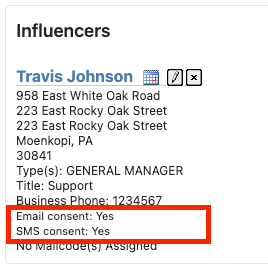
Behind the scenes, marketing consent is handled by two specific fields inside Equipment CRM: Email Consent and SMS Consent. These fields only exist in Equipment CRM and do not exist in DBS.
- Salesforce as the Source of Truth: Salesforce operates as your data's absolute source of truth for marketing consent.
- The Adjustment Rule: Because Salesforce dictates the true state of compliance, users cannot directly adjust or override a contact's consent fields inside Equipment CRM. Any manual unsubscribes or resubscribes must be executed directly through the Salesforce application, which will then automatically synchronize with Equipment CRM.
Influencer Creation
When a brand-new contact (influencer) is created in Equipment CRM, the system determines their initial consent status based on public-facing configuration keys managed in the CloudLink Console.
Administrators can configure the following two keys:
- ckSL_Influencer.DefaultEmailConsent
- ckSL_Influencer.DefaultSMSConsent
Each of these keys features three distinct dropdown options to control how the fields are initialized:
- (1) Yes - Contact is opted in: Automatically defaults the consent indicators to "Yes" behind the scenes for every new influencer. This enables an Implied Consent strategy, allowing you to immediately market to new contacts.
- (0) No - Contact is opted out: Automatically sets the fields to "No" upon creation. This establishes an Explicit Consent strategy, meaning contacts are suppressed until your team manually updates their approval.
- () Consent is not set: Leaves the consent field completely Null or unassigned. (Note: In practice, the system treats a null status as a "No" during campaign filtering).
Dealer Workflow Operational Impact: If a dealer does not actively configure these keys, the marketing consent fields will remain blank and unpopulated in Equipment CRM.
Campaign Enrollment & Filtering
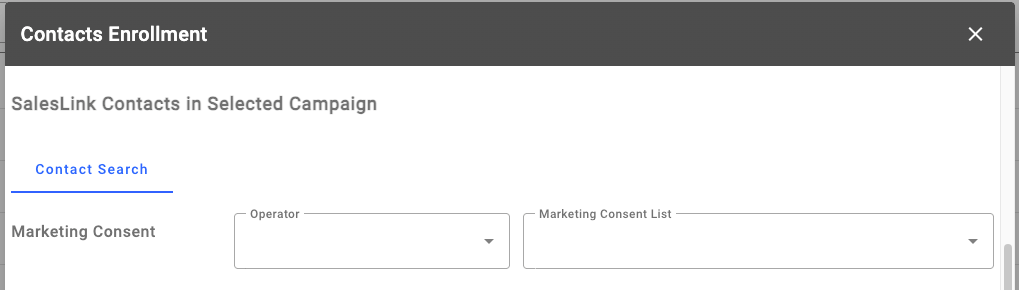
When your marketing team wants to run a campaign, they use the Marketing Integrator tool to build a list. To remain compliant and protect email domain reputations, users filter their contact lists using the Marketing Consent search fields. For example, if you are launching an email blast, the interface forces you to filter for contacts who specifically have a "Yes" status for email consent.
Salesforce vs. HubSpot
The Email Consent and SMS Consent fields themselves exist for all influencers inside Equipment CRM, regardless of which marketing platform a dealer uses. However, how those fields interact with your marketing tool changes completely depending on whether you use Salesforce or HubSpot:
- Salesforce Users: Get the full automated loop. When a customer clicks unsubscribe in an email or text, Salesforce tracks it, and the daily API automatically updates the Email/SMS consent fields to "No" inside Equipment CRM.
- HubSpot Users: Do not get the automated unsubscribe sync. HubSpot does not support this native loopback process. So while a HubSpot dealer still has those consent fields inside Equipment CRM, the automated "daily update" from an unsubscribe click does not function for them.
Ultimately, any dealer can use the console configuration keys to set up initial "Yes" or "No" consent states when creating a contact, but only Salesforce dealers get the benefit of the automated, hands-off unsubscribe sync back into Equipment CRM.
Using Mail Codes for Marketing Segmentation
For dealers who prefer to continue utilizing traditional Mail Codes from DBS, the Marketing Integrator can leverage these codes to build and fine-tune campaign lists.
- Fine-Tuning Target Audiences: Mail codes are highly effective for filtering down mass contact lists to ensure relevance. For instance, you can select specific codes like Email New Machinery to isolate contacts responsible for equipment purchases, ensuring asset-specific materials are only deployed to relevant decision-makers rather than field operators or mechanics.
- Combining Logic Filters: Within the Marketing Integrator interface, users are not restricted to a single code. You can combine multiple distinct mail codes alongside influencer titles (such as Director or Owner-Operator) to create a highly specific, multi-layered recipient grid before pushing the contacts to your marketing platform.

If you choose to manage preferences via Mail Codes, the process will not be automated when a user unsubscribes from an email or text. You will be required to manually update the Influencer's Mail Code to a suppression status (e.g., Email Do Not Send) inside Equipment CRM or DBS to prevent future unwanted deployments.