
In This Article
- Introduction
- Release Highlights
- Equipment CRM (SalesLink)
- Equipment CRM Mobile (SalesLink Flex)
- Equipment Quoting (iQuote)
- Power Systems Projects (iMACS)
- Service Agreement Quoting
- Service Management CD (ServiceLink)
Introduction
These notes address new features and code fixes for version 2026.0827 of Equipment CRM & Service Suite CD.
Release Highlights
Equipment CRM Mobile - Default Homepage
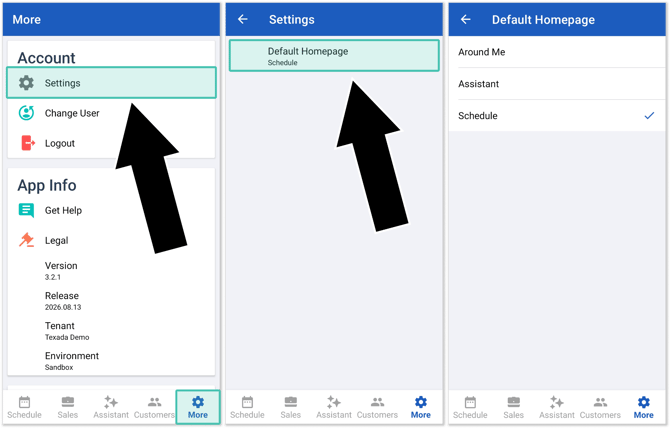
It’s now possible to set a default homepage in Equipment CRM Mobile (SalesLink Flex)! This feature allows you to quickly return to your preferred page upon opening the Equipment CRM mobile app.
To set a default homepage, launch Equipment CRM Mobile and select More from the bottom menu. Select Settings, then Default Homepage. You can set one of three possible homepages:
- Around Me
- Assistant
- Schedule
Save time and customize your mobile experience with default homepages!

Equipment CRM (SalesLink)
|
Ticket # |
Description |
|
CLA-43982 |
Resolved an issue affecting the Settings menu in which sub-menus would occasionally appear detached from the main menu, making it impossible to select an item from that menu. |
|
CLA-44241 |
Resolved an issue in which the Model field on the Opportunity details page would occasionally appear blank. |
|
CLA-44549 |
A new ckCommon.DataQuality.Company.ConsecutiveSpaces configuration key has been added to CloudLink Console. This key determines whether company names will be validated against having multiple consecutive spaces. When set to "Enforce", the user will not be able to save company names containing two or more consecutive spaces. When set to "Do not enforce," consecutive spaces will be allowed. |
|
CLA-44635 |
Resolved an issue in which Advanced Search in Equipment CRM (Executive) would occasionally not display all matching influencers when filtering by mail code. |
Equipment CRM Mobile (SalesLink Flex)
|
Ticket # |
Platform |
Description |
|
TM-4610 |
iOS |
Resolved an issue affecting the Add Contact screen in which the Business Phone field would occasionally be optional even when configured to be mandatory. |
Equipment Quoting (iQuote)
|
Ticket # |
Description |
|
CLA-43670 |
Clicking a column header on the Work Tools On Order page now correctly sorts the table by that column as on the other Work Tools pages. |
|
CLA-44331 |
Resolved an issue in which the Default GP% on Standard Packages set to Automatic update mode was not updating when the Default GP% was changed at the model level. |
Power Systems Projects (iMACS)
|
Ticket # |
Description |
|
CLA-44096 |
An "Export to Excel" button has been added to the Stock Numbers By Program report. |
|
CLA-44373 |
Resolved an issue in which data uploaded via the RTS Upload function was occasionally not being saved correctly to the On Order Status tab, causing order information such as model, serial number, and ESO to appear incomplete or missing. |
Service Agreement Quoting
|
Ticket # |
Description |
|
CLA-44263 |
Resolved an issue in which adding equipment to a Quote would occasionally return unrelated flat rate exchange options instead of filtering matching Events by equipment model. |
Service Management CD (ServiceLink)
|
Ticket # |
Description |
|
CLA-44628 |
While the "Explain Required Mandatory" (SVL.Technician.ExplanationField.Mandatory.Enable) configuration key is enabled, the Comment field will now be mandatory when adding new Labor via the Labor tab of the Time Sheet window. |