
In This Article
Introduction
The Caterpillar SOS API is a critical integration that automatically pulls machine health and oil sample data directly from Caterpillar into your Texada applications. This data feeds into Service Management CD (ServiceLink) and Condition Monitoring Portal, empowering your service teams to track machine health, monitor diagnostics, and execute preventative maintenance without leaving the Texada ecosystem.
Why the Change?
Caterpillar is modernizing its infrastructure and upgrading its legacy SOS API to a new SOS 2.0 API architecture.
To maintain compliance with Caterpillar's platform standards and guarantee the uninterrupted flow of critical oil sample data into your Texada applications, all integrated dealerships must transition to the new SOS 2.0 connection. This is strictly an infrastructure update; the functionality of the integration will not be affected.
Transition Timeline
To align with Caterpillar's rollout schedule, Texada is executing a phased transition:
- January 2027: Texada engineering completion and initial dealer testing windows open.
- February 2027 to May 2027: Scheduled cutover window for North American (NA) dealerships.
- July 2027 to August 2027: Scheduled cutover window for Asia Pacific (APAC) dealerships.
Your dealership's exact deadline will depend on Caterpillar's slotted cutover schedule. We strongly recommend configuring your credentials well in advance to ensure zero data disruption.
What You Need to Do
In order to transition to the new SOS 2.0 API, your organization's administrator must complete the following steps:
Step 1: Provision New Credentials via CAT Digital Marketplace
Newly generated API credentials have a strict 90-day expiry if left unused. Do not generate your credentials too early if you are not ready to configure them in Texada.
- Log in to the CAT Digital Marketplace.
- Navigate to APIs → API Catalog.
- Locate the SOS 2.0 API product collection and click Subscribe Now.
- Complete the required subscription forms.
- Upon approval, you will receive a new Scope, Client ID, and Client Secret. Save these values to a convenient location, as you will need them for the next step.
Step 2: Update Credentials in Texada
If your system comprises multiple environments (such as Production and Sandbox), you will need to make the below changes in each environment separately.
Texada strongly recommends updating credentials in your Sandbox environment first, then using this environment to test the configuration. Once you have confirmed the SOS 2.0 API is working as intended, you can then update your Production environment with the same configuration.
Stay tuned for further communication from Texada regarding when this migration is ready to test in your Sandbox environment.
Once you have your new credentials, they must be updated in CloudLink Console. See “Manage Configuration Keys” for more information.
There are 3 configuration keys pertaining to the CAT SOS 2.0 API, corresponding to the Scope, Client ID, and Client Secret fields. Each of the following keys should be updated with the values you received in Step 1 above:
CAT SOS 2.0 download Scope
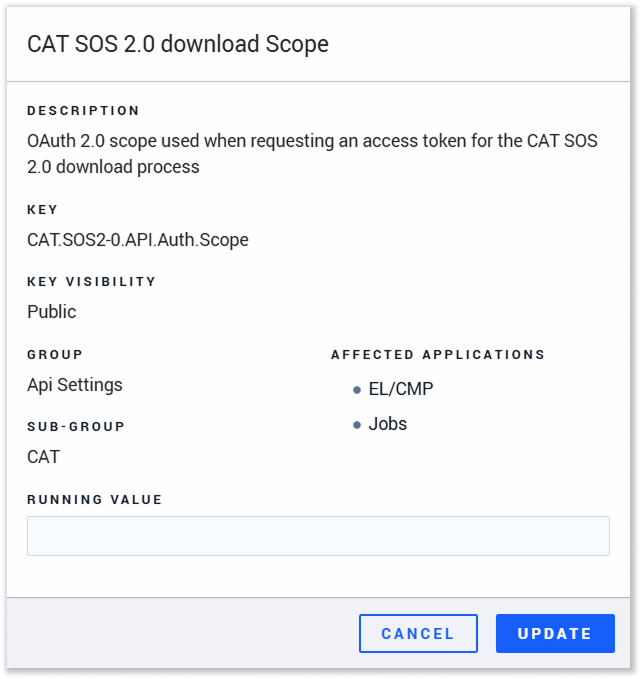 Key: CAT.SOS2-0.API.Auth.Scope
This key contains the OAuth 2.0 scope used when requesting an access token for the CAT SOS 2.0 download process.
CAT SOS 2.0 Client ID
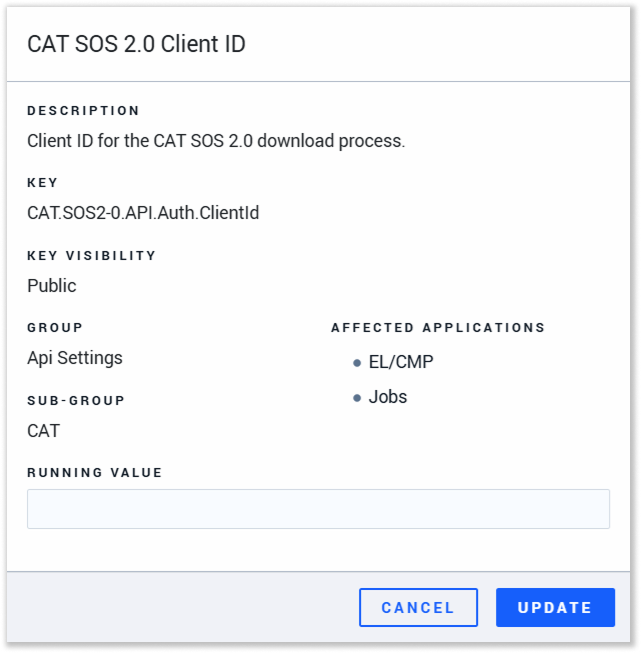 Key: CAT.SOS2-0.API.Auth.ClientId
This key contains the Client ID for the CAT SOS 2.0 download process.
CAT SOS 2.0 Client Secret
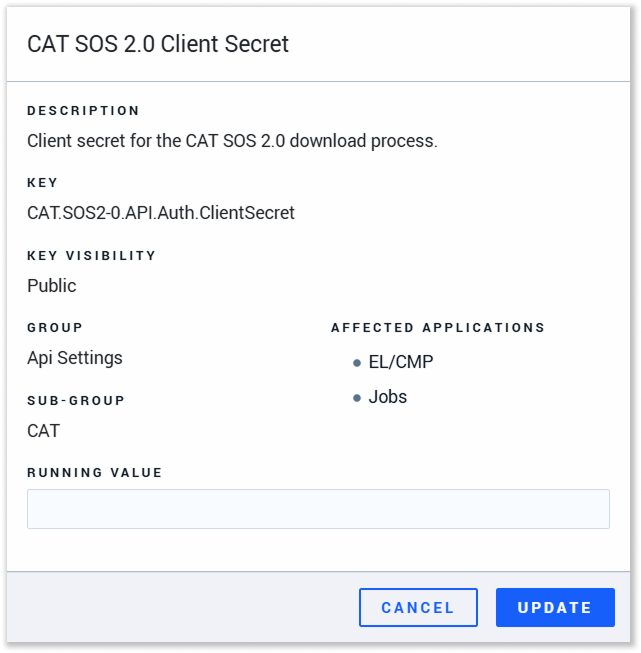 Key: CAT.SOS2-0.API.Auth.ClientSecret
This key contains the Client Secret for the CAT SOS 2.0 download process.
Once you have updated the values of the CAT SOS 2.0 download Scope, CAT SOS 2.0 Client ID, and CAT SOS 2.0 Client Secret configuration keys, your transition to the SOS 2.0 API is complete!
Additional Notes
Please be aware of the following Caterpillar-enforced system behaviors as we migrate to SOS 2.0:
- Historical Data Limit: The SOS 2.0 API enforces a strict 5-year historical data limit. Data processed prior to January 2021 will not migrate to the new endpoints.
- Data Cleansing & Validation: Caterpillar's new system applies much stricter data quality controls regarding asset serial numbers, customer details, and dealer IDs. Your dealership must utilize Caterpillar's grief dashboards to actively review and correct invalid sample records. Records that fail to meet these new data quality thresholds will not be transmitted through the SOS 2.0 API.
If you have any questions or require assistance preparing for this transition, please reach out to Texada Support.