In This Article
- Introduction
- Rental Products and Sale Products
- Working with Rental Products and Sale Products
- Rental Products and Sale Products - Field Breakdown
Introduction
In the context of the Texada system, a “Product” is any asset held in inventory for the purposes of rental, sale, or use in repairs or maintenance. Individual Products are organized into Groups, which in turn are organized into Classes - see “Classes, Groups, and Products” for more information.
There are a number of different ways in which Products can be categorized. These variables affect which information is stored for each Product and how it behaves in the system. One of these distinctions is between Rental Products and Sales Products.
Rental Products and Sale Products
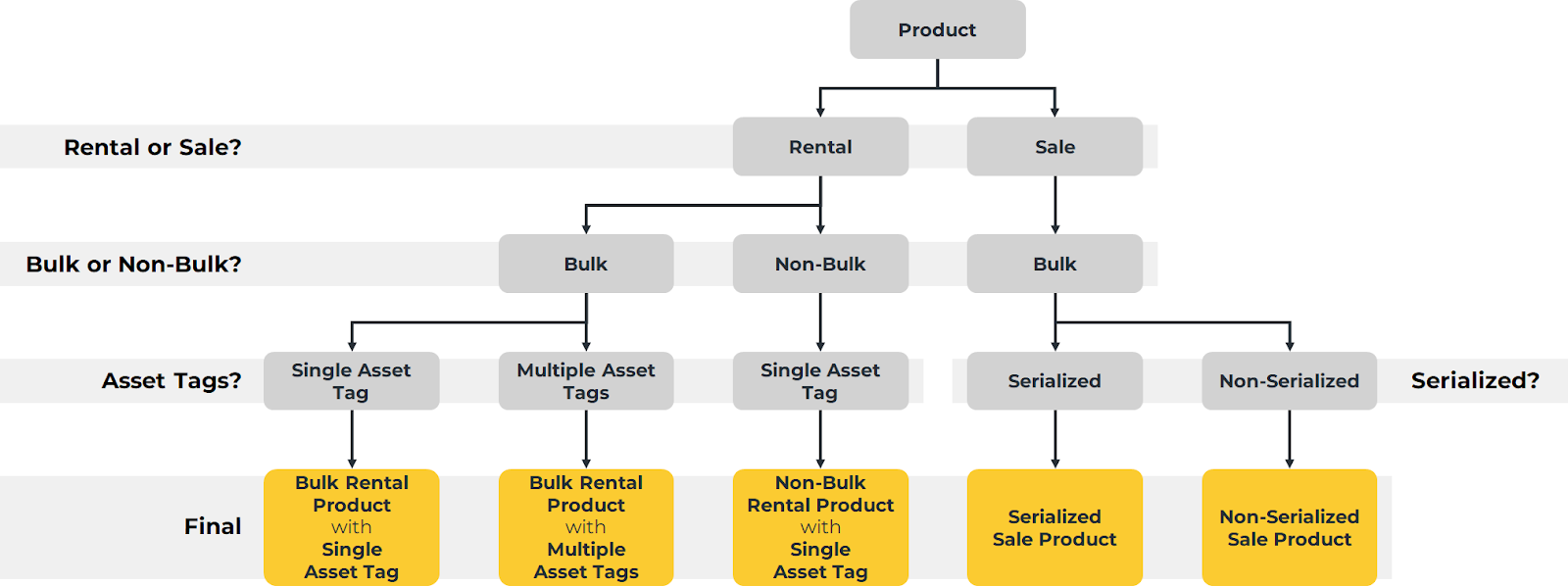 Diagram illustrating the different ways Products can be classified based on Rental or Sales status, bulk status, Asset Tags, and serialization. Click to view the full-sized image.
There are two main types of Product in the Texada system: Rental Products, also known as Assets, and Sale Products, also known as Parts.
Generally speaking, Rental Products are large, unique assets that are rented out to generate revenue. These Products are long-term investments that often have loans against them, and their value depreciates over time. Information such as add-ons and repair history is often tracked for Rental Products.
Sales Products, meanwhile, are smaller assets intended for resale or parts used to complete repairs. These are short-term assets that are often sold within a year and are not subject to depreciation.
While the differences between Rental and Sales Products are usually considered at the Product level, the distinction is actually made at the Class level: Products belonging to a Rental Class are considered Rental Products, and Products belonging to a Sales Class are considered Sales Products. This is because a Product’s Class determines which General Ledger accounts are posted to when that Product is rented, sold, or repaired; in order for revenue from rentals and revenue from sales to flow into different GL accounts, Rental Products and Sale Products must belong to different Classes.
A summary of the differences between Rental Products and Sale Products can be found in the table below.
|
Rental Products |
Sale Products |
|
Large, complex assets that are rented out to generate revenue. Often kept in inventory for an extended amount of time. |
Small assets intended for resale or use in repairs or maintenance. Often purchased and sold as quickly as possible. |
|
Value depreciates over time. |
Not subject to depreciation. |
|
Can be metered or bladed. |
Cannot be metered or bladed. |
|
May be bulk or non-bulk. |
Always bulk. |
|
Each Rental Product has its own Asset Tag which includes a serial number. |
Sale Products do not have Asset Tags and may or may not be serialized. |
Working with Rental Products and Sale Products
Rental and Sale Products can be managed in both Service, Rental, and Financials (Classic) and (Next). As (Next)’s inventory management functionality is currently under development, some tools and options are exclusive to (Classic).
In both (Classic) and (Next), Rental Products and Sale Products are managed in different locations. In (Classic), the same also applies for Rental Classes and Sales Classes. If you ever find yourself unable to locate a particular Product or Class, make sure you are working in the appropriate utility.
To find out where to manage Rental and Sale Products and Classes, consult the tables below.
Service, Rental, and Financials (Classic)
|
Action |
Location |
Help |
|
Manage Rental Classes |
System Maintenance → Configure System Settings → Accounting → Rental Classes |
|
|
Manage Sales Classes |
System Maintenance → Configure System Settings → Accounting → Sales Classes |
|
|
Create and Manage Rental Products |
Inventory Control → Rental Inventory |
|
|
Create and Manage Sales Products |
Inventory Control → Sales Inventory |
Service, Rental, and Financials (Next)
|
Action |
Location |
Help |
|
Create Assets |
Inventory → Create Asset |
|
|
Manage Assets |
Inventory → Assets |
|
|
Create Parts |
Inventory → Create Part |
|
|
Manage Parts |
Inventory → Parts |
Rental Products and Sale Products - Field Breakdown
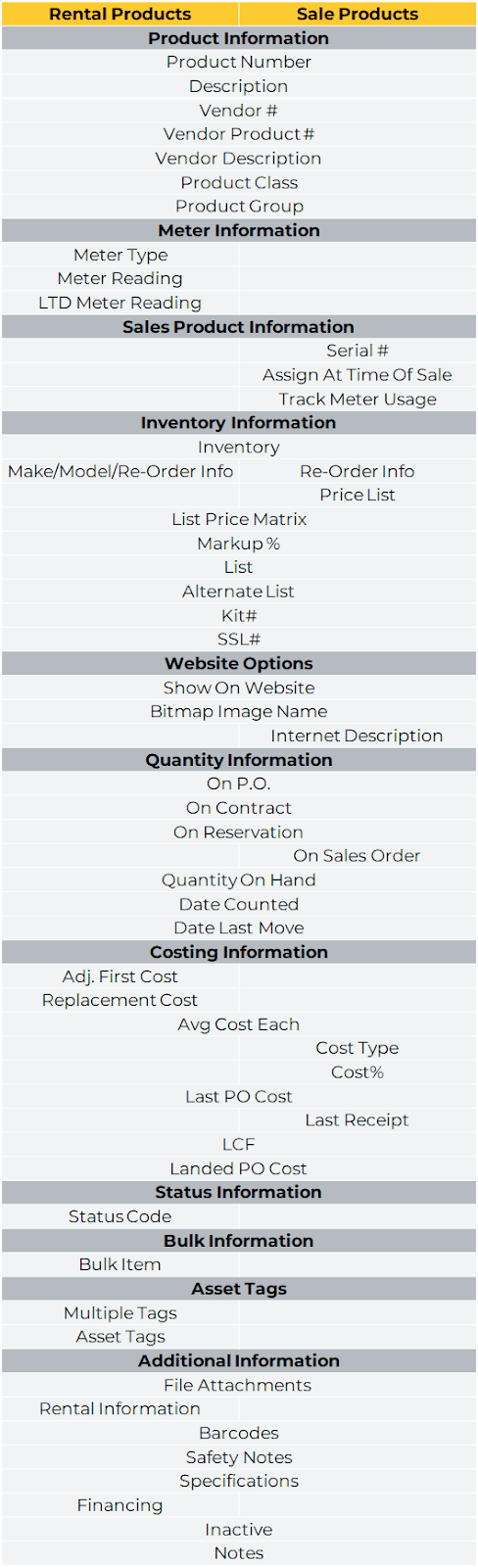
The below chart lists the fields present in the Rental Inventory and Sales Inventory utilities in Service, Rental, and Financials (Classic). This serves to illustrate the similarities and differences between Rental Products and Sales Products.