In This Article
Introduction
Download a Work Order as a PDF when you need to share a Work Order with someone who does not have access to Service Management, but still needs the Work Order information. For example, if your Technician carried out a repair on a piece of equipment and later a customer disputes the condition of the equipment at the time of the repair, you can email a PDF of the Work Order to show the customer the results of the inspection the Technician carried out.
Download a Work Order
To download a Work Order as a PDF, do the following:
- Log in to Service Management (Next), then select Work Orders → List from the left navigation menu to open the Work Order List.
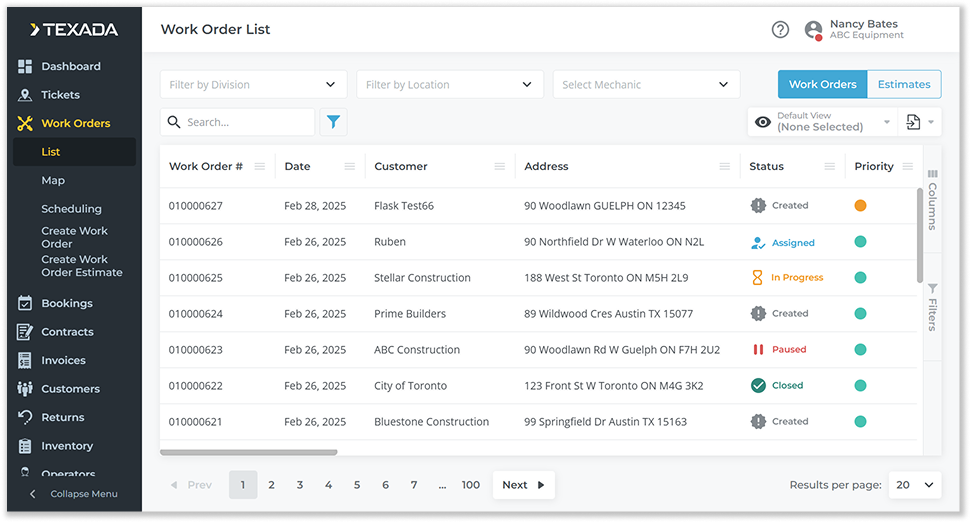
- Select the Work Order you would like to download to open the Work Order details page.
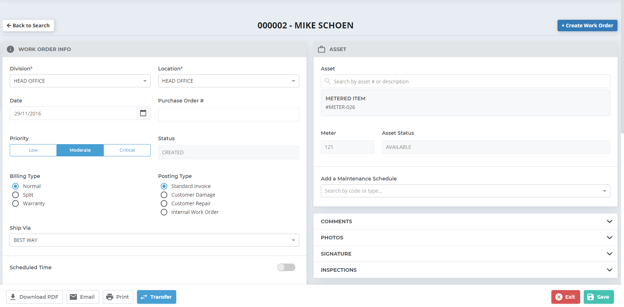
- Click the “Download PDF” button to download the Work Order as a PDF. Depending on your browser’s settings, you may be prompted to select a download location, or the file may be automatically downloaded to your Downloads folder.