.png?width=365&height=50&name=Texada%20Logo%20(Black).png)
In This Article
- Introduction
- About Equipment CRM
- About e-Emphasys
- About the Equipment CRM - e-Emphasys Integration
- Completing the Integration
Introduction
Texada is pleased to announce that Equipment CRM now supports integration with e-Emphasys! Keep reading to learn all about how these two systems can work together to accelerate your equipment dealership business.
About Equipment CRM
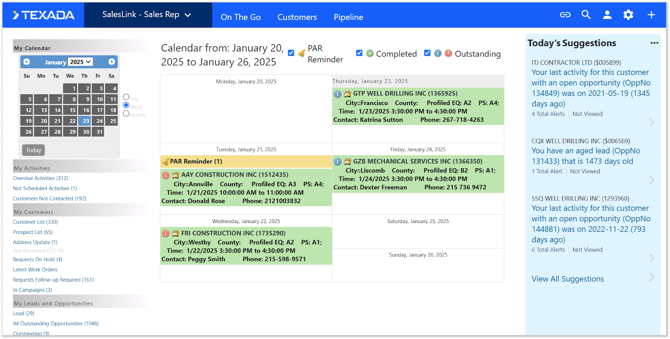
Equipment CRM is Texada’s purpose-built Customer Relationship Management (CRM) software solution designed specifically for equipment dealerships, offering functionality across sales, rentals, and service. It centralizes customer touchpoints and equipment data, integrates with existing ERPs and OEM systems, and empowers on-the-go productivity with its mobile companion application, Equipment CRM Mobile.
About e-Emphasys
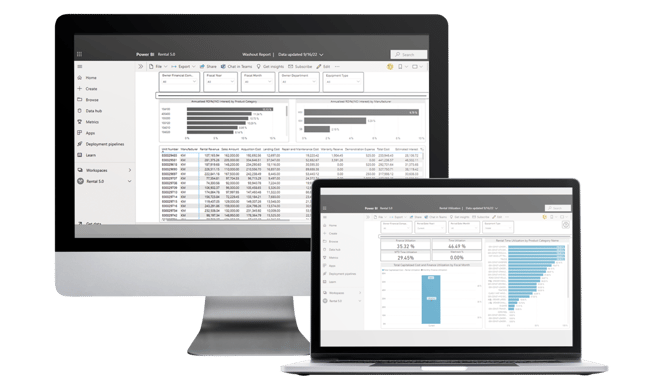
e-Emphasys is VitalEdge’s Enterprise Resource Planning (ERP) software solution tailored for equipment dealerships and rental companies, built to boost efficiency, visibility, and profitability by unifying operations across sales, service, parts, rentals, and finance.
About the Equipment CRM - e-Emphasys Integration
Integrating e-Emphasys with Equipment CRM gives your sales team instant access to accurate equipment, customer, and financial data without switching between systems. This reduces errors, speeds up quoting and deal management, and provides managers with full visibility into the sales pipeline.
Leverage the combined power of e-Emphasys and Equipment CRM to work more efficiently, close more deals, and deliver a better customer experience!
This integration is the result of a joint effort between Texada and VitalEdge. The ongoing communication and cooperation between our organizations has resulted in a robust, high-quality integration.
What does the integration do?
Once the integration is complete, Equipment CRM and e-Emphasys will begin sharing data on an automatic basis, allowing changes made in one system to be promptly reflected in the other. By keeping the two systems synchronized and up-to-date, this integration will both save time and reduce data discrepancies.
What data is included?
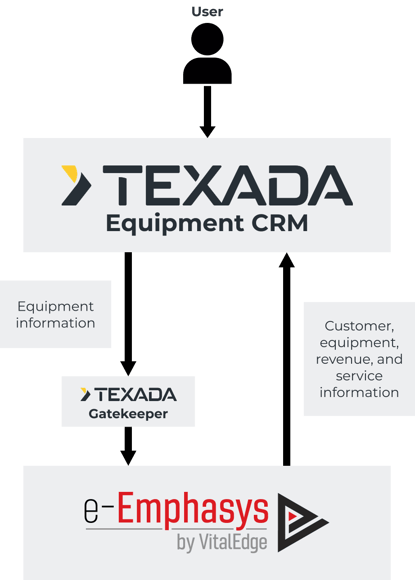
The flow of data between Equipment CRM and e-Emphasys is bidirectional: data is both exported from Equipment CRM to e-Emphasys, and from e-Emphasys to Equipment CRM. The timing of these exports, and the data they include, depends on the direction of the flow:
Equipment CRM to e-Emphasys
When events occur in Equipment CRM that require data updates in e-Emphasys – for example, new equipment is added – these changes will be sent to e-Emphasys.
Currently, only Equipment data will be sent to e-Emphasys. Support for transferring Customer (Business Partner) and Contact information is planned for future releases.
Depending on your system’s configuration, changes made in Equipment CRM may need to be approved in Gatekeeper before they will be sent to e-Emphasys.
e-Emphasys to Equipment CRM
Data stored in e-Emphasys – including customer, equipment, revenue, and service information – will be exported to Equipment CRM at frequent, regular intervals. The below table lists the data that will be included in these exports.
|
Data transferred from e-Emphasys to Equipment CRM |
|||
|
Customer (Business Partner) Information |
Equipment Information |
Revenue Information |
Service Information |
|
|
|
|
Completing the Integration
In order to complete this integration, the following requirements must be met regarding your organization’s e-Emphasys implementation:
- e-Emphasys ERP 6.0
Your organization must have e-Emphasys ERP 6.0. This must be deployed to the cloud (i.e. Microsoft Azure) as opposed to on-premises (on-prem). - Solution level = 25.12 (Solution #309672)
“Solution level” is an e-Emphasys term that refers to a specific software version. Your organization’s IT department must decide to upgrade to / deploy a new solution level / version of e-Emphasys. The specific solution number needed to support our integration is Solution #309672.
To receive API keys from VitalEdge, please reach out to your assigned Customer Success Manager (CSM). They will initiate a project to deploy the API. Your VitalEdge project manager will then provide you with further instructions for completing the implementation.