.png?width=365&height=50&name=Texada%20Logo%20(Black).png)
In This Article
- Introduction
- Where to Find the New Fields
- CAT Service Excellence API Updates
- Deployment Timeline
- Configuration Keys
Introduction
Texada is introducing new ServiceLink fields to support the CAT Service Excellence 2.0 “Back To Work” program. These additions make it easier for dealers to track how quickly they respond to customer requests and get machines back to work under labor preventative maintenance agreements.
The update adds a set of customer commitment date fields to ServiceLink work orders and exposes those same dates in the ST_ServiceExcellence API, giving both front-line users and reporting teams a clear, consistent way to see:
- When the customer first requested service
- When the customer wants the work to start
- When the customer wants the work completed
- When the dealer committed to the customer
These fields help you measure performance against CAT’s “Back To Work” expectations and provide a more transparent experience to your customers.
Where to Find the New Fields
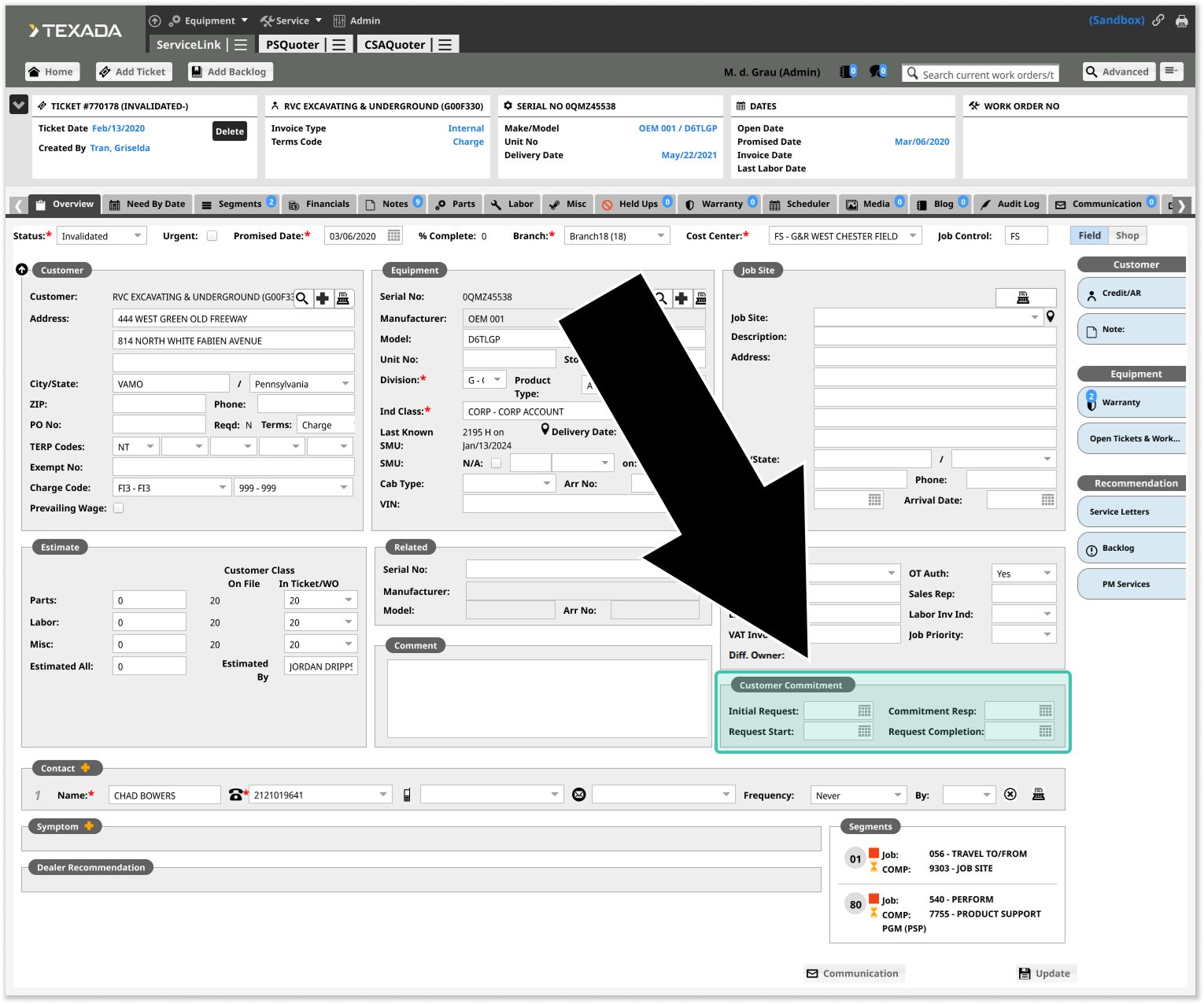
The new fields are located in the new Customer Commitment section near the bottom-right corner of the Work Order → Overview tab. Within this section, you’ll see four new date fields:
- Initial Request: The date on which the customer submitted this work order request. This is the start date for the entire service event and is often used in CAT metrics to understand total response time.
- Customer Requested Start: The date on which the customer wants the work to start.
- Commitment Response: The date on which the dealer responded to the customer with a commitment date.
- Customer Requested Completion: The date by which the customer wants the work completed.
By completing these fields consistently, your organization will gain a clear before-and-after view of customer expectations versus actual performance.
These fields will be available on applicable ServiceLink Work Orders once the feature has been enabled for your environment. See “Configuration Keys” for more information.
CAT Service Excellence API Updates
To support CAT Service Excellence 2.0 “Back To Work” reporting, the following changes are being made to the ST_ServiceExcellence API:
- The four new Customer Commitment fields have been added:
- Initial Request
- Customer Requested Start
- Commitment Response
- Customer Requested Completion
- In addition, the Est. Arrival Date field has been added.
In order to access this data, your organization must have the ST_ServiceExcellence API. If you do not have this API and are interested in using it, please contact your Texada account representative.
Important: Action Required for Dealers Using the ST_ServiceExcellence API
If your organization uses the ST_ServiceExcellence API, you must review and test the above changes before the Production API is permanently updated in version 2026.0115. Depending on how you process the API response, new fields may require updates to your mappings, validations, or transformations.
- Following the 2025.1204 release on Thursday, December 11th, 2025, enable the new fields in Sandbox using the Customer Commitment Fields – Visibility configuration key.
- Once you’ve enabled the new fields, you’ll want to test your existing integrations against the updated Sandbox API:
- Confirm your processes handle the additional fields correctly.
- Update any mapping or validation logic that expects a specific set of fields.
- Prepare for Production cutover so that when the API is updated in Production in the 2026.0115 release, your downstream processes are already compatible.
See “Deployment Timeline” for more information on key dates.
Deployment Timeline
2025-12-11: Equipment CRM & Service Suite CD version 2025.1204
The new Customer Commitment fields and API changes will be released to Sandbox in this release, allowing dealers to test the feature and validate their integrations.
These new fields will not appear in your Sandbox environment by default. Instead, dealers can enable these fields for testing using a temporary configuration key in CloudLink Console. See “Customer Commitment Fields – Visibility” for more information.
2026-01-22: Equipment CRM & Service Suite CD version 2026.0115
In this release, the Customer Commitment Fields – Visibility configuration key will be removed from CloudLink Console, and the new fields and API changes will be permanently enabled for all dealers.
Configuration Keys
The behavior of the CAT Service Excellence fields can be managed via configuration keys in CloudLink Console. For more information on working with configuration keys, see “Manage Configuration Keys”.
Customer Commitment Fields – Visibility
 Key: Temp.SVL.ServiceExcellence.CustomerCommitment.Fields
This is a temporary key that controls the visibility of the Service Excellence Customer Commitment fields in Sandbox environments. Use this key to enable the fields for testing purposes.
Following the 2026.0115 release, these fields will be enabled for all dealers and this key will be removed from CloudLink Console.
- (1) Hide: Do not display the Service Excellence Customer Commitment fields.
- (2) Show: Display the Service Excellence Customer Commitment fields in your Sandbox environment.
Initial Request Date – Mandatory

Key: SVL.InitialRequestDate.Mandatory
This configuration key controls whether the Initial Request field is mandatory before a Work Order can be saved.
- (1) Optional: The Initial Request field remains optional. This may be appropriate during early rollout or in scenarios where intake processes are still being aligned to the “Back To Work” framework.
- (2) Mandatory: Users must enter a value in Initial Request before saving the Work Order. This is recommended for dealers who want to ensure consistent tracking of the earliest point in the service journey for CAT Service Excellence metrics.