.png?width=365&height=50&name=Texada%20Logo%20(Black).png)
Introduction
These notes address new features and code fixes for version 2025.1204 of Equipment CRM & Service Suite CD.
Quick Navigation
- Release Highlights
- CloudLink Console
- Equipment CRM (SalesLink)
- Equipment CRM Mobile (SalesLink Flex)
- Equipment Monitoring Toolkit
- Order Fulfillment (COTI)
- Service Management CD (ServiceLink)
Release Highlights
Service Management CD (ServiceLink) - CAT Service Excellence 2.0 - 'Back To Work'
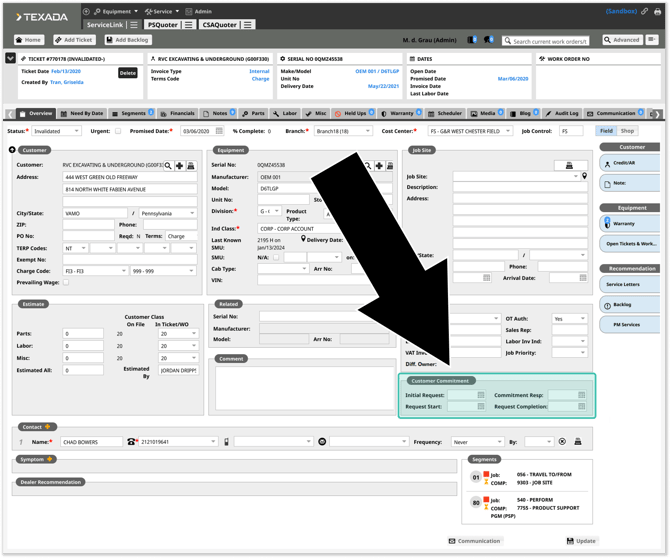
Texada is introducing new ServiceLink fields to support the CAT Service Excellence 2.0 “Back To Work” program. These additions make it easier for dealers to track how quickly they respond to customer requests and get machines back to work under labor preventative maintenance agreements!

Equipment CRM Mobile (SalesLink Flex) - Opportunity Description Added to Leads / Opportunities List
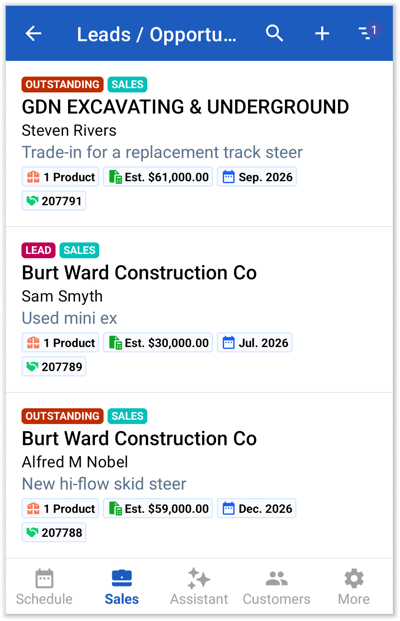
In this update, the information included for each item in the Leads / Opportunities list screen in SalesLink Flex has been modified:
- The Lead / Opportunity's description will now be displayed under the customer's name.
- The source field will no longer be displayed.
This quality-of-life change makes it easier than ever to find the Leads and Opportunities you’re looking for!
Your voice matters!
This feature was put into production as a result of its popularity in the CloudLink Ideas Portal!
The Ideas Portal allows Texada customers to submit and vote on possible product improvements. Join the community today and help shape the future of Texada's products!

Equipment CRM (SalesLink) - Microsoft Entra Support for CAT Integrations
Texada is pleased to announce that is it now possible to use Microsoft Entra authentication to access several Caterpillar integrations in Texada products! This migration can be done entirely in CloudLink Console, without any input from Texada staff. Watch the above video to learn more!
This update is currently compatible with the following integrations, with support for additional integrations planned for future releases:
- Equipment CRM - PSE Integration
- Equipment CRM - Prime Product+ Integration

CloudLink Console
|
Ticket # |
Description |
|
CLA-40393 |
Resolved an issue affecting the Uploads List in which attempting to upload an Extended Warranty file would occasionally fail, indicated by a Processing Status of Failed. |
Equipment CRM (SalesLink)
|
Ticket # |
Description |
|
CLA-40647 |
Enhanced the performance of the Advanced Search feature for the Account List page. |
|
CLA-40887 |
Resolved the "CloudLink - Error" that would occasionally occur when running an Advanced Search. |
|
CLA-38803 |
Two new configuration keys have been added to CloudLink Console to determine the default consent value for newly-created influencer records: Default email consent for new influencers
Default SMS consent for new influencers
|
Equipment CRM Mobile (SalesLink Flex)
|
Ticket # |
Platform |
Description |
|
TM-973 |
Android |
Updated the color of certain labels throughout the application to improve legibility on devices using dark mode. |
Equipment Monitoring Toolkit
|
Ticket # |
Description |
|
CLA-40133 |
Resolved an issue in which creating a ServiceLink ticket from a machine in EMT would result in an error if the PO number in EMT was too long. |
Order Fulfillment (COTI)
|
Ticket # |
Description |
|
CLA-40011 |
Resolved an issue in which Phase 3 in COTI would occasionally fail to complete when inventory was received, preventing deals from progressing correctly to Phase 4. |
Service Management CD (ServiceLink)
|
Ticket # |
Description |
|
CLA-40385 |
When creating a new segment from a Work Order or Template, all associated Operation parts, including operation numbers, will be copied correctly when “Copy Parts” is selected. |
|
CLA-40739 |
Resolved an issue in which customer service reports were not correctly sorted by technician start/end date and displayed Signed On and Email Sent dates in the wrong format. |
|
CLA-40601 |
Resolved an issue in which previously approved allowances could be re-approved, resulting in duplicate submissions to DBS. |