
In This Article
- Introduction
- How to Enable
- What Has Changed
- What Happens When a Credit Check Fails
- Logic Changes for Existing Documents
- Invoice Types Excluded from Credit Checks
- Monthly Exposure Rule
Introduction
Credit check functionality in Service, Rental, and Financials has been enhanced to provide a more comprehensive, real-time evaluation of customer credit exposure across the sales and billing lifecycle.
Previously, credit checks focused primarily on invoice balances and were typically triggered at limited points in the workflow. With this enhancement, the system now evaluates a customer’s total exposure – including open Contract amounts, services, damage waiver, and taxes – before allowing certain transactions to proceed.
This change affects Contract, Reservation, Quote, and Miscellaneous Invoice workflows, as well as related API endpoints.
How to Enable
This feature can be enabled and disabled via a new “Include Contracts In Credit Check” checkbox located at System Maintenance → Configure System Settings → System → Company Parameters → Miscellaneous Parameters.
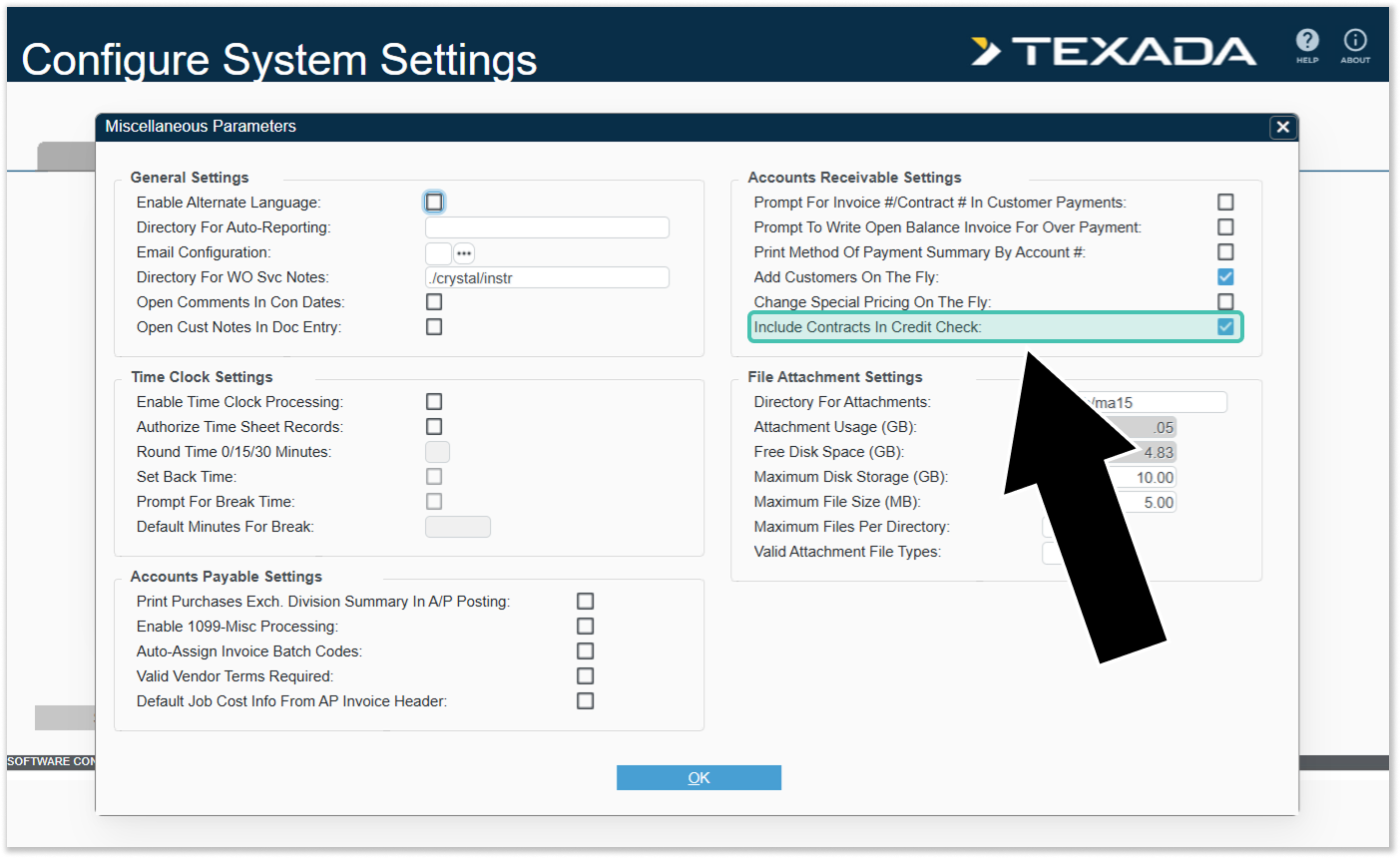
When enabled, open Contract amounts will be included in the customer’s total credit exposure during credit checks.
What Has Changed
Expanded Credit Exposure Calculation
To provide a more accurate view of the customer’s total liability at the time of transaction, credit exposure calculations now include:
- Unposted invoices
- Open contract amounts for items not yet sold or returned (calculated up to a maximum of one month’s rent – see “Monthly Exposure Rule” for more information)
- Services (including automatic services)
- Damage waiver
- Applicable taxes
Additional Credit Check Triggers
Credit checks now occur at the following workflow points:
Contracts
- Creating a new Contract
- Changing an existing Contract
- Finalizing a Contract (end-of-entry check includes the current Contract)
Conversions
- Converting a Reservation to a Contract (includes the Reservation amount in the check)
- Converting a Quote to a Contract (includes the Quote amount in the check)
If the credit check fails, the conversion will be cancelled, and the original Reservation or Quote will remain intact.
Miscellaneous Invoices
- Creating a new Miscellaneous Invoice
- Changing an existing Miscellaneous Invoice
- Finalizing a Miscellaneous Invoice (includes the current invoice’s on-account amount)
Credit checks for Invoices are performed following the Invoice Totals screen, based on the value of the “Amount On Acct” field.
APIs
- Create and update Contract APIs
- Create and update Invoice APIs
- Reservation-to-Contract conversion APIs
API calls that would cause the customer to exceed their credit limit will be rejected.
What Happens When a Credit Check Fails
If the customer’s credit limit is reached, the Credit Limit Warning window will appear, showing the amount by which the limit has been exceeded. As part of this update, this window also specifies which component of the transaction caused the limit to be exceeded.
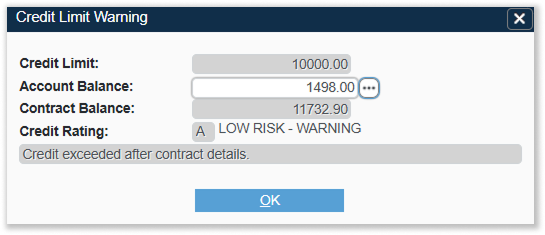
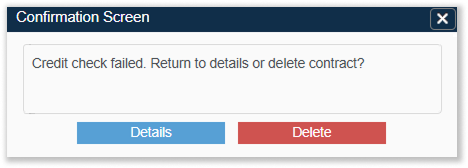
The user will then be presented with two options:
- Details: Return to the previous screen with all entered data preserved.
- Delete: Discards the document and returns to the menu. This option will not be available if the Contract has already been billed.
Logic Changes for Existing Documents
Previously-Approved Contract Lines
When editing an existing Contract, previously-approved line amounts will be respected. As long as a line’s quantity or value is not increased beyond its previously-approved amount, the system will not block the change, even if the customer is now over their credit limit due to other activity.
If amounts are increased or new lines are added, the new exposure will be evaluated.
The system will record approval information (amount, date, and quantity) to ensure historical approvals are honored.
Previously-Approved Invoice Amounts
Similarly, when modifying an existing Miscellaneous Invoice, the previously-approved on-account amount will be respected. Only new or increased exposure will be evaluated against the credit limit.
Invoice Types Excluded from Credit Checks
The following invoice types are excluded from credit checks due to their operational nature:
- Rental Return Invoices
- Cycle Billing Invoices
- Work Order Invoices
These transactions are permitted even if the customer is over their credit limit.
Monthly Exposure Rule
For open Contracts, credit exposure calculations will include Contract amounts up to a maximum of one month’s rent. The original contract time period is used for this calculation.
Non-returned and non-sold items will be included in this calculation. Returned or sold items will be excluded.