.png?width=365&height=50&name=Texada%20Logo%20(Black).png)
Introduction
These notes address new features and code fixes for version 2026.0326 of Equipment CRM & Service Suite CD.
Quick Navigation
- Release Highlights
- CloudLink API Center
- Condition Monitoring Portal
- Equipment CRM (SalesLink)
- Equipment Monitoring Toolkit
- Equipment Quoting (iQuote)
- Model Administration
- Parts & Service Quoting
- Service Management CD (ServiceLink)
Release Highlights
Service Management CD - Labor & Allowances Split View
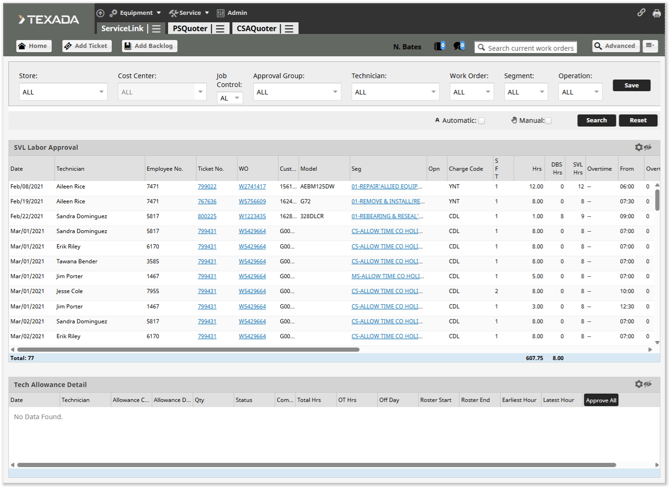
An upgraded Labor Approval screen is now available in Service Management CD!
The new Labor Approval screen shows pending labor approvals and technician allowances in a split view, bringing more context to the supervisor approval process. Instead of reviewing technician labor and allowances separately, managers can now see them together on the same screen, making it easier to verify submissions, spot inconsistencies, and approve or reject entries with a clearer view of the technician’s day.

Equipment CRM Mobile - Inventory Status Filter Added to Equipment Search
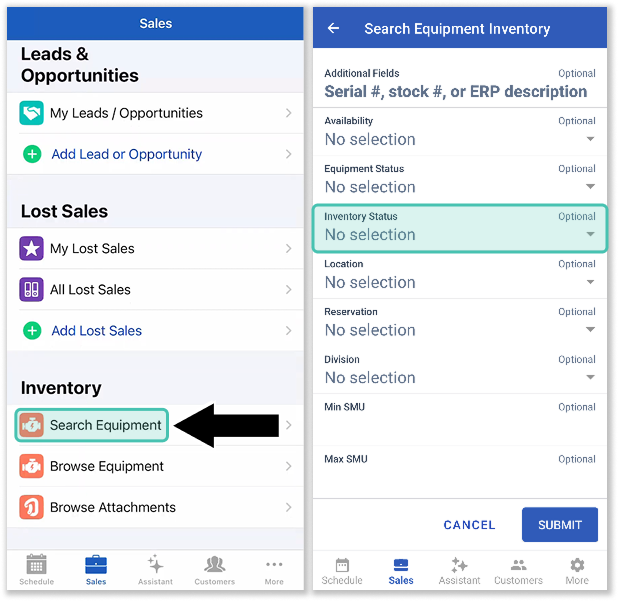
Following dealer feedback on the Search Equipment Inventory feature in Equipment CRM Mobile, we have added an Inventory Status filter to this screen! It is now possible to perform even more precise searches using this tool, such as filtering out machines that are on RPO. Finding the exact piece of equipment you’re looking for has never been easier!
Equipment CRM Mobile - Changes to Customer Creation
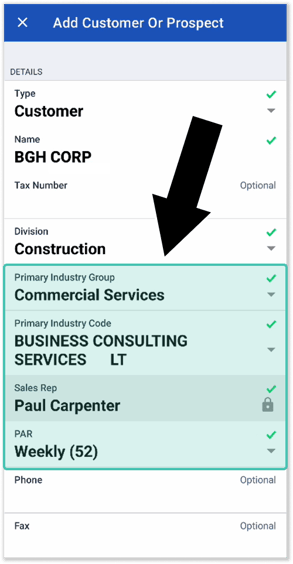
A wealth of improvements are coming to the Add Customer Or Prospect screen in Equipment CRM Mobile!
- Company Details section:
- Primary Industry Group: This field has been added. Options are dependent on the current Division.
- Primary Industry Code: This field has been added. Options are dependent on the current Division and Primary Industry Group.
- Sales Rep: This field has been added. It will default to the current user.
- PAR: This field has been added. Options are dependent on the current Division.
- Contact section:
- The Standalone Contact section has been removed and incorporated into the Details section.
- Phone: This field has been renamed to “Business Phone”.
- Mail Code: This field has been added. Options are dependent on the current Division.
- Additional improvements:
- Address: This field has been renamed to “Billing Address”.
- After creating a Customer or Prospect, the Add Contact form will now open automatically.
- The Customer Name and Division fields will now be pre-filled and read-only on the Add Contact form.

CloudLink API Center
|
Ticket # |
Description |
|
CLA-42196 |
A new customer reporting endpoint, /ServiceScheduleTimesheetLogs, has been added to the CloudLink API Center. This endpoint provides access to older labor records (approved entries older than 3 months) in Service Management CD. |
Condition Monitoring Portal
|
Ticket # |
Description |
|
CLA-42326 |
Updated the Equipment Link overview to ensure that the most relevant fault is displayed when multiple fault code levels exist for the same event. The overview will now reflect either the highest severity fault level or the most frequently occurring fault, depending on system configuration. |
Equipment CRM (SalesLink)
|
Ticket # |
Description |
|
CLA-41830 |
To support an OEMs new reporting requirements, a new Customer Number column has been added to the Lost Sales (CSS) batch export. Positioned right next to the Customer Name, this critical data point ensures dealers can seamlessly complete their APEX uploads without manual data entry. |
|
CLA-35077 |
The “Expire Warranty” section of the Opportunity details screen has been renamed to “Warranty Details.” The Status column within this section will now display the warranty status (Active or Expired), rather than the acceptance status. |
|
CLA-40324 |
Resolved an issue affecting the UCC All Filings screen in which values in the "State" column would occasionally appear blank. |
|
CLA-41730 |
Resolved an issue affecting the Fusion Parts and Service Performance Summary page in which no data was being displayed for the year 2026. |
|
CLA-41834 |
A new "Make FPC Code Mandatory" (ckCommon.AttachmentAddEdit.FPC.Mandatory) configuration key has been added to CloudLink Console. This key determines whether or not the FPC Code field is mandatory for real and / or prospect customers. Options are:
|
|
CLA-41844 |
Resolved the "CloudLink - Error" that would occasionally occur when switching Divisions after selecting the "All" Division radio button on the Work Orders page. |
|
CLA-42143 |
Resolved an issue in which the Activity Indicator field was not displayed when editing equipment in SalesLink. |
|
CLA-42178 |
The "OEM Lead Type" field on the Opportunity details screen will now only be visible when the "Enable CAT PSE Marketing Leads" (ckCommon.CAT.PSE.MarketingLeads.Enable) configuration key is enabled. |
|
CLA-42292 |
It is now possible to bulk update opportunities linked to quotes to “No Deal” in the Manage - Opportunity, Activity and Issue Status screen.
|
Equipment Monitoring Toolkit
|
Ticket # |
Description |
|---|---|
|
CLA-41279 |
The PM Execution Analysis Report has been enhanced to also include Yearly PM Services. |
|
CLA-42460 |
Resolved an issue in which updating a PM service incorrectly modified audit data for subsequent services.
|
Equipment Quoting (iQuote)
|
Ticket # |
Description |
|
CLA-41355 |
Updated pricing logic to ensure that SystemWide Extras retain their value after a Quote is won. |
|
CLA-42214 |
A new “RPO” option has been added to the Document Type dropdown in the Agreement Editor tab of iQuote.
|
Model Administration
|
Ticket # |
Description |
|
CLA-42328 |
Resolved the "CloudLink - Error" that would occasionally occur when deleting a Base Model in Model Administration. |
Parts & Service Quoting
|
Ticket # |
Description |
|
CLA-42144 |
Resolved an issue in which extra segment notes would occasionally be created when creating new segments from multi-segment standard jobs using FR Exchange. |
Service Management CD (ServiceLink)
|
Ticket # |
Description |
|
CLA-38888 |
Resolved an issue in which accessing the Technician Scheduler from the Service Pipeline pie chart caused the Day view to persist incorrectly. The scheduler will now open in Day view only when accessed via the chart, and will otherwise respect the user’s default view. |
|
CLA-42293 |
Resolved an issue in which moving a ticket in the Service Scheduler would not save selected segments if the change was too small. |
|
CLA-42199 |
Resolved an issue affecting Standard jobs in which Parts and Labor would occasionally not pull into created segments. |