
Introduction
These notes address new features and code fixes for version 2026.0326 of Service, Rental and Financials.
Quick Navigation
Release Highlights
Service & Rental Mobile - AI Damage Detection
This feature will be available in the North America and Asia Pacific (APAC) regions on Wednesday, April 15th, 2026.
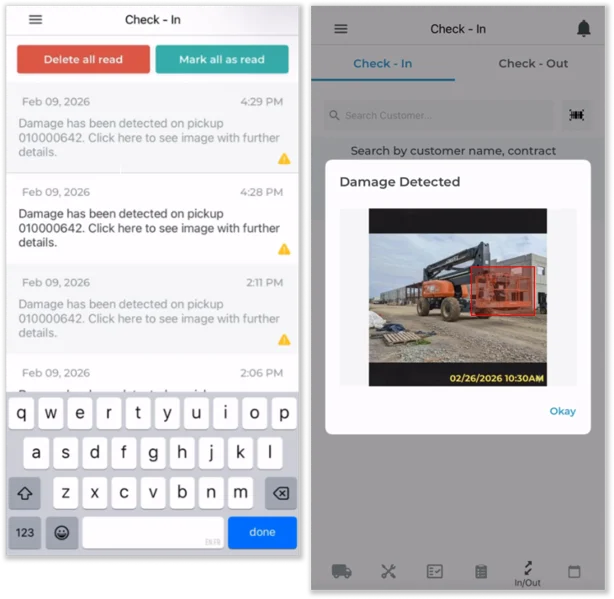
Texada is thrilled to announce the release of AI-powered damage detection for the Service & Rental mobile application!
Identifying equipment damage at the right moment—before it becomes a dispute, missed charge, or service delay—is one of the biggest challenges in rental operations. AI Damage Detection brings automation and consistency to this process by comparing equipment condition at check-out and return, helping your team quickly spot new damage and take action.
By leveraging AI-powered image analysis directly within your existing workflows, this feature enables faster inspections, reduces reliance on manual review, and provides a clearer, more objective record of equipment condition across the rental lifecycle.


Service, Rental and Financials (Next) (formerly Texada Web)
|
Ticket # |
Description |
|
TR-6708 |
Support for user-defined fields has been added to the Work Order List page. |
|
TR-7453 |
The Accounts Opened Report in Service, Rental, and Financials (Next) is now only visible and accessible to users with the necessary permissions, matching existing behavior in Service, Rental, and Financials (Classic). |
|
TR-7358 |
The Customer-Owned Equipment selection experience in Work Orders has been updated.
|
|
TR-7057 |
The Create Work Order screen in Service Management (Next) has been updated to respect the Default Posting Type established in Service Management (Classic). |
|
TR-7359 |
Resolved an issue affecting the Filters feature of tables throughout Service, Rental, and Financials (Next) in which the "Select All" checkbox used to select or deselect all items in a filter would occasionally be unresponsive. |