
In This Article
Introduction
These notes address new features and code fixes for version 2026.0430 of Service, Rental and Financials.
Release Highlights
Service, Rental, and Financials (Classic) - Received, Not Invoiced Inventory
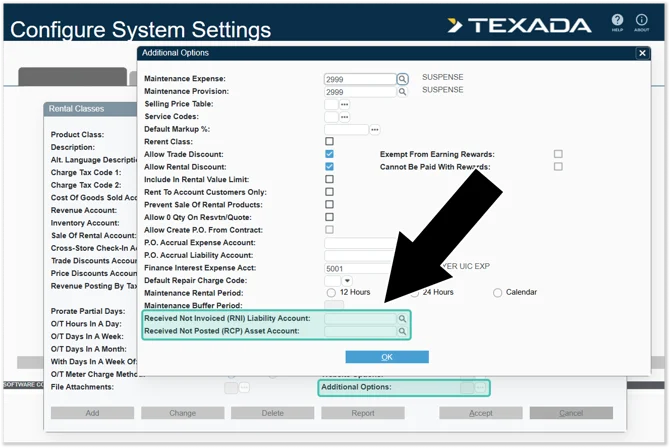
Texada is pleased to announce new functionality for Received, Not Invoiced (RNI) inventory posting in Service, Rental, and Financials (Classic)! This feature expands on (Classic)’s existing warehouse receiving functionality.
When inventory is received but has not yet been invoiced through Accounts Payable, Financials (Classic) can now create the associated General Ledger postings so that these outstanding warehouse receipts are reflected properly in your financial records. This feature helps automate a process that would otherwise need to be handled manually by your accounting team.


Service, Rental and Financials (Classic)
|
Ticket # |
Description |
|
TR-7244 |
When printing and emailing Invoices for Work Orders performed on customer-owned equipment, it is now possible to include Invoice, Work Order, and Inspection information together as a single package. To support this change, a new "Incl Cust Owned Equip Package On Invc" checkbox has been added in two locations:
While "Incl Cust Owned Equip Package On Invc" is enabled for a Customer, printing an Invoice for a Work Order containing a piece of customer-owned equipment will cause the Invoice, Work Order, and any related Work Order Inspections to be printed together. This change affects the following locations:
|
|
TR-7736 |
Some accounting logic has been updated to prevent posting to non-GL locations.
|
|
TR-7832 |
Resolved an issue in which clicking the "Bulk Report" button in the Change Bulk Status utility would occasionally cause the system to freeze. |
|
TR-6492 |
Resolved an issue in which the Sales Inventory Value report displayed Divisions instead of Inventory Locations in the Location selection fields, and placed Location values under the Division column in Excel exports. |