
Introduction
New functionality is coming to Rental Management Mobile! With this update, Inspection photos taken when an Asset was delivered will be displayed next to their corresponding pictures when that same Asset is picked up.
This small change has a huge impact, as delivery drivers will now be able to effortlessly compare an asset’s condition before and after the rental period, making it easier than ever to spot new damage.
How it Works
This feature will be enabled automatically for all customers – no configurations required.
When completing a Pickup Ticket in Rental Management Mobile, all Inspection photo fields will now display two thumbnails instead of one. The thumbnail on the left is the photo taken during delivery; the thumbnail on the right is the photo taken during pickup:
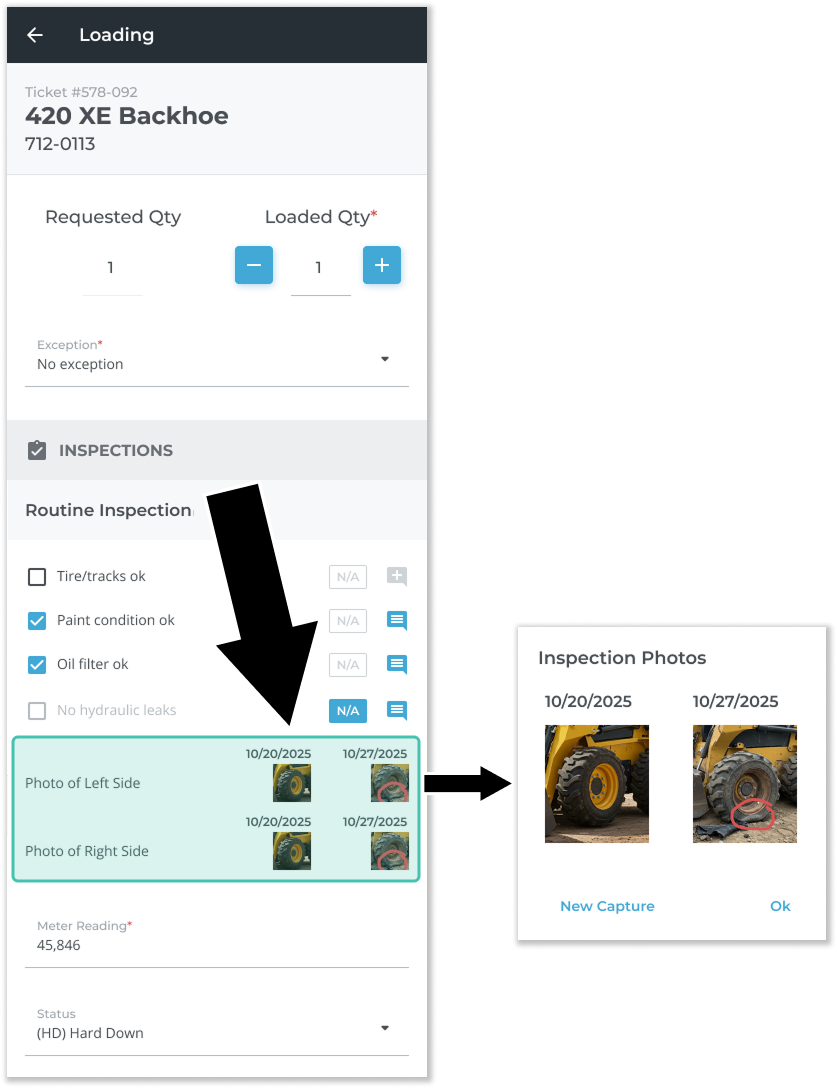
Each photo will be stamped with the date on which it was taken, making it easy to tell before and after photos apart. Tap on a photo pair to view them side-by-side in more detail. Tap the “New Capture” button to take a new pickup photo. If you haven’t yet taken a pickup photo, a camera icon  will be displayed.
In order for the system to know which photos to compare, the same Inspection form must be included during both Delivery and Pickup – if the Inspection forms used during Delivery are different from those used at Pickup, this feature will not work. See “About Inspections” for more information on configuring Inspection forms.
By comparing photos taken during delivery against those taken at pickup, you can confidently determine whether or not damage occurred during the rental period – resulting in more accurate Inspections and more productive liability discussions with your customers.