
In This Article
Introduction
The following article describes the various user types present in Field Sales Tracker, and lists the permissions possessed by each.
User Types
There are 4 types of user in Field Sales Tracker:
- Admin: Full company management: users, accounts, deals, reports, settings, billing, rules, and integrations.
- Team Lead: Manages and views their reporting team's users, accounts, deals, and reports. Cannot delete users or manage company-wide settings.
- Inside Sales: Operational access to assigned/reporting users, accounts, and deals. Cannot manage users at Admin level or access user reports.
- Outside Sales: Works with assigned accounts, contacts, deals, activities, and personal profile. No team-management access.
Assigning User Types
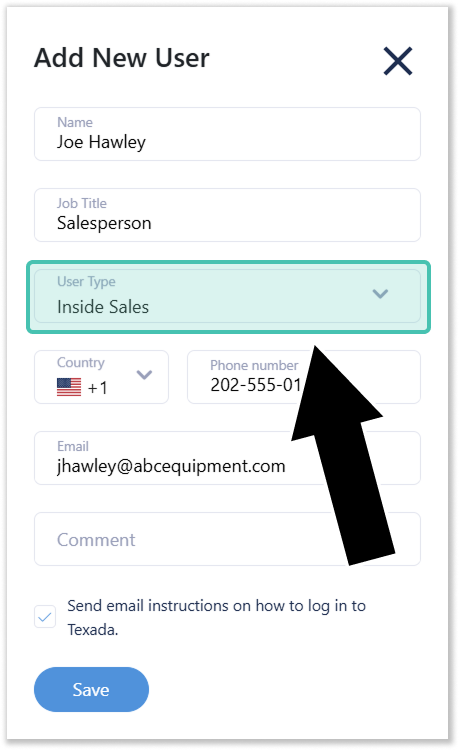
A user’s type is determined by the User Type field in the Add / Edit User window, accessible from the My Team page at Team → My Team. Only Admin users are able to assign user types.
- New users: Admins must assign a user’s type when adding a team member to the application.
- Existing users: Admins can change the User Type of existing users by clicking the pencil icon
 next to that user’s name, then selecting a new User Type from the drop-down.
Permissions List
The below table captures the full list of permissions possessed by the various user types in Field Service Tracker.
|
Capability |
Admin |
Team Lead |
Inside Sales |
Outside Sales |
|
View own profile |
Yes |
Yes |
Yes |
Yes |
|
View Team page |
Yes |
Yes |
Yes |
No |
|
View all company users |
Yes |
No |
No |
No |
|
View assigned/reporting users |
Yes |
Yes |
Yes |
No |
|
Add new users |
Yes |
No |
No |
No |
|
Edit users |
Yes |
Sales Reps only |
Sales Reps only |
No |
|
Delete users |
Yes |
No |
No |
No |
|
Create Admin users |
Yes |
No |
No |
No |
|
Create Team Lead users |
Yes |
No |
No |
No |
|
Create Inside Sales users |
Yes |
No |
No |
No |
|
Create Sales Rep users |
Yes |
No |
No |
No |
|
Reset user password |
Yes |
For editable users |
For editable users |
No |
|
View user reports |
Yes |
Yes |
No |
No |
|
View accounts |
All company accounts |
Assigned/reporting accounts |
Assigned/reporting accounts |
Assigned accounts |
|
Create accounts |
Yes |
Yes |
Yes |
Yes |
|
Edit accounts |
Yes |
Yes |
Yes |
Yes |
|
Delete accounts |
Yes |
Yes |
Yes |
Yes |
|
Assign accounts to users |
Yes |
Yes |
Yes |
Yes |
|
Assign account to self |
Yes |
Yes |
Yes |
Yes |
|
Manage account tags |
Yes |
Yes |
Yes |
Yes |
|
View deals |
All company deals |
Assigned/reporting deals |
Assigned/reporting deals |
Assigned deals |
|
Create deals |
Yes |
Yes |
Yes |
Yes |
|
Edit deals |
Yes |
Assigned/reporting deals |
Assigned/reporting deals |
Assigned deals |
|
Delete deals |
Yes |
Assigned/reporting deals |
Assigned/reporting deals |
Assigned deals |
|
Manage deal pipelines/settings |
Yes |
No |
No |
No |
|
View contacts |
Yes |
Yes |
Yes |
Yes |
|
Create/edit/delete contacts |
Yes |
Yes |
Yes |
Yes |
|
View reports |
Yes |
Yes |
Some reports |
Some reports |
|
Account adhoc report |
Yes |
Yes |
Yes |
No |
|
User report |
Yes |
Yes |
No |
No |
|
Manage company settings |
Yes |
No |
No |
No |
|
Manage subscriptions |
Yes |
No |
No |
No |
|
Manage categories |
Yes |
No |
No |
No |
|
Manage tags |
Yes |
No |
No |
No |
|
Manage email templates |
Yes |
No |
No |
No |
|
Manage assignment rules |
Yes |
No |
No |
No |
|
Manage pipeline rules |
Yes |
No |
No |
No |
|
Manage integrations |
Yes |
View/access integration area |
View/access integration area |
View/access integration area |
|
View location/tracking tools |
Yes |
Yes |
Yes |
Yes |