
Introduction
These notes address new features and code fixes for version 2022.02 of Service, Rental, and Financials (Next). Release dates for this version are as follows:
North America: Thursday, November 10th, 2022
APAC: Wednesday, November 23rd, 2022
Notes are categorized as either Enhancements (new components or features) or Corrections (bug fixes).
Quick Navigation
- Release Highlights
- Authentication and Security
- Bookings
- Contracts
- Dashboard Calendar
- Inspections
- Inventory
- Returns
- Settings
- Tables
- Tickets
- Work Orders
- Miscellaneous
- APIs and Integration
Release Highlights
Here are some of the most significant features and improvements that have been added in this release.
Better Tables
Several improvements have been made to tables throughout Service, Rental, and Financials (Next), making it easier to view, filter, and organize your data.
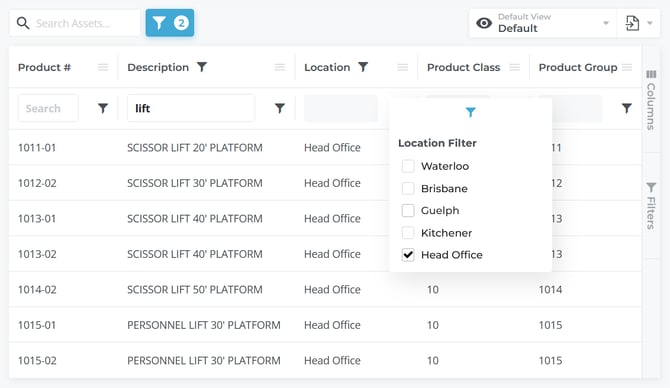
- An Advanced Filter button has been added to all tables, allowing you to easily add filters to individual columns. Access this feature by clicking the blue funnel icon next to the search bar on any page featuring a table. This will display individual search bars for each column which can then be used to finely control the information displayed in the table.
- A "Share View" option has been added to the View Manager, allowing you to share custom table views with the rest of your team. When you share a view using this feature, it will appear in your teammates’ list of available views when they use the “Load” option of the View Manager.
- More columns have been added to the Contracts table, the Requested Parts table, the Maintenance Schedule tab of the Asset Details page, and the Pickup, Delivery, and Task Ticket tables. These additional columns increase the amount of information you can access from these pages, and give you more options for filtering and exporting your data. More data will continue to be added in future releases.
Dashboard Calendar Improvements
A number of improvements have come to the Dashboard Calendar, including:
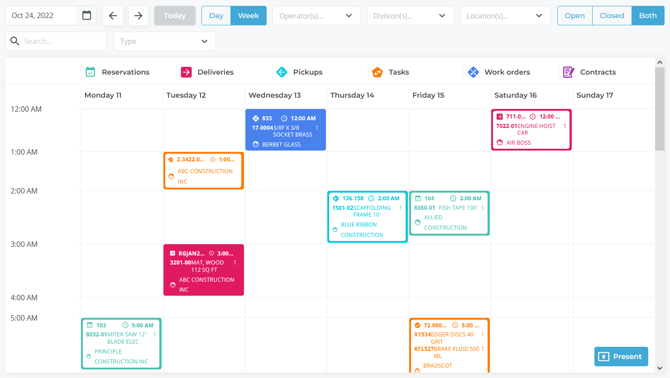
- You are now able to filter Calendar events by completion status - open items only, closed items only, or all items.
- The Calendar now automatically updates every 30 seconds, ensuring that it is always displaying the most up-to-date information possible.
- Unscheduled Work Orders will now appear in the Calendar at the time a Mechanic starts working on them.
Warranty Indication
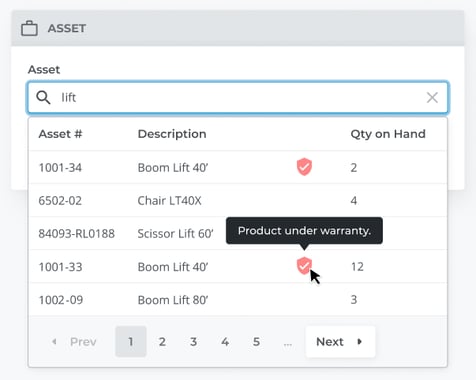
When searching through Products to add to a Work Order, a red shield icon will appear next to Products covered under warranty per their Warranty Expiry date in Service, Rental, and Financials (Classic). This feature allows you to easily identify warrantied Products at-a-glance.

Authentication and Security
|
Ticket # |
Type |
Description |
|
LP-5354 |
Enhancement |
Updates have been made to the login functionality of Service, Rental, and Financials (Next) and Mobile in preparation for the transition to Auth0. |
|
LP-5355, LP-5348 |
Correction |
Fixed a bug affecting Service, Rental, and Financials (Next) in which refreshing a page or opening a page in a new tab would prompt the User to log in again. |
|
LP-5463 |
Correction |
Fixed a bug affecting Service, Rental, and Financials (Next) where attempting to open Service, Rental, and Financials (Classic) using the "Switch to Backoffice" button would occasionally result in a "This site can’t be reached" error. |
Bookings
|
Ticket # |
Type |
Description |
|
LP-5233 |
Correction |
Fixed a bug affecting the Reservations / Quotes pages where the "Rental Discount" and "Sales Discount" columns would sometimes reappear after being hidden by the user. |
Contracts
|
Ticket # |
Type |
Description |
|
LP-5253 |
Enhancement |
The Search feature on the Contract Calendar page now filters Contracts by Contract # as well as Asset name. |
|
LP-5022 |
Enhancement |
A number of additional columns have been added to the Contracts table on the Contract List page, including:
All of the above fields can be toggled ON and OFF using the "Columns" button. |
Dashboard Calendar
|
Ticket # |
Type |
Description |
|
LP-5056 |
Enhancement |
A three-way toggle element (Open / Closed / Both) has been added to the Dashboard Calendar, allowing you to filter items by their completion status. Select "Open" to only show open items, "Closed" to show completed items, or "Both" to show all items. |
|
LP-5166 |
Enhancement |
The Dashboard Calendar will now automatically refresh every 30 seconds, reflecting any changes made throughout the system. |
|
LP-5199 |
Enhancement |
Unscheduled Work Orders will now be displayed in the Dashboard Calendar.
|
|
LP-5135 |
Correction |
Fixed a bug affecting the Dashboard Calendar where Tickets and Work Orders would sometimes appear in the wrong timezone. |
Inspections
|
Ticket # |
Type |
Description |
|
LP-5240 |
Enhancement |
Added the ability to display the new Inspection form fields (multiple choice, instruction, and reference image) when viewing completed Inspections via the Edit Ticket and Asset Details → Inspection History pages. |
|
LP-5246 |
Correction |
Fixed a bug affecting Inspection forms in Service Management (Next) and Mobile in which form IDs would occasionally change, causing issues with deleting Inspection forms. |
Inventory
|
Ticket # |
Type |
Description |
|
LP-5442 |
Enhancement |
Added four new columns to the Maintenance Schedule table on the Asset Details screen:
|
|
LP-515 |
Enhancement |
A number of additional columns have been added to the Requested Parts table, including:
All of the above fields can be toggled ON and OFF using the "Columns" button. |
Returns
|
Ticket # |
Type |
Description |
|
LP-279 |
Enhancement |
The ability to submit a "Meter In" value lower than the "Meter Out" value while processing a Rental Return for a metered Asset has been added. If the Meter In is lower than the Meter Out, a window will pop up prompting the User to either select a Reason Code to justify the Meter In value, or adjust it so that it is equal to or higher than the Meter Out value. |
Settings
|
Ticket # |
Type |
Description |
|
LP-4880 |
Enhancement |
The Company Settings screen has been overhauled to provide more options and information, and to reflect the changes made to User Roles and permissions.
See "The Company Settings Page" for more information. |
Tables
|
Ticket # |
Type |
Description |
|
LP-5032 |
Enhancement |
Added a "Share View" option to the View Manager, allowing Users to share saved table views with the rest of their team. A "Share with team" checkbox will also appear when saving a view.
|
|
LP-5312 |
Enhancement |
An Advanced Filter button has been added to all tables throughout Service, Rental, and Financials (Next), allowing you to easily add filters to individual table columns. Click the Filter button to the right of the Search bar on any page with a table to activate the Advanced Filter. A box will appear at the top of each column allowing you to enter text with which to filter that column. As more filters are added, the Filter button will be updated to display the number of filters that are currently active. |
|
LP-5351 |
Correction |
Fixed a bug affecting tables in Service, Rental, and Financials (Next) where changes to column layout would sometimes not be preserved. |
|
LP-5445 |
Correction |
Fixed a bug affecting tables in Service, Rental, and Financials (Next) where the "Results per Page" element would disappear when only one page of results was present. |
|
LP-5254 |
Correction |
Fixed a bug in which certain table elements, such as the Asset search element on the Create / Edit Contract page, would have incorrect cell padding. |
Tickets
|
Ticket # |
Type |
Description |
|
LP-5358 |
Enhancement |
A new "Cancelled" status has been added to Pickup, Delivery, and Task Tickets, allowing you to indicate that a Ticket has been cancelled and will not be completed. |
|
LP-5262 |
Enhancement |
A number of additional columns have been added to the Pickup, Delivery, and Task Ticket tables, including:
All of the above fields can be toggled ON and OFF using the "Columns" button. |
|
LP-5226 |
Enhancement |
An "Email" button has been added to the Ticket details page for Task Tickets, allowing Completed and Closed Task Tickets to be emailed in the same manner as Pickup and Delivery Tickets. |
|
LP-5304 |
Correction |
Fixed a bug affecting the Pickup / Delivery / Task Ticket list pages where changes made to a Ticket's Driver - assigning, reassigning, or unassigning - would not be reflected when filtering the Ticket list by assigned Driver. |
|
LP-4771 |
Correction |
Fixed a bug affecting Tickets in which comments left on Tickets in Service Management Mobile would sometimes disappear after being briefly visible in Service Management (Next). |
|
LP-5173 |
Correction |
Fixed a bug affecting the Ticket List page in which cancelled Tickets would appear as Closed instead of Cancelled. |
Work Orders
|
Ticket # |
Type |
Description |
|
LP-4586 |
Enhancement |
A new warranty indication feature has been added to Work Orders in Service Management (Next) and Mobile. A red shield icon will be displayed next to Assets that are currently under warranty, per their Warranty Expiry date in Service, Rental, and Financials (Classic). This icon will be displayed in the following locations:
|
|
LP-5170 |
Enhancement |
The Division and Location selectors on the Work Order Scheduling page have been replaced with multi-select drop-downs, allowing you to view Work Orders for multiple different Divisions and Locations at the same time. |
|
LP-3838 |
Enhancement |
The ability to add a Maintenance Schedule to an Asset while creating a Work Order has been added. Previously, Maintenance Schedules could only be added to existing Work Orders. |
|
LP-5402 |
Enhancement |
Added the ability to sort and filter the Work Order list by any column. |
|
LP-5011 |
Correction |
Fixed a bug affecting the Edit Part / Labor / Service Details windows where switching between percentage display and dollar amount display for the Customer / Warranty / Internal Charge fields was not working as expected. |
|
LP-5040 |
Correction |
Fixed a bug affecting the Work Order List page where clicking on a Work Order to open its details would sometimes result in an "Oops, something went wrong..." error. |
|
LP-5267 |
Correction |
Fixed a bug affecting Work Orders where discounts applied to Parts or Labor would be reflected in the Total for that particular item, but would not be reflected in the Items Summary, the Grand Total, or the printed Work Order. |
|
LP-5283 |
Correction |
Fixed a bug affecting the Work Order List page where the User would occasionally be logged out after viewing the details of a Work Order, then navigating back to the Work Order List. |
|
LP-5303 |
Correction |
Fixed a bug affecting Work Orders where attempting to update a Work Order would sometimes result in an "Only assigned mechanic can update workordertimetracked_set" error. |
|
LP-5299 |
Correction |
Fixed a bug affecting Work Orders where attempting to send a completed Work Order by email would occasionally result in a “Something went wrong while sending email. Please contact Texada Software" error. |
|
LP-5197 |
Correction |
Fixed a bug affecting Work Order comments in which it was not possible to change the Customer Facing / Internal status of Work Order comments in Service Management (Next) if those comments had originally been made in Service Management (Classic). |
|
LP-5422 |
Correction |
Fixed a bug affecting Work Orders in which searching through serialized Parts to add to a Work Order would include unavailable Parts in addition to available Parts. |
|
LP-5107 |
Correction |
Fixed a bug affecting Work Orders in which files and URLs attached to a Work Order would occasionally disappear after a few minutes. |
Miscellaneous
|
Ticket # |
Type |
Description |
|
LP-5048 |
Enhancement |
The ability to search Products by Vendor Product Number has been added to several screens, including:
|
|
LP-3989 |
Enhancement |
When emailing documents from Service, Rental, and Financials (Next), the system will automatically retrieve email addresses for all valid Customer Contacts. This functionality, which was previously present when sending Invoices for payment, has been added to all screens where emails can be sent. |
|
LP-5347, LP-5473 |
Enhancement |
A 1,000-character limit has been added to comment fields throughout Service, Rental, and Financials (Next), including the following locations:
When entering a comment, a warning message will appear when the length of the comment exceeds 900 characters. |
|
LP-5410 |
Correction |
Fixed a bug affecting Service, Rental, and Financials (Next) in which some Users would occasionally see a blank screen after logging in. |
APIs and Integration
|
Ticket # |
Type |
Description |
|
LP-5184 |
Enhancement |
Added support for Google Tag Manager to all pages in Service, Rental, and Financials (Next). |
|
LP-5330 |
Correction |
Fixed an issue with Service, Rental, and Financials (Next)'s API where Work Orders created via API would sometimes fail to be reflected in Service, Rental, and Financials (Next). |
|
LP-5314 |
Correction |
Fixed a bug affecting Service, Rental, and Financials (Next)'s API in which attempting to change the status of a Pickup or Delivery Ticket via API would occasionally result in a "You are not assigned to this ticket" error. |
|
LP-5457 |
Correction |
Fixed a bug affecting Service, Rental, and Financials (Next)'s API in which retrieving Work Order information via API would occasionally return incorrect Customer and Asset information. |