
In This Article
- Introduction
- Release Highlights
- CloudLink API Center
- CloudLink Console
- Commissions
- Contract Tracking
- Customer Order to Invoice
- Customer Search
- Equipment CRM (SalesLink)
- Equipment Quoting (iQuote)
- Parts & Service Quoting
- Power Systems Projects (iMACS)
- Service Agreement Quoting
- Service Management CD (ServiceLink)
Introduction
These notes address new features and code fixes for version 2026.0618 of Equipment CRM & Service Suite CD.
Release Highlights
Projects in Equipment CRM
For heavy equipment dealerships, infrastructure jobs such as a highway expansions or major commercial developments aren’t just single sales – they are goldmines of long-term revenue streams. Large-scale construction projects involve multiple subcontractors, shifting timelines, and a continuous need for rentals, sales, and service.
The Projects feature in Equipment CRM is designed to give your dealership a competitive edge. Instead of tracking scattered leads independently, Projects allow you to aggregate every associated subcontractor, contact, sales activity, and piece of equipment under a single, centralized record. By maintaining full visibility into the scope and relationships driving a project, your sales and service teams can time their outreach perfectly, protect margins, and capture maximum market share.

Equipment CRM Mobile & Service Management CD Mobile - New Login Experience
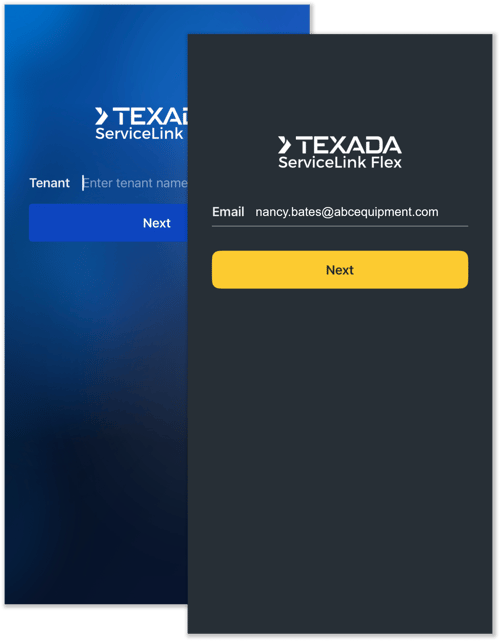
A new login experience is coming soon to two of Texada’s mobile applications: Equipment CRM Mobile (SalesLink Flex) and Service Management CD Mobile (ServiceLink Flex)! This update will simplify the authentication process and unify the mobile Production and Sandbox environments into a single application.
The new login experience will be implemented in a future release. We recommend familiarizing yourself with the changes outlined in the article below in preparation for this update.

Equipment CRM - Bulk Update Leads & Opportunities
The Manage - Opportunity, Activity, and Issue Status utility has been updated! All Opportunity stages are now selectable from the Status drop-down, allowing you to bulk update Opportunities to any stage. Watch the above video to learn more!
Equipment CRM - Dealer Parts Purchased
A new "Default value for Parts Purchased in service opportunities" configuration key has been added to CloudLink Console! This key allows you to set the default value of the "Dealer Parts Purchased" field on the Opportunity Details screen. Watch the above video to learn more!

CloudLink API Center
|
Ticket # |
Description |
|
CLA-43492 |
SalesLink Territory Plan data is now available through the CloudLink API. External applications can retrieve plan information for both customers and territories, including action plans, performance tracking, influencers, manufacturers, and supporting code tables. |
|
CLA-43460 |
The response structure for creating records via the Local Items POST API endpoint (POST /cl1.1-api/v2/quotes/local-items) has been updated to return the newly generated unique identifier (`id`). This allows external integrations to maintain a immediate, persistent mapping without requiring a separate follow-up GET request.
Before: [ { "errorCode": 200, "errorMessage": "Success" } ] After: [ { "id": 9999, "errorCode": 200, "errorMessage": "Success" } ]
See the CloudLink API Center for more information. |
CloudLink Console
|
Ticket # |
Description |
|
CLA-43181 |
The "Make" field will now be automatically populated for Leads created from Caterpillar PSEs. |
Commissions
|
Ticket # |
Description |
|
CLA-43640 |
Resolved an issue affecting automated Commission Revision creation in which new Revisions would be created every 90 days regardless of whether or not the criteria for a new Revision had been met. |
Contract Tracking
|
Ticket # |
Description |
|
CLA-38750 |
Resolved the "CloudLink - Error" that would occasionally occur when launching Contract Tracking from the Global Landing Hub. |
Customer Order to Invoice
|
Ticket # |
Description |
|
CLA-38168 |
Resolved an issue affecting the Cancelled Deals page in which the total number of cancelled deals would occasionally differ from the number listed in the drill-down. |
|
CLA-38819 |
When clicking a deal count on the Completed Deals report, the detail view now correctly loads for sales reps whose Sales Manager is listed as Unknown. Previously, clicking through from the summary grid for an Unknown Sales Manager would show an empty "No data is available" screen instead of the expected deal details. |
Customer Search
|
Ticket # |
Description |
|
CLA-43290 |
Resolved the "CloudLink - Error" that would occasionally occur when accessing the A/R Notes tab for a Customer with existing notes, provided the A/R Notes setting was enabled. |
Equipment CRM (SalesLink)
|
Ticket # |
Description |
|
CLA-42033 |
Resolved the "CloudLink - Error" that would occasionally occur when accessing the Manage - OLGA Import Summary secured module. |
|
CLA-42598 |
While the "Enforce strict data quality rules in company and contact (influencer) records" configuration key is enabled, leading and trailing spaces will no longer be counted toward the length of phone numbers entered into the Phone field when adding or editing an influencer record. This change ensures that users are required to enter phone numbers of the correct length (between 7 and 15 digits). |
|
CLA-43741 |
Date picker in SalesLink Activity page now takes user's local date when choosing available date range. |
|
CLA-36610 |
When adding a Work Order to an Opportunity via the Opportunity Details page, only Work Orders for the serial number of the product associated with the Opportunity will be displayed. |
|
CLA-37337 |
The ProductAreaRequired, ProductFamilyRequired, and ProductBaseModelRequired configuration keys, which determine whether the Area, Product Family, and Base Model fields are required, have been updated to affect Equipment CRM in addition to Equipment CRM Mobile. Additionally, a new ProductMakeRequired configuration key has been added, determining whether the Make field is required in both Equipment CRM and Equipment CRM Mobile. |
|
CLA-38193 |
The alignment of elements on the Division Add New Compare page has been updated for legibility. |
|
CLA-38520 |
Resolved an issue affecting the "By Family" tab of the Opportunity Pipeline in which the number of Opportunities displayed for a family would occasionally differ from the number listed in the drill-down. |
|
CLA-39197 |
Resolved an issue affecting the Customer Information screen in which clicking "X" to remove a Parent or Child Company, then clicking "Cancel" in the confirmation window would still generate a Gatekeeper request for the removal. |
|
CLA-42175 |
Resolved an issue affecting the Customer Surveys screen in which recent surveys that appeared in Equipment CRM would occasionally fail to appear in Service Management CD. |
|
CLA-42358 |
The behavior of the Opportunity Reason Management screen has been updated. It is now possible to disable (uncheck) Opportunity reasons that are currently in use. Disabling an Opportunity reason will only prevent that reason from being assigned to new records. Existing records with that reason will not be affected. |
|
CLA-43359 |
Resolved an issue affecting the Outstanding Leads page in which filtering by Division was not working as expected. |
|
CLA-43433 |
New external API endpoints have been added to allow dealers to extract and manage CRM Project data for custom reporting and analytics. See the CloudLink API Center for more information. |
|
CLA-43434 |
New ProjectId foreign key fields have been added to the following APIs:
|
|
CLA-43602 |
Resolved an issue affecting the Resolved Leads page in which Leads with an Unknown Source were not included in the drill-down list of Total Leads. |
Equipment Quoting (iQuote)
|
Ticket # |
Description |
|
CLA-43475 |
Resolved an issue in which winning a Quote created from a Standard Package would automatically update extra costs and sell prices instead of preserving the original quoted pricing. |
|
CLA-43490 |
A new "Inventory attachment asking price" configuration key has been added to CloudLink Console. This key determines whether the asking price for used equipment inventory attachments is added to machine quotes. "Include in asking price" adds the attachment asking price to the machine quote. "Exclude from asking price" prevents the attachment asking price from being added to the machine quote. |
Parts & Service Quoting
|
Ticket # |
Description |
|
CLA-43208 |
Resolved the "Failed to attach remote documents to the ticket" error that would occasionally occur when transferring a Ticket with an attached .MSG file from Parts & Service Quoting to Service Management CD. |
Power Systems Projects (iMACS)
|
Ticket # |
Description |
|
CLA-42658 |
Resolved the "CloudLink - Error" that would occasionally occur when accessing the Stock Numbers by Program page. |
Service Agreement Quoting
|
Ticket # |
Description |
|
CLA-43657 |
The behavior of the following Event Type fields in SAQ has been updated: ModifierCode, BusinessGroup, QuantityCode, WorkAppCode, CabTypeCode, JobLocationCode, JobConditionCode, and ShopFieldCode.
To reflect this change, all existing "All" values have been updated to "Blank" in dealer Sandbox environments. |
Service Management CD (ServiceLink)
|
Ticket # |
Description |
|
CLA-41136 |
Resolved an issue affecting the Ticket Segments tab in which the "Segment Status" drop-down was occasionally displaying duplicate options. |