.png?width=365&height=50&name=Texada%20Logo%20(Black).png)
Introduction
These notes address new features and code fixes for version 2026.0115 of Equipment CRM & Service Suite CD.
Quick Navigation
- Release Highlights
- Customer Search
- Equipment CRM (SalesLink)
- Equipment CRM Mobile (SalesLink Flex)
- Marketing Integrator
- Parts & Service Quoting
- Service Agreement Quoting
- Service Management CD (ServiceLink)
- Service Management CD Mobile (ServiceLink Flex)
Release Highlights
Equipment CRM - Trade-In User Defined Fields
Support for user-defined fields for Trade-Ins has been added to Equipment CRM (SalesLink)! This feature allows your sales team to capture the exact equipment attributes that drive valuation and deal approvals, improving pricing accuracy, forecast quality, and close rates without forcing workarounds.

Equipment CRM Mobile - Associate Activities with Leads / Opportunities
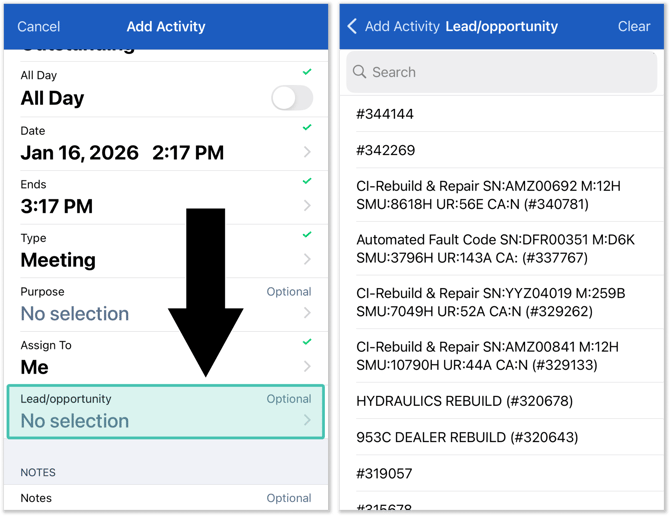
It’s now possible to link activities to leads and opportunities in Equipment CRM Mobile, bringing a key piece of web functionality to your mobile device! This update makes it easier for your field staff to capture follow-ups with the right context, keep deal-related work organized, and maintain a cleaner activity history for each customer.
- Associate activities with leads and opportunities: Tap the new “Lead/opportunity” field on the Add Activity / Activity details screen to browse all of the open leads and opportunities for that customer/prospect. Select a lead or opportunity to associate it with that activity.
- See which lead / opportunity is associated with an activity (and vice versa!): Screens that show an activity’s details now include a lead/opportunity field, allowing you to see which lead or opportunity, if any, is associated with that activity. Tap this field to instantly jump to the lead or opportunity’s details! Similarly, leads and opportunities now include an activity field, which you can use to quickly jump to their associated activity.
Enjoy greater visibility and faster navigation thanks to this long-awaited update!

Customer Search
|
Ticket # |
Description |
|
CLA-41064 |
Resolved the "CloudLink - Error" that would occasionally occur when performing a Customer Search by City. |
Equipment CRM (SalesLink)
|
Ticket # |
Description |
|
CLA-41042 |
Resolved an issue in which the values of the DefaultEmailConsent and DefaultSMSConsent configuration keys were occasionally not being respected when creating new influencers on active accounts in Equipment CRM. |
Equipment CRM Mobile (SalesLink Flex)
|
Ticket # |
Platform |
Description |
|
TM-3618 TM-3605 |
Android iOS |
The Leads / Opportunities List now filters to only show open records by default. |
|
TM-3590 TM-3579 |
Android iOS |
The dollar amount field has been removed from the Equipment Units List. |
Marketing Integrator
|
Ticket # |
Description |
|
CLA-41041 |
Resolved an issue in which the values of the DefaultEmailConsent and DefaultSMSConsent configuration keys were occasionally not being respected when creating new influencers in external ERP systems such as DBS. |
Parts & Service Quoting
|
Ticket # |
Description |
|
CLA-41026 |
Resolved an issue in which Parts & Service Quoting would occasionally calculate an incorrect extended price for parts when a negative quantity was entered. |
|
CLA-40584 |
Resolved an issue in which “Work Order/Invoice” indicators selected in a ticket’s Special Instructions were occasionally not carried over to the Quote when creating a Quote from a Ticket. |
|
CLA-39527 |
Resolved an issue in which parts in Parts & Service Quoting and Service Management CD would display incorrect weights due to kilogram/pound conversion. |
Service Agreement Quoting
|
Ticket # |
Description |
|
CLA-41183 |
The Select Parts Group window in SAQ now displays additional job and equipment details to help users choose the correct group part number. |
Service Management CD (ServiceLink)
|
Ticket # |
Description |
|
CLA-40883 |
Resolved an issue in which clicking + to add a new SIMS entry after selecting an existing entry could overwrite the selected SIMS line instead of creating a new one. |
|
CLA-39422 |
Resolved an issue in which the system would occasionally fail to identify expired warranties based on hour usage during new ticket creation. |
|
CLA-40453 |
The process to add single parts to the parts section has been optimized. If a single part is added with only 1 match, the prompt to select the part is bypassed. |
Service Management CD Mobile (ServiceLink Flex)
|
Ticket # |
Platform |
Description |
|
TM-3612 |
Android iOS |
Resolved an issue in which the Modifier Code field on the Segment details screen would occasionally display the Component Code instead of the Modifier Code. |