
Introduction
These notes address new features and code fixes for version 2026.0129 of Service, Rental and Financials.
Quick Navigation
Release Highlights
Reservations in Rental Management (Next)
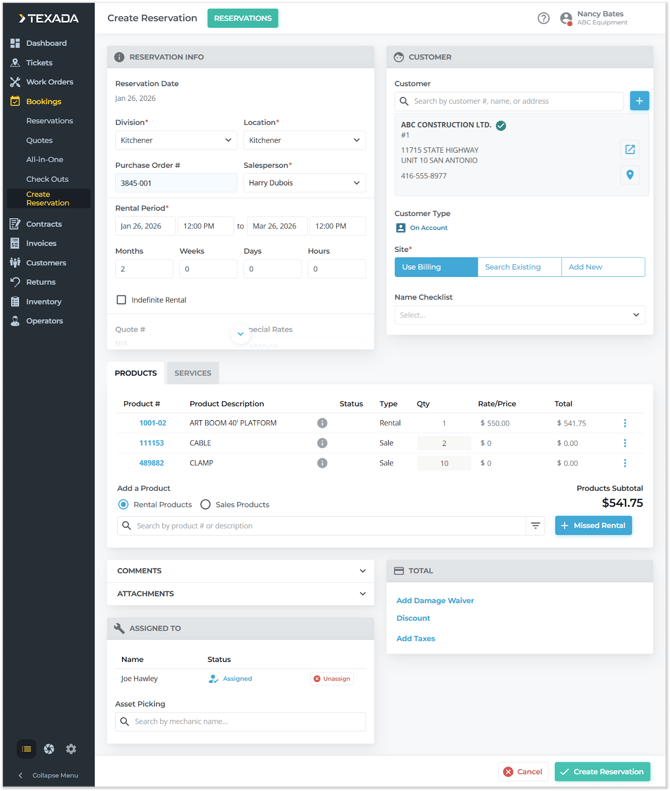
Texada is pleased to announce the arrival of Reservations in Rental Management (Next)!
Reservations give your team a smarter way to secure equipment for future rentals, estimate costs early, and smoothly transition from customer interest to a confirmed Contract. Whether you’re booking months in advance or managing multiple upcoming rentals at once, Reservations help you stay organized, reduce last-minute surprises, and deliver a better customer experience.
Click the button below to learn more!


Service, Rental and Financials (Next) (formerly Texada Web)
|
Ticket # |
Description |
|
TR-6778 |
Resolved the "01: Only 1 Tax code provided" error that would occasionally occur when creating an Invoice. |
|
TR-6616 |
The permissions required to access the Labor Management page have been updated to match those required in Service, Rental, and Financials (Classic). |
|
TR-6201 |
Resolved an issue affecting the Asset Details screen in which Assets' Maintenance Schedules would occasionally fail to appear under the Maintenance Schedule tab. |
|
TR-6292 |
Resolved the "Barcode number already exists" error that would occasionally occur when updating Parts barcodes via API. |