
In This Article
Introduction
The ability to enhance Work Order notes with AI is coming to Service Management CD Mobile! This powerful feature allows your technicians to create professional, polished notes with the tap of a button.
This feature works for all of the following note types:
- Work Order Notes
- Segment Notes
- Original Technician Notes
- Operation Notes
Enhance Notes With AI
To add AI-enhanced technician notes to a Work Order Segment in Service Management CD Mobile, follow the steps below.
- Open Service Management CD Mobile and navigate to the Segment or Operation to which you’d like to add notes. Tap “Segment Notes”, “Original Technician Notes”, or “Operation Notes”, then tap “Add Note” in the top-right corner of the screen to add a new note.
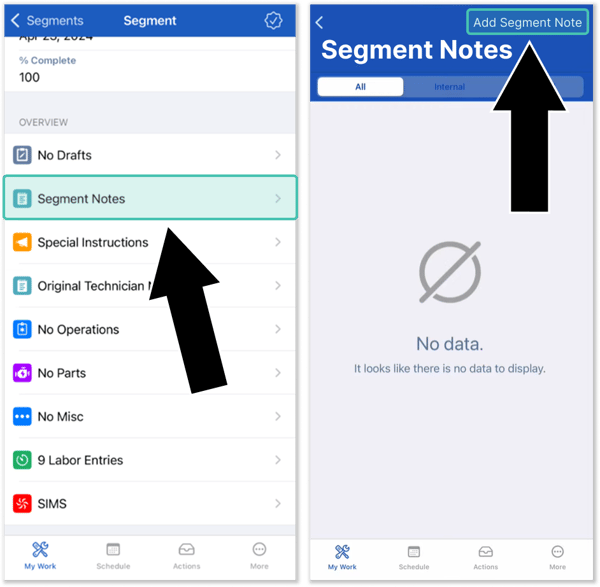
- Tap the new “Insert AI Enhanced Text” button at the bottom of the screen to open the AI Enhanced Text tool. Enter your notes by typing or dictating, then tap “AI Enhance” to generate an AI-enhanced version of the notes you entered.
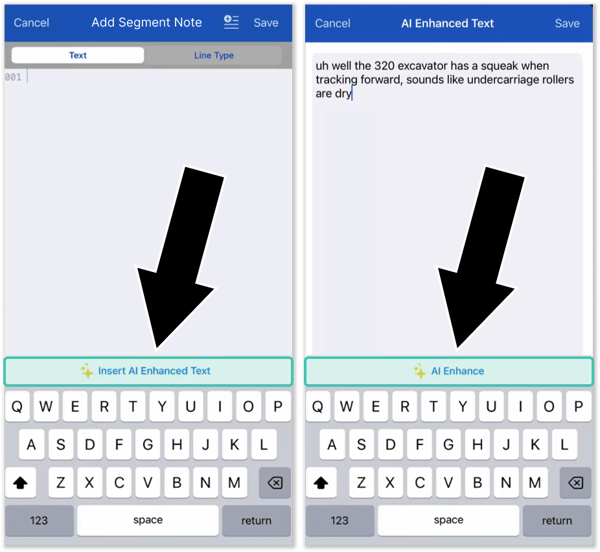
- A window will now appear allowing you to compare your original notes against the AI-enhanced version. You now have a number of options:
- Tap “Insert AI Enhanced Text” to add the AI-enhanced version of the notes to the Segment.
- Tap “Regenerate” to generate the AI-enhanced notes again. This option is useful if the notes aren’t exactly what you’re looking for.
- Tap “Insert Original Text” to add the original version of your notes to the Segment.
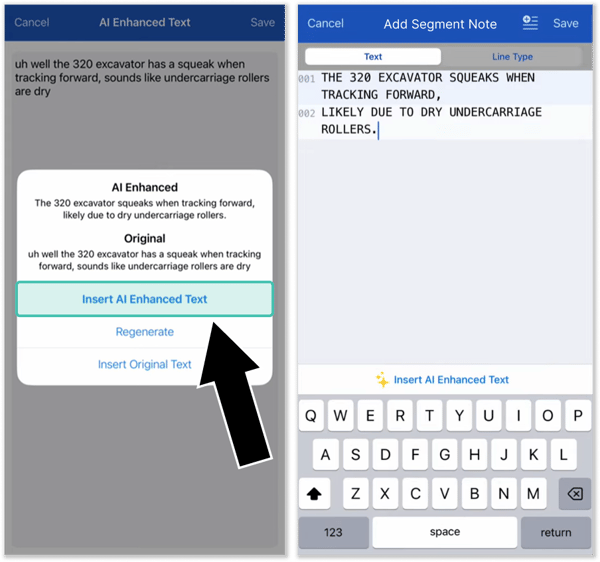
- You’re finished! Tap “Save” to save your notes to the Work Order Segment.
If notes have already been left on the Work Order, Segment, or Operation in question, you can insert AI-enhanced notes between existing notes. To do this, place the cursor on an existing note by tapping it, then tap the “Insert AI Enhanced Text” button and continue as normal.
Your notes will be inserted after the line upon which the cursor was placed.
Configuration
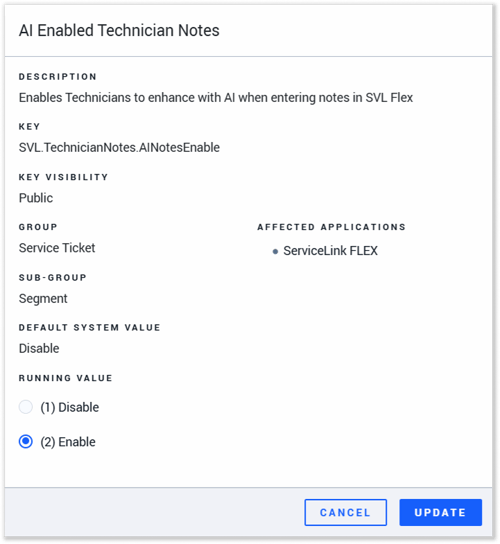
This feature can be enabled and disabled via the “AI Enabled Technician Notes” (SVL.TechnicianNotes.AINotesEnable) configuration key in CloudLink Console. For more information, see “Manage Configuration Keys”.
Presentation
Click the above preview to download a Microsoft PowerPoint (.pptx) training presentation for this feature. This presentation, created by a Texada client, includes both instructions on how to use the feature and three before-and-after examples of AI enhancement in action.