.png?width=365&height=50&name=Texada%20Logo%20(Black).png)
Introduction
These notes address new features and code fixes for version 2026.0312 of Equipment CRM & Service Suite CD.
Quick Navigation
- Release Highlights
- Equipment CRM (SalesLink)
- Equipment Monitoring Toolkit
- Gatekeeper
- Order Fulfillment (Customer Order to Invoice)
- Service Management CD (ServiceLink)
Release Highlights
Parts & Service Quoting - Revision Description
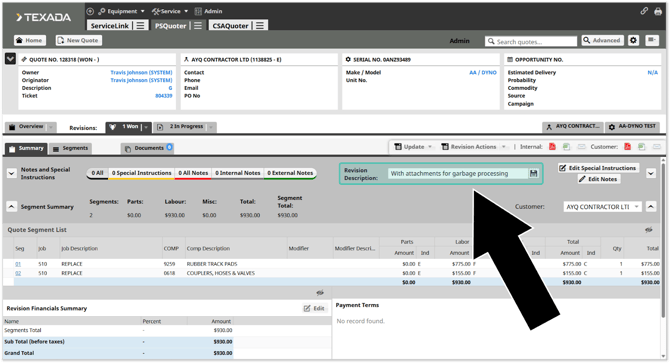
A new “Revision Description” field has been added to Quote Revisions in Parts & Service Quoting! This update allows you to enter a brief descriptive name for each Revision, giving each Revision an identity and making it easier to tell Revisions apart at-a-glance.

Equipment CRM - Trade-In User-Defined Fields
Support for user-defined fields for Trade-Ins has been added to Equipment CRM (SalesLink)! This feature allows your sales team to capture the exact equipment attributes that drive valuation and deal approvals, improving pricing accuracy, forecast quality, and close rates without forcing workarounds.

Equipment CRM (SalesLink)
|
Ticket # |
Description |
|
CLA-41833 |
Updated CRM Attachment handling such that attachments are added or updated immediately without being sent to Gatekeeper, and can now be configured to use ERP, local CRM storage, or both, consistent with CRM Equipment. |
|
CLA-41899 |
Trade-In User-Defined Fields have now been enabled in all environments. |
|
CLA-42109 |
Added a new "Service meter unit of measure field visibility" (ckCommon.EquipmentAddEdit.ServiceMeter.UOM.Visibility) configuration key to CloudLink Console. This key controls whether the Service Meter Unit of Measure field is visible when adding or editing a machine in a customer’s or prospect’s fleet. The unit of measure defines the unit used for the machine’s SMU (hours, kilometers, or miles). When hidden, the field is not displayed and cannot be edited. In this case, it will default to hours. |
|
CLA-42156 |
Resolved the "CloudLink - Error" that would occasionally occur when using the Filter function on the Customer Coverage Report screen. |
|
CLA-42086 |
Resolved the "CloudLink - Error" that would occasionally occur when navigating to the Lost Sales By Region or Lost Sales by Model pages. This error was caused by decimal values being present in the "Quantity" field under Competitor Info. This field has been updated to only accept whole numbers in both Equipment Quoting and Equipment CRM. |
|
CLA-41531 |
Resolved an issue affecting the Advanced Search function in which the value of the "Family" drop-down would occasionally change unexpectedly after running a search. |
|
CLA-41529 |
Resolved the "CloudLink - Error" that would occasionally occur when attempting to access the Add New Activity page with the "Purpose Visibility" configuration key set to "Hide". |
Equipment Monitoring Toolkit
|
Ticket # |
Description |
|---|---|
|
CLA-41883 |
Rental fleet machines will now appear in the PL/Parked Equipment Report. |
|
CLA-42079 |
Fixed an issue affecting the PM Services Data refresh job in which pre-defined interval days were being incorrectly appended to pending PM service dates when a service appointment was completed with an open work order. |
Gatekeeper
|
Ticket # |
Description |
| CLA-38231 |
Resolved an issue affecting the Request Details window in which the Sales Rep's last name would occasionally be missing from the "From" field. |
Order Fulfillment (Customer Order to Invoice)
|
Ticket # |
Description |
|
CLA-41532 |
Resolved an issue in which changing a warranty checklist's Phase or Department would cause it not to be displayed on old deals. |
|
CLA-42126 |
Resolved an issue affecting the Invoicing Coordinator Workflow page in which the header row of the Invoicing Coordinator table would occasionally become misaligned. |
Service Management CD (ServiceLink)
|
Ticket # |
Description |
|
CLA-41908 |
The "Arr No" field will now be automatically populated when creating a new ticket, provided one is available and the "Ticket Related Info" configuration key is enabled. |
|
CLA-40896 |
The default Quantity value in the Add Misc window will now be determined by the value of the "SVL Misc Quantity Default" configuration key. |