
In This Article
- Introduction
- Release Highlights
- Equipment CRM Mobile & Service Management CD Mobile - New Login Experience
- Projects in Equipment CRM - Change Log
- CloudLink API Center
- CloudLink Console
- Customer Hierarchy
- Customer Order to Invoice
- Customer Search
- Equipment CRM (SalesLink)
- Equipment Quoting (iQuote)
- Gatekeeper
- Parts & Service Quoting
- Power Systems Projects (iMACS)
- Service Management CD (ServiceLink)
- Service Management CD Mobile (ServiceLink Flex)
Introduction
These notes address new features and code fixes for version 2026.0716 of Equipment CRM & Service Suite CD.
Release Highlights
Equipment CRM Mobile & Service Management CD Mobile - New Login Experience
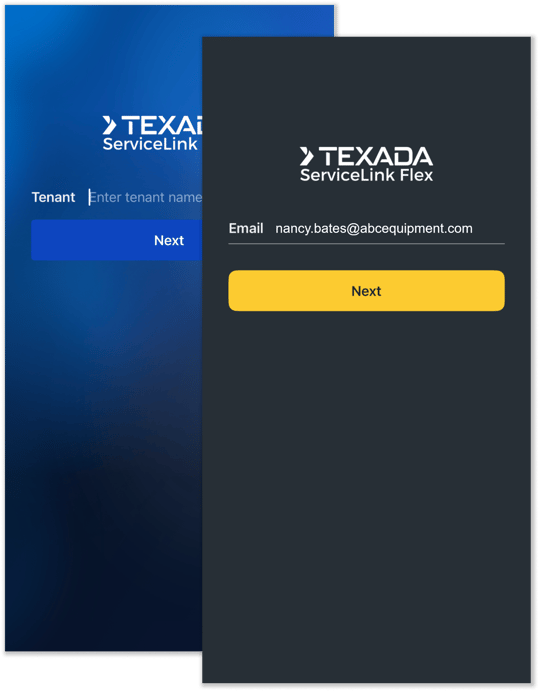
A new login experience is coming soon to two of Texada’s mobile applications: Equipment CRM Mobile (SalesLink Flex) and Service Management CD Mobile (ServiceLink Flex)! This update will simplify the authentication process and unify the mobile Production and Sandbox environments into a single application.
The new login experience will be implemented as of this release. We recommend familiarizing yourself with the changes outlined in the article below in preparation for this update.

Projects in Equipment CRM - Change Log
The Change Log for Projects in Equipment CRM is a powerful feature that provides a searchable audit trail of every modification made to a Project record. Use this tool to browse the entire change history of complex Projects, including the exact time each change was made, the user responsible, and a comparison of the data before and after.
Click the button below to learn more about how your team can leverage the Change Log to get the most out of Projects in Equipment CRM!


CloudLink API Center
|
Ticket # |
Description |
|
CLA-40408 |
Resolved an issue in which the v1/SMADeals API endpoint failed to populate the quote number (QuoteNo) field, causing it to return as null for all records. |
|
CLA-43286 |
Resolved an issue in which the Service Excellence API would incorrectly display the First Labor Date or Last Labor Date as one day later when Labor for a Work Order began exactly at midnight. |
CloudLink Console
|
Ticket # |
Description |
|
CLA-43903 |
Resolved an issue in which uploaded CAT OLGA opportunity XML files successfully processed in the CloudLink Console but failed to appear or generate opportunities in Equipment CRM due to a change in the XML file structure. |
Customer Hierarchy
|
Ticket # |
Description |
|
CLA-41036 |
Resolved the "An Error Occurred" error that would occasionally appear when viewing the Account / Period tab in Accounts Receivable. |
Customer Order to Invoice
|
Ticket # |
Description |
|
CLA-42059 |
Resolved an issue affecting the Documents tab of the Deal Details screen in which removing an existing document of a user-defined type would cause the "Add" button under "User defined document type" to disappear on subsequent uploads. |
Customer Search
|
Ticket # |
Description |
|
CLA-43837 |
Resolved display issues affecting the Credit Notes tab of the Customer Details screen. |
Equipment CRM (SalesLink)
|
Ticket # |
Description |
|
CLA-44018 |
Resolved an issue in which opportunity summary counts on the Opportunity Pipeline screen would mismatch the number of records displayed when drilling down into the detailed list. |
|
CLA-43092 |
Resolved an issue affecting the Advanced Search tool in which the "County" column would occasionally appear blank. |
|
CLA-43213 |
Resolved an issue in which the Activity Purpose Report would occasionally appear blank even when results would be expected for the currently-applied filters. |
|
CLA-43778 |
Resolved the "[]" error that would occasionally occur when bulk updating records via the Manage - Opportunity, Activity and Issue Status secured module. |
|
CLA-43864 |
Resolved an issue in which newly created Issues occasionally displayed the creator as the assigned user on the main Issue page, rather than the intended user designated by the Issue Default Assignment rules. |
|
CLA-43865 |
Resolved an issue affecting the Add New Prospect Customer screen in which the E-Mail field under "Add Extra Details" would be mandatory even when the "Data quality enforcement account scope" (ckSLCommon.CustomerProspect.DataQuality.AccountScope) configuration key was set to "Exclude Prospects". |
|
CLA-43867 |
Resolved an issue affecting the Customer Information page in which Mail Codes would occasionally be missing from Influencer records. |
|
CLA-43992 |
A new "Serial Number" field has been added to the Work Orders tab of the Customer Details screen, making it possible to filter Work Orders by equipment serial number. |
|
CLA-44044 |
A new "AGCO Dealer Code" column has been added to the Manage - Global Branches secured module. The visibility of this column is determined by the "Enable AGCO CRM Integration" (AGCO.CRM.Integration.Enabled) configuration key in CloudLink Console. |
Equipment Quoting (iQuote)
|
Ticket # |
Description |
|
CLA-43951 |
Resolved the "CloudLink - Error" that would occasionally occur when attempting to edit a Quote's Options or Extras. |
Gatekeeper
|
Ticket # |
Description |
|
CLA-42821 |
Improved the error messaging that accompanies invalid Requests with a Hold/Invalid Reason of "Failed 5 times". |
Parts & Service Quoting
|
Ticket # |
Description |
|
CLA-43666 |
Resolved an issue in which Miscellaneous items imported from a Work Order Segment would occasionally display a zero unit cost or an incorrectly-calculated extended price on the Miscellaneous Edit page. |
|
CLA-43991 |
A new "Export to Excel - All Parts" option has been added under Quote Details → Segments → Segment Level → Parts. Selecting this option will print an Excel file that contains all Parts for all Segments and Operations. |
Power Systems Projects (iMACS)
|
Ticket # |
Description |
|
CLA-41044 |
Resolved the "CloudLink - Error" that would occasionally occur when attempting to access the Export Sales screen. |
|
CLA-42819 |
Resolved the "CloudLink - Error" that would occasionally occur when clicking the "Search" button on the Project Payment Status screen after selecting a new Owner. |
|
CLA-43289 |
Resolved an issue affecting the Engineering Schedule page in which certain screen elements would occasionally be missing or disabled. |
Service Management CD (ServiceLink)
|
Ticket # |
Description |
|
CLA-44061 |
Resolved an issue in which Special Instructions were occasionally not preserved when editing the Operation header for Work Orders that did not originate in Service Management CD. |
|
CLA-43883 |
The Service Excellence v1 API endpoint now returns the "DateCorrected" field. |
Service Management CD Mobile (ServiceLink Flex)
|
Ticket # |
Platform |
Description |
|
TM-4448 TM-4447 |
Android iOS |
Resolved an issue affecting non-rostered dealers in which Labor Overtime added in Service Management CD Mobile was occasionally failing to be reflected in Service Management CD. |