
In This Article
Introduction
Rental Management’s Check-In / Check-Out functionality allows yard workers to inspect Products and collect Customer signatures at the start and end of rental Contracts.
Check-Outs are performed at the beginning of a rental Contract, when the customer arrives to pick up rented equipment. Check-Ins are performed at the end of a Contract, when the customer returns equipment to the yard. Both Check-Ins and Check-Outs are configured in Rental Management (Classic), completed in Service and Rental Mobile, and can be reviewed and processed in Rental Management (Next).
The following article provides an overview of the Check-In / Check-Out screen in Service and Rental Mobile, where yard workers can process Check-Ins and Check-Outs for equipment being dropped off and picked up by Customers. To reach this screen, tap the In/Out icon  at the bottom of the screen.
The Check-In / Check-Out Screen
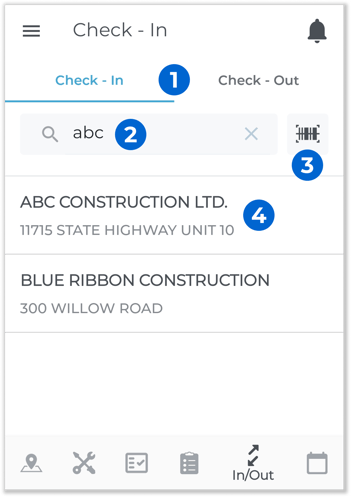
- Check-In / Check-Out Toggle
Tap the buttons at the top of the screen to toggle between Check-Ins and Check-Outs. - Search Bar
Begin typing into the search bar to search the list of Customers by the text entered. You can search by Customer name, Contract number, Product name, or Product number to return a list of Customers with open Contracts. - Scan Barcode
Tap to scan a Product barcode and search by that Product’s number. See “Scan a Product Barcode in Service and Rental Mobile” for more information. - Customer
Customers matching the current search criteria will appear below the search bar. Tap on a Customer start the Check In / Check Out process. See “Complete a Check-In or Check-Out in Service and Rental Mobile” for more information.