
In This Article
Introduction
The Manage - Project Administration secured module in Equipment CRM can be used to grant users access to the Project Settings menu, which offers options for configuring Projects in Equipment CRM.
Access Structure
Access to the Manage - Project Administration secured module can be granted via the Manage - Secured Modules screen. As such, the full access structure is as follows:
- An administrator with access to the Manage - Secured Modules screen gives other users access to the Manage - Project Administration module.
- These users can now use the Manage - Project Administration module to give other users access to the Project Settings menu.
- These users can now use the Project Settings menu to configure Projects in Equipment CRM.
This multi-tiered approach gives your organization tight control over both who can configure Projects in Equipment CRM, and who can grant this ability to other users.
Manage - Project Administration
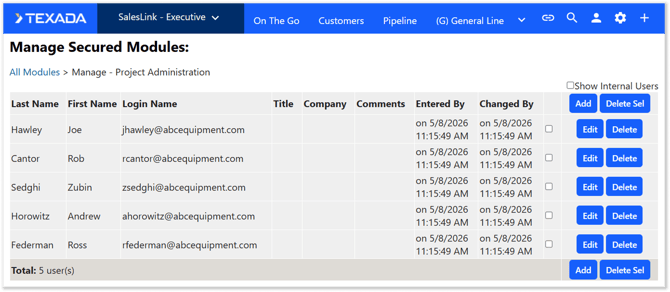
To reach the Manage - Project Administration module, log in to Equipment CRM (Executive) and select Settings (gear icon in the top-right corner of the screen) → Manage - Project Administration. If you do not see this option in the menu, you do not have access to the module. See “Access Structure” for more information.
For information on how to use this page, see Manage - Secured Modules - Manage Module.