
Introduction
These notes address new features and code fixes for APAC version 2026.0212 of Service, Rental and Financials.
This version comes packed with highly-anticipated features including Reservations in Rental Management (Next), Work Order Estimates, AI Dictate & Enhance for Service Management Mobile, and more! It also includes hundreds of minor updates, bugfixes, and quality-of-life changes. Keep reading to learn more!
Quick Navigation
- Notice - Service, Rental, and Financials Mobile iOS Support
- Release Highlights
- Rental Management - Check In / Check Out
- Reservations in Rental Management (Next)
- Service Management
- Service Management Mobile - AI Dictate & Enhance
- Service Management (Next) - Work Order Estimates
- Service Management - Customer-Owned Equipment
- Service Management - Updates to Customer-Owned Equipment
- Rental Management - Asset Staging
- Service Management (Classic) - Posting Technician Costs to the General Ledger
- Service, Rental, and Financials - Vendor Product Number Visibility
- Service Management (Classic) - Labor Special Pricing
- E-Commerce - Color Customization
- E-Commerce - Email Templates
- E-Commerce - Restrict Credit Card Payments
- E-Commerce - Order Info Window
- Service, Rental, and Financials (Classic) (formerly Texada SRM)
- Service, Rental, and Financials (Next) (formerly Texada Web)
- Service and Rental Mobile (formerly Texada Mobile)
- E-Commerce (formerly Texada GateWay)
- Payments (formerly Texada Pay)
Notice - Service, Rental, and Financials Mobile iOS Support
As of this update, Texada will be discontinuing support for Texada Rental Mobile on devices running iOS 15 and lower. Devices running iOS 16 (released on September 12, 2022) and above will continue to be supported.
For information on how to verify and update your iOS version, please refer to the following Apple support articles:
Older iOS devices may not be compatible with iOS 16 and above. To verify the latest iOS version compatible with your device, refer to the following articles:
Release Highlights
Rental Management - Check In / Check Out
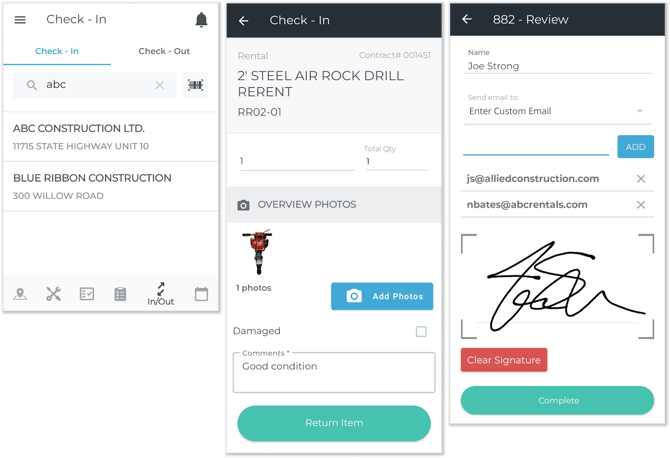
Check In / Check Out functionality is coming to Rental Management!
This update allows yard workers to inspect Products and collect Customer signatures at the start and end of rental Contracts. By leveraging the flexibility of the Service and Rental mobile application, your staff can replace paper inspection forms with digital checklists and handwritten notes with photographic evidence of equipment damage.
Click the button below to learn more!

Reservations in Rental Management (Next)
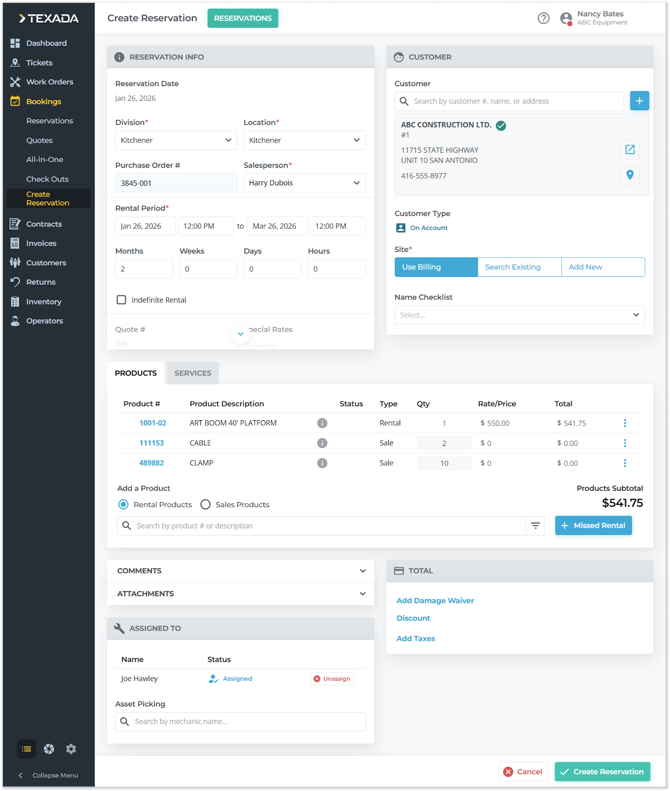
Texada is pleased to announce the arrival of Reservations in Rental Management (Next)!
Reservations give your team a smarter way to secure equipment for future rentals, estimate costs early, and smoothly transition from customer interest to a confirmed Contract. Whether you’re booking months in advance or managing multiple upcoming rentals at once, Reservations help you stay organized, reduce last-minute surprises, and deliver a better customer experience.
Click the button below to learn more!

Service Management
Texada is thrilled to announce that a wealth of exciting new service management features are coming! Service Management makes it easier than ever for dealers and rental houses to manage service work, streamline customer interactions, and capture new revenue opportunities.
From letting customers register and request service on their own equipment, to giving your team better visibility into work in progress and faster ways to create accurate work orders, these tools are designed to save time, reduce errors, and strengthen customer relationships. Click the button below to learn more!

Service Management Mobile - AI Dictate & Enhance
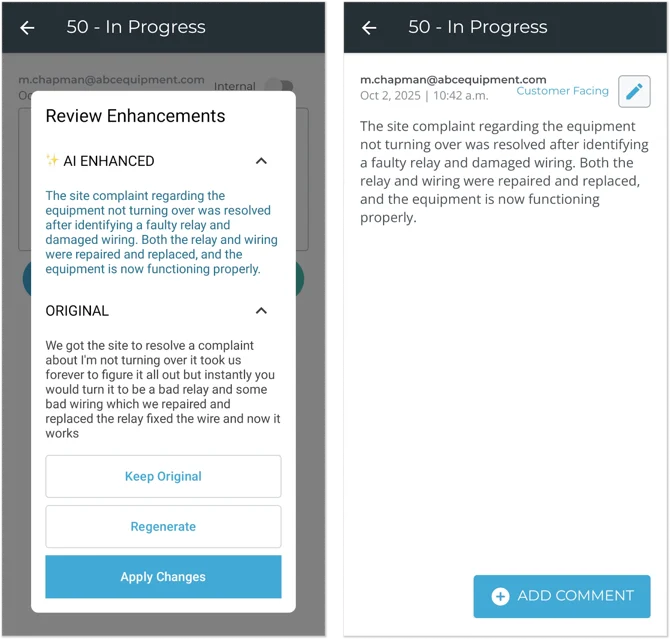
It is now easier than ever to take clean, professional Work Order notes thanks to new AI features coming to Service Management Mobile!
Mobile’s existing talk-to-text functionality gives mechanics the ability to dictate comments to their smart device. This feature is ideal for leaving quickly taking notes in the field or on the shop floor without lengthy typing sessions. Now, these comments can be further refined thanks to a new “AI Enhance” button!
Service Management (Next) - Work Order Estimates
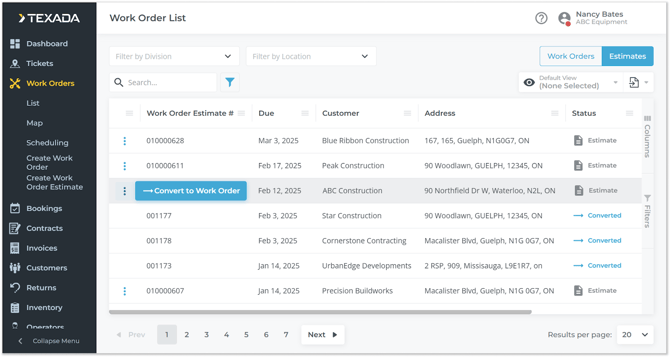
Support for Work Order estimates has been added to Service Management (Next)!
This functionality, previously only available in Service Management (Classic), allows you to draft Work Orders and share their potential costs with customers without affecting inventory or committing to performing work. Once a Work Order estimate has been approved by the customer, you can convert it to a regular Work Order.
Service Management - Customer-Owned Equipment
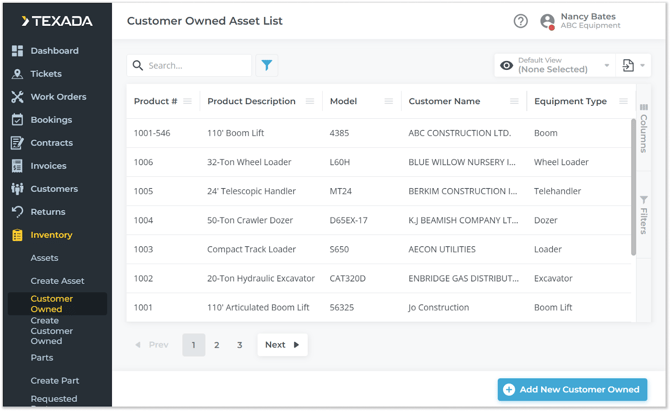
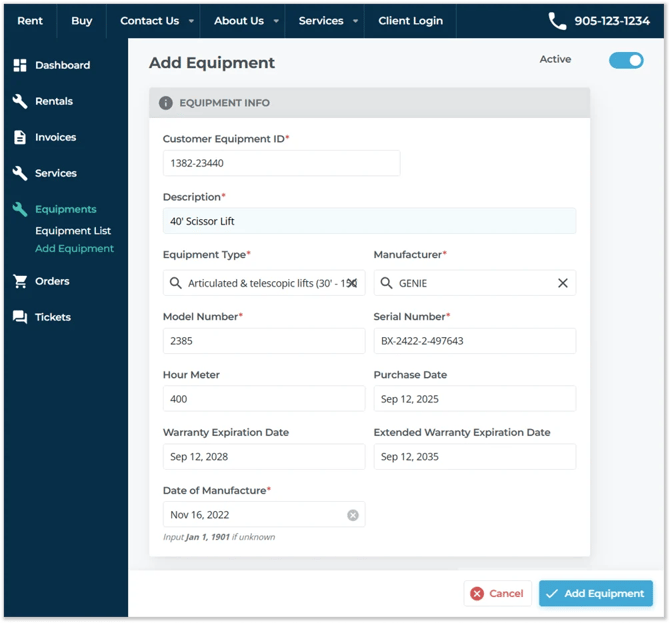
Support for customer-owned Assets has been added to Service Management!
This feature allows you to register equipment owned by your customers in your system without affecting your own inventory numbers. This, in turn, allows you to perform Work Orders on your customers’ equipment while maintaining a clear delineation between their equipment and yours.
This is an optional feature that can be enabled and disabled in Service Management (Classic). Click the button below to learn more!
Service Management - Updates to Customer-Owned Equipment
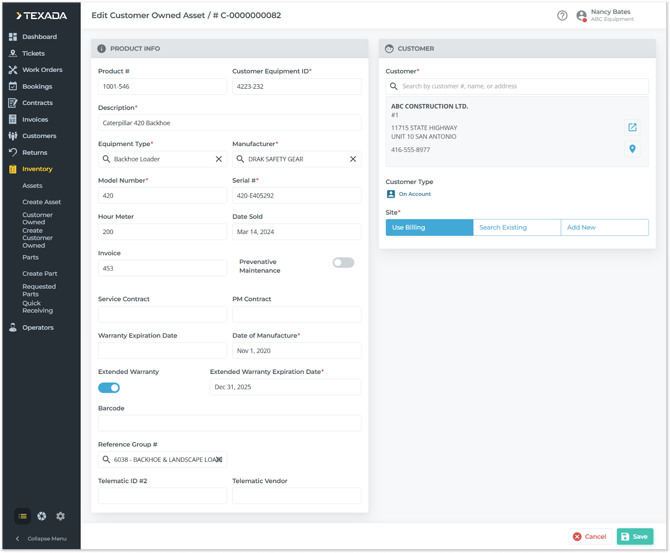
New updates have come to customer-owned assets in Service Management! These changes make it easier than ever to create and manage assets owned by your customers.
- A number of quality-of-life updates have been made to the Create / Edit Customer Owned Asset screen, including the addition of a new Equipment Type field and the conversion of text fields into searchable drop-down lists.
- A new “Equipment Type” tab has been added to the Company Settings screen, allowing you to customize the options available in the Equipment Type drop-down.
Rental Management - Asset Staging
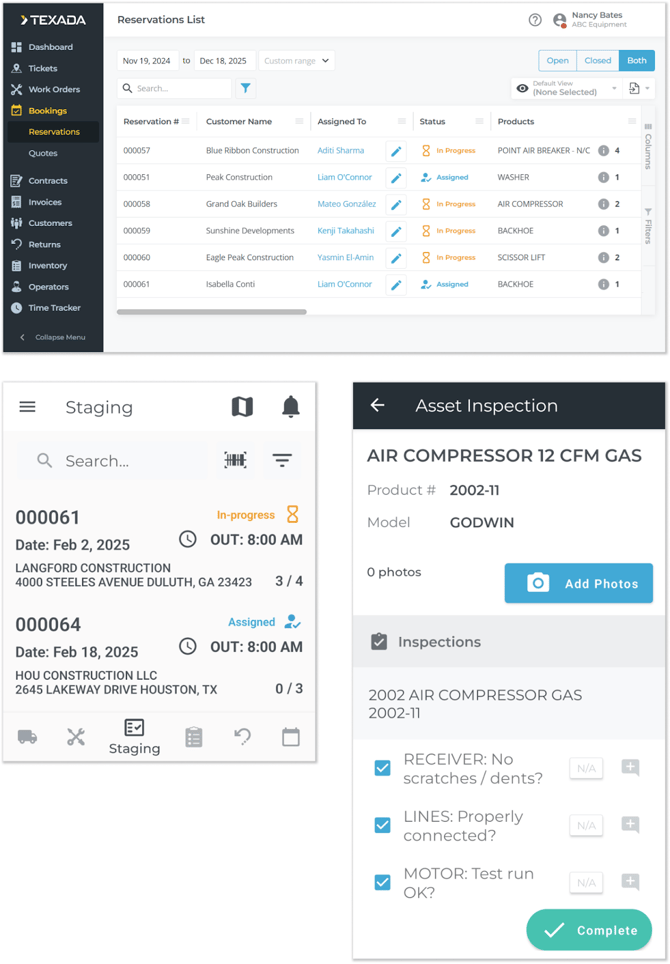
Asset staging has been added to Rental Management (Next) and Mobile!
Asset staging is the process of selecting which Assets will be sent out on Reservations once they are converted to Contracts, and inspecting these Assets to ensure they are in good condition before the rental period begins. This feature includes all of the following updates:
- Rental Management (Next): A new Reservations List page allows counter operators to track the Reservations in your system, and assign them to yard workers for staging.
- Rental Management Mobile: The new Staging tool allows yard workers to perform Asset staging for the Reservations assigned to them, including selecting and inspecting the Assets that will go out on the final Contract.
- Rental Management (Classic): New permissions and inspection form types have been added to support Asset staging functionality.
Click the button below to learn all about these features!
Service Management (Classic) - Posting Technician Costs to the General Ledger
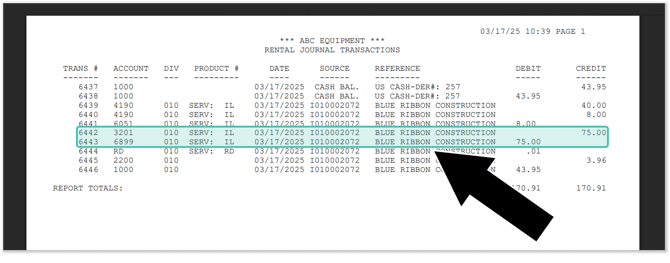
This update introduces the capability to link Work Order labor costs to specific General Ledger (GL) accounts. This feature can provide your organization with new insights into the profitability of the Work Orders you complete.
Service, Rental, and Financials - Vendor Product Number Visibility
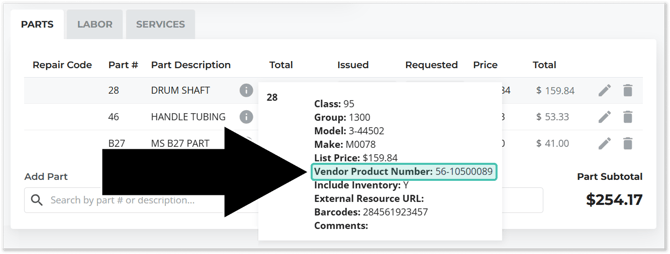
To make it easier to cross-reference parts in your system with your vendors’ catalogues, we have added Vendor Product Number fields to several screens in Service, Rental, and Financials, including:
- The Create / Edit Work Order screen in Service Management (Next)
- The Create / Edit Invoice screen in Financials (Next)
- The Create / Edit Ticket screen in Service Management (Next)
- The Work Order Parts window in Service Management (Classic)
- The Sales Order Invoice Details windows in Financials (Classic)
Service Management (Classic) - Labor Special Pricing
It is now possible to establish customer-specific pricing for Work Order labor in Service Management (Classic)!
This update expands Service Management’s existing Product, Group, and Class special pricing capabilities, giving you more precise control over how you charge your customers for Work Orders. Reward repeat customers with discounted rates and eliminate the need to manually override labor pricing each time you create a Work Order!
E-Commerce - Color Customization
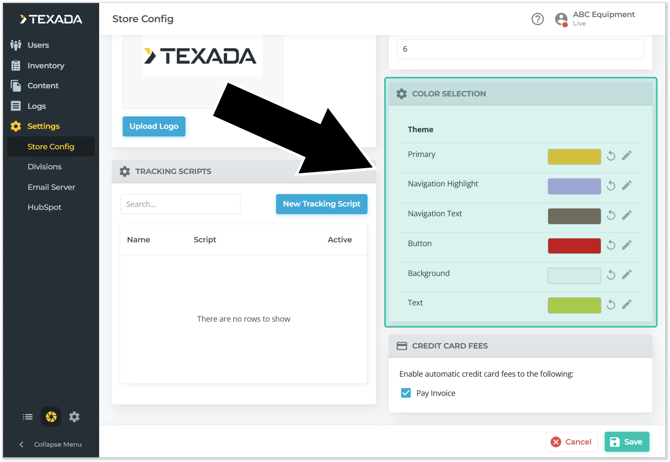
A new “Color Selection” tool has been added to the Store Config page of the new E-Commerce Administration Panel! This tool allows you to customize your website’s color palette, including the color of text, buttons, navigation elements, and your website’s background!
To use this tool, log in to the E-Commerce Administration panel and navigate to Settings → Store Config, then scroll down until you see the Color Selection panel. Click the pencil icon  next to a color to edit it, or click the undo icon
  to reset it to the default.
Changes made using this tool will be visible on your E-Commerce website right away, so experiment with different colors and create a website consistent with your company’s brand!
E-Commerce - Email Templates
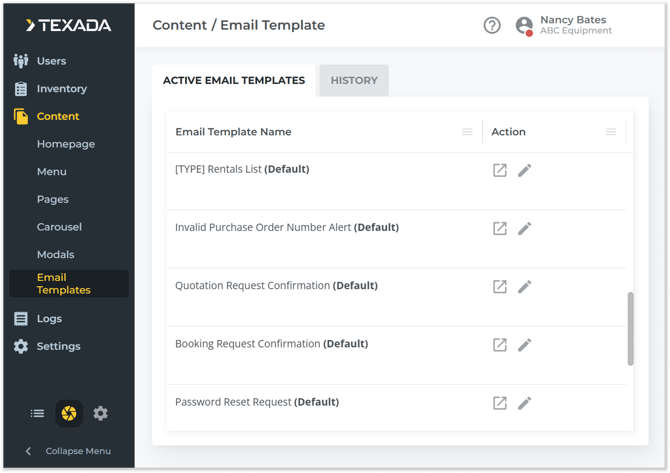
It is now possible to edit the content of system emails sent by E-Commerce!
Use the new Email Templates page to browse the list of system-generated emails, edit their content, and preview them to see how they will look when your customers receive them. Change email content with confidence thanks to a robust history feature that allows you to restore old versions of emails.
Use this feature to personalize the system emails sent to your customers and ensure that they align with your organization’s voice!
E-Commerce - Restrict Credit Card Payments
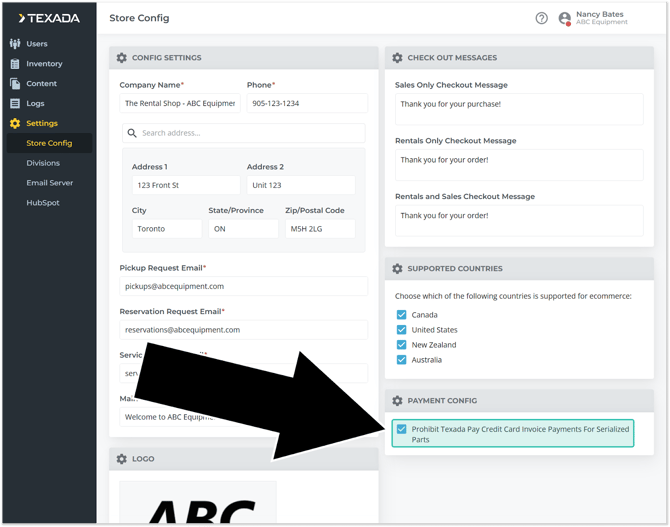
E-Commerce now provides the ability to disable credit card payments for serialized parts! This feature can help you manage loss of profits caused by credit card fees, while still permitting your staff to process credit card payments in Financials (Classic).
E-Commerce - Order Info Window
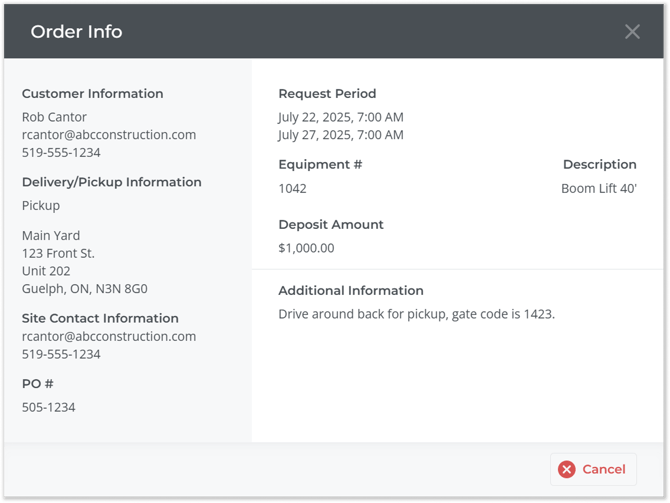
Clicking on a booking request from the Web Requests page in the new E-Commerce Administration Panel will now open a new “Order Info” window. This window contains details about the order in question, including customer, contact, deposit, and equipment information, making it easier for administrators to review incoming orders at a glance!

Service, Rental, and Financials (Classic) (formerly Texada SRM)
Accounts Payable
|
Ticket # |
Description |
|
SRM-4624 |
Resolved an issue affecting the Vendor Information utility (APVF01) in which it was possible to create Vendors with names containing banned special characters such as “, +, &, @. |
|
TR-6225 |
It is now possible to configure the Days To Post parameter for Accounts Payable direct credit payments using the TD Bank 80-byte format. |
Accounts Receivable
|
Ticket # |
Description |
|
TR-4325 |
It is now possible to void manual payments that include a credit card fee. |
|
SRM-4351 |
Resolved an issue in which attempting to print an Invoice via the Customer Account Inquiry utility (ARAR05) would occasionally fail with a "An Error Has Occurred And The System Will Now Generate An Automatic Rollback" error. |
|
SRM-4802 |
Resolved an issue occasionally affecting the Customer Account Inquiry utility (ARAR05) in which nothing would happen when clicking the "Print" button to download a PDF version of a document. |
|
TR-3612 |
Additional input restrictions have been placed on the "Phone Number Format" field in the Company Information window to prevent invalid phone number formats from being entered:
|
|
TR-5655 |
When adding a credit card to a Customer under Customer Maintenance → Additional Information → Credit Cards, the issuer on the method of payment will now be validated according to the first digits of the credit card number:
|
|
TR-4861 |
It is now possible to add Customer Contacts whose Primary or Alternate Email address contains an underscore (_) after the @ symbol. |
Backoffice
|
Ticket # |
Description |
|
TR-3508 |
A new screen has been added to the beginning of the Daily Close 1 process. This screen will present users with a list of deposits in previous batches/DBRs. Users will have the option to (1) mark the deposits as posted, (2) change the DBR# to the current DBR#, or (3) do nothing with the deposit. The User will not be able to select option (2) if the date is outside of the contract (RSCH) date range control and they do not have date range control override. Users will need to mark those as posted and deal with the GL postings themselves. |
|
SRM-3996 |
Resolved an issue in which the user would occasionally not be emailed a .csv file upon completing the Daily Close process. |
|
SRM-4336 |
Resolved the "WARNING: INVALID DIVISION" error that would occur the first time the user attempted to open a Contract in the Return Operator Time Charge Equipment utility (RSOT15). |
|
SRM-4667 |
Resolved an issue affecting the Daily Close process in which the revenue for Product Kits with revenue allocation enabled was not getting allocated to no-charge Kit items, resulting in "HEADER != DETAILS" errors. |
Counter
|
Ticket # |
Description |
|
SRM-1148 |
It is now possible to generate the Detailed Open Contract Report (RSCH50) as an Excel (.xls) file. To do this, select "Excel" under "Report Options". Selecting this option will generate one spreadsheet for all customers. |
|
TR-4737 |
Contract Service Notes will now be displayed under each Service line in the Invoice Services window of the Cycle Bill a Single Contract utility. |
|
SRM-6059 |
Improved performance with screen rendering after clicking the contract details delete button. |
|
SRM-5547 |
To prevent potential rate calculation issues, it is no longer possible to use the Esc key to close the Rental Rates window (RSRF03 (3705)). |
|
SRM-4996 |
If the "Allow Create P.O. From Contract" option is enabled for a Sales Product, availability for that Product will no longer be checked during Contract entry. Rather, insufficient availability will prompt the creation of a Purchase Order as expected. |
|
TR-4712 |
Payments (formerly Texada Pay) is now supported when converting a Reservation to a Contract. |
|
SRM-4085 |
Resolved an issue in which the system was allowing Operators without the correct permissions to perform a Substitution when creating or updating a Contract, Counter Worksheet, Reservation, or Quote. |
|
SRM-4170 |
Resolved an issue in which deposit request emails sent via the Add Contract Deposits utility (RSCH15) would occasionally fail to send, despite an "Email request has been successfully submitted" message appearing. |
|
SRM-4229 |
Resolved an issue in which it was possible to overbook Assets by adding the same Non-Bulk Rental Asset to a Quote multiple times, then converting that Quote to a Contract. |
|
SRM-4722 |
Resolved an issue affecting the Product Select window (RSEQ01) in which searching by Model Number would occasionally return unexpected availability numbers. |
|
SRM-5095 |
Resolved an issue affecting Counter Worksheets in which comments not marked as "Print" were occasionally being included on PDFs generated via the Print Rental Return Worksheet function (RSRS11). |
|
SRM-5402 |
Resolved an issue affecting the Counter Worksheet utility (RSRQ04) in which the expected Products would occasionally fail to appear in the Product Select window. |
|
TR-3951 |
Resolved an error in which extending the due date of a contract with a rental cap caused capped line items to recalculate incorrectly, leading to unintended refund amounts after the cap had been reached. |
|
TR-4097 |
Resolved the "Valid bill to postal/zip not provided" error that would occasionally appear during asset staging. |
|
TR-3448 |
Resolved an issue where duplicate safety sheets were printed for contracts. |
|
TR-3949 |
Resolved the "Inspection Error" and "Asset Could Not Be Staged" errors that would occasionally occur when completing the asset staging process. |
|
TR-3454 |
Resolved an issue affecting the Enter Services window of the Contracts screen in which the application would occasionally freeze when the character limit of the "Notes" field was reached. |
|
TR-6504 |
Half-Day Proration no longer affects rentals under 1 day. |
|
TR-6383 |
When entering a re-rental product to a contract, the user will now be able to cancel out of PO details, including vendor selection, after changing the rates of that product. |
|
TR-4130 |
It is now possible to submit and manage separate check-in and check-out Inspection forms on Contracts.
|
Document Generation & Printing
|
Ticket # |
Description |
|
SRM-4710 |
The expected date format for Excel imports throughout SRF (Classic) has been updated from DD-MM-YYYY (European) and MM-DD-YYYY (American) to DD/MM/YYYY (European) and MM/DD/YYYY (American), with leading zeros for days and months less than 10. This change is to align the expected import and output formats, allowing users to export then import reports without reformatting date fields. |
|
SRM-5002 |
Resolved an issue in which Excel spreadsheets exported from SRF (Classic) would occasionally be generated with inconsistent borders between cells. |
|
SRM-5136 |
Customers' Australian Business Numbers (ABNs) will now be included beneath their BILL TO address on printed Contracts, Quotes, and Reservations. |
|
SRM-5140 |
Resolved the "This XML file does not appear to have any style information associated with it" error that would occasionally appear when clicking a hyperlink in a PDF inspection form generated via the Print Inspection Forms utility (WOWI10 (7049)). |
|
SRM-5703 |
Empty date fields will no longer be populated with the value "!~DATE~!" when exporting reports to Excel. |
|
SRM-2052 |
PDF documents generated by SRF (Classic) will now be generated with descriptive filenames, including the document's type, number, and date/time (for printed documents). The following document types are affected by this change: Counter Documents, Invoices, Sales Orders, Sales Quotes, Purchase Orders, and Work Orders. |
|
SRM-4300 |
Resolved an issue in which attempting to print bulk disposals (RSBS03) would occasionally result in an "ERROR OPENING FILE" error. |
|
SRM-4592 |
Resolved an issue in which the date fields in certain Excel reports would occasionally be printed in the incorrect format (e.g. MM-DD-YYYY where YYYY-MM-DD was expected). |
|
TR-4956 |
Resolved an issue affecting the formatting of generated PDF documents. |
General Ledger
|
Ticket # |
Description |
|
SRM-4447 |
Resolved an issue affecting the GL Account Inquiry to Print/Summary utility (GLGL15) in which monetary values over $10,000,000.00 were being displayed as a line of asterisks in the printed report. |
|
SRM-4969 |
Resolved an issue in which Texada Pay payments made during Customer Payment Posting would occasionally fail to be posted to the General Ledger. |
|
SRM-5925 |
Resolved the "366 - SQL ERROR" error that would occasionally occur when running the Trial Balance report (GLGL11). |
|
SRM-5962 |
Resolved an issue causing certain payments / deposits to not be posted to the General Ledger. |
|
TR-6253 |
Resolved an issue in which Miscellaneous Journal imports failed when Job Costing was enabled, even if the entries did not include any job cost information. |
Integrations
|
Ticket # |
Description |
|
SRM-449 |
When submitting a status code change via the submit inspection form API, it should reject the process if the status code being submitted has been suppressed or flagged as “Not TW from SRM” (System Maintenance → Configure System Settings → Operations → Product Status Codes). The rejection message will read ‘Status Code Change {status_code} Not Allowed for Web’. |
|
TR-3774 |
Added Caterpillar Visionlink as a supported telematics vendor. |
|
SRM-4677 |
An inbound API endpoint has been added that allows third-party telematics providers to push telematics information to SRF (Classic). This endpoint enables telematics providers to update meter and location information for batches of Products without the need for custom integration. To enable this integration, add a new entry to the Maintain Web Services API Keys utility at System Maintenance → Configure System Settings → Security → Web Service API Keys (WSAPI01 (5024)).
Swagger documentation for this endpoint can be found at: https://documentation.texadasoftware.com/#/Integrations/put_update_telematics_ |
|
SRM-5470 |
Resolved in issue in which the /create/workorder API was not checking Part availability. |
|
TR-3925 |
Resolved a rare issue where Void transactions made in Payments were failing in Financials (Classic) even though they were successful in Global Payments. |
Inventory Control
|
Ticket # |
Description |
|
TR-4621 |
Enhancements allowing for clearer separation of parts and equipment sales activity have been made to Sales Classes in SRF (Classic).
|
|
TR-4793 |
Further changes have been made to the behavior of Products belonging to Parts Sales Classes and Equipment Sales Classes:
|
|
TR-5069 |
The speed at which Inventory Quantity Changes are processed has been improved. |
|
TR-3906 |
An "Inactive" box has been added to customer-owned equipment, offering the same functionality as the existing toggle for regular equipment. Check this box if the product is no longer part of your fleet and should only appear in the Inventory Search when the 'Include Inactive' filter is checked. |
|
SRM-1300 |
The Post Inventory Transfer Report (RSTH20) under Inventory Control can now be printed in both PDF and Excel formats. The Excel report will consist of two spreadsheets, the first being the main Transfer Edit Report and the second being the Transfer Summary Edit. |
|
TR-4713 |
When customer-owned equipment is added to the system, the product number will be set to an auto-generated equipment ID if left blank. |
|
SRM-1910 |
A new "TO BIN LOCATION" field has been added underneath each product on Internal Transfer Packing slips (INDH03). This field indicates the inventory bin location for the given product. |
|
TR-4701 |
Inventory quantity changes will no longer be recorded for bulk rentals if the return location is the same as the contract location. |
|
SRM-5144 |
Resolved an issue affecting the Rental Inventory utility (RSPF02) in which updating a Product's meter reading would occasionally cause unexpected values to be recorded, especially when editing a meter reading multiple times without closing the Product Meter Information window, or editing a Product on a Contract while the Contract was open in Change mode. |
|
SRM-6035 |
Resolved an issue causing delays between products being received via warehouse receiving (INWR20) and those products appearing in inventory. |
|
TR-3494 |
Improved the performance of the warehouse receiving function. Asset quantities should now be updated significantly faster after completing warehouse receiving. |
|
TR-3817 |
Resolved an issue in which product status code changes were occasionally recorded out-of-order in the status change history log. |
|
TR-6466 |
Resolved an issue affecting the Sales Inventory screen (RSPF01) in which the adjustment type on the inventory adjustment record was occasionally not set. An "Adjustment Type" column has been added to the Excel (exported) version of the Inventory Adjustment Report (RSIT43). |
|
TR-6395 |
The Inventory Clean-Up Export by Location report will now respect the Rental/Sale/Both parameter. |
|
TR-6382 |
Resolved an issue affecting the Inventory Adjustment window of the Rental Inventory and Sales Inventory screens in which attempting to edit the Adjustment Date to a value outside of the allowable range would occasionally cause the screen to freeze. |
|
TR-5935 |
Resolved an issue in which certain asset count values would occasionally differ between the Inventory Count Console utility and the Rental Inventory utility. |
|
TR-5834 |
Added support for including backordered quantities from work orders and sales orders to the "committed" quantity in the Allocation of Stock utility. |
Invoices
|
Ticket # |
Description |
|
TR-4935 |
Improved the error messaging that appears when a payment fails to be applied to an Invoice. |
|
SRM-5428 |
Resolved an issue in which Invoices marked as not on-account that contained an on-account amount would occasionally have double the expected balance due when printed. |
Logins & Security
|
Ticket # |
Description |
|
SRM-4151 |
Resolved an issue affecting the SRF (Classic) login screen in which the "Remember Me" checkbox would occasionally fail to appear. |
|
SRM-4152 |
Resolved an issue occasionally causing SRF sessions to time out prematurely. |
Operators
|
Ticket # |
Description |
|
TR-5658 |
In preparation for the transition to the Texada Identity Service (TIS), features have been introduced to ensure that all Operators have a valid email address associated with their account. When an Operator logs in to Service, Rental and Financials (Classic) with a profile that does not include a valid email address, a pop-up window will appear prompting them to update their email address.
|
|
TR-5333 |
In preparation for the transition to the Texada Identity Service (TIS), a new "Operators With No Email Addresses" window has been added to the Operators utility (GLOP01). This window will appear whenever you access the Operators utility while Operators with no email address exist in your system, providing a list of such users and allowing you to specify an email address for each. |
|
TR-3436 |
Operator Name is now split into Operator First Name and Operator Last Name on all operator maintenance screens. |
|
TR-5006 |
Updating a user role's permissions will now force a menu refresh for all users with that role, ensuring that the changes are applied immediately. |
Order Entry
|
Ticket # |
Description |
|
SRM-2337 |
When printing a Sales Order, users will now be prompted to print the associated Purchase Order, if one exists. Supported areas:
Restrictions:
|
|
SRM-4789 |
Resolved an issue in which it was possible to bill Sales Orders (OEOD02) for Bad Risk List Customers. |
Portal Management
|
Ticket # |
Description |
|
SRM-5216 |
Resolved an issue affecting the functionality of the Portal Customers utility (WEB091). |
Purchase Orders
|
Ticket # |
Description |
|
TR-6346 |
When running the Generate PO from Worksheet function and the user selects “Include Worksheets From Other Agents”, the Purchase Orders will now be merged by agent, using the first agent on the Purchase Order. The Vendor, Ship Via and Location will still be unique. If there is more than one worksheet with the same Vendor, Ship Via, and Location values but a different agent, the Order Date, Ship To Address, and Terms from the first worksheet will be used. |
|
TR-5272 |
Several updates have been made to Purchase Order worksheets, PO generation, and related inventory and product maintenance functions to support Ship Via handling, session locking by agent and location, and revised purchase order generation logic:
|
Reports
|
Ticket # |
Description |
|
SRM-1209 |
The Insurance Expiry Report (ARCF46) has been added to the Automatic Reporting utility (SMCR01). |
|
TR-3991 |
A progress counter will now appear in the middle of the screen for most reports. |
|
TR-3826 |
Contract Location is now included in the Product Status Code Report (RSAR03). |
|
SRM-4376 |
Support for Dynamic Reports has been deprecated. All associated utilities and menu options have been removed from SRF (Classic). |
|
TR-5560 |
The functionality of the Texada Pay Payment Reconciliation Report (TPLOG03) has been enhanced with improved debugging and new filter options to make it easier to identify and troubleshoot mismatched or missing payments, particularly for manual and card-not-present transactions. |
|
SRM-4582 |
Resolved an issue in which the Invoice Cut-Off Report utility (RSID42) would occasionally generate an empty report in circumstances where results were expected. |
|
SRM-5925 |
Resolved the "366 - SQL ERROR" error that would occasionally occur when running the Trial Balance report (GLGL11). |
|
SRM-6144 |
Resolved an issue causing the Customer Revenue Report (RSSH17) to occasionally take an excessive amount of time or fail to generate. |
|
SRM-6081 |
Resolved an issue affecting the Inventory Usage Report in which the L/Y and YTD columns were occasionally appearing blank. |
|
TR-5893 |
Resolved an issue in which the Excel spreadsheet generated when exporting Customer Owned Equipment was missing headings for the last three columns. |
|
TR-6381 |
The Exchange Inquiry Report screen (RSEX02) will no longer freeze when the date is changed. |
System Maintenance
|
Ticket # |
Description |
|
SRM-3963 |
The maximum length of the Buffer field in the Repair / Maintenance Codes utility (WOMC01) has been increased to 5 characters. |
|
TR-4063 |
A new "Manage Mechanic Performance" permission has been added to Security Role Permissions, at System Maintenance → Configure System Settings → Security → Security Roles → Role Permissions → Texada Web Permissions. This role has been added in anticipation of an upcoming feature that will allow permissioned users to view mechanics' working performance data. |
|
SRM-4211 |
A default Reason Code of "N - NONE AVAILABLE" has been added to the Substitution Reason Codes utility (RSSBR01). This code ensures there is always at least one Reason Code to select when performing a Substitution, and cannot be deleted. |
|
SRM-4294 |
Resolved an issue affecting the Configure System Settings screen (CONFIG) in which certain options would appear available to users who did not have the necessary permissions. These options would display a "You do not have permissions to run this function" error when clicked, instead of simply being grayed out as expected. |
|
SRM-4414 |
Resolved an issue in which the Database Lock Inquiry utility (FINDLOCK) would occasionally display the incorrect Waiting Opr or Holding Opr. |
|
SRM-4881 |
Resolved an issue affecting the Price Codes utility (RSCO01) in which the "Type" drop-down in the Add Price Code window was too short, making it difficult to make a selection. |
|
SRM-4999 |
A new "Check Availability In BOM Creation" parameter has been added to the Company Inventory Parameters utility (GLCN90K (3838)). When this option is enabled, availability will be checked when adding or changing a component in the Bill of Materials in the Inventory Bill of Materials (INBM01) utility. As this utility does not include a Location parameter, availability across all Locations will be checked. |
|
SRM-5300 |
A new "Excel Date Format" drop-down field has been added to the Company Information utility (GLCN01). This element allows you to select the format of date fields in Excel reports exported from SRF (Classic). Four options are available:
|
|
SRM-5380 |
Resolved the "Cannot move to field: Field modification not allowed" error that occasionally appeared when attempting to modify the E-Mail Address field in the Operator window (GLOP01). |
|
SRM-5760 |
The "Default Date Based On" field on the Deposits tab of the Contract Parameters utility (GLCN90D (3834)) has been changed from a drop-down to radio buttons. This resolves an issue in which attempting to open this drop-down would occasionally cause the application to load indefinitely. |
|
SRM-5937 |
Resolved an issue affecting the Operator utility (GLOP01) in which the Employee Number field would occasionally be uneditable. |
|
TR-5625 |
A new 'Print "Completed By <TECH>" Comment' checkbox has been added to the Estimate and Work Order Parameters window at System Maintenance → Configure System Settings → System → Company Parameters → Estimate and W.O. Parameters. When checked, the "Completed by <Mechanic Name>" comment automatically added to Work Orders completed in Service and Rental Mobile will be flagged as customer-facing, and will appear on printed documents. When unchecked, this comment will be internal-only. |
|
TR-6144 |
In Database Lock Inquiry, users are now able to terminate their own session. |
|
TR-5829 |
Updated the behavior of the Texada Pay tab at Company Parameters → Software Integration → Texada Pay.
|
|
TR-5811 |
If "Allow On Account for Cash Customers" is set to "No" at Company Parameters -> Invoice Parameters, payments will no longer be able to be taken on account in the following locations:
|
Utilities
|
Ticket # |
Description |
|
TR-4481 |
The performance of the GL Account Inquiry utility has been improved. |
|
SRM-4454 |
Resolved the "WARNING: SET INVALID VALUE" error that would occasionally occur when changing salespeople via the Change Sales History Salesman utility (INSH66). |
|
SRM-4459 |
Resolved the "UNABLE TO CREATE SSO" error that would occasionally occur when importing a file through the Update Group Information utility (GRP695). |
|
SRM-5479 |
Resolved an issue affecting the Update Group Information utility (GRP695 (7059)) in which the review file downloaded prior to importing would occasionally only contain one line of data. |
|
TR-5209 |
Resolved the "Not all AEMP Telematics configuration complete for Trackunit IRIS API" error that would occasionally occur upon running the Import AEMP Telematics utility. |
|
TR-6465 |
Clicking the "Excel" checkbox in the Bulk Report function (RSPF56) (Utilities Menu → Inventory Control → Change Bulk Status → Bulk Report) will no longer cause the system to freeze. |
|
TR-6374 |
The Export/Import Group function will no longer include blank rows when importing data. |
|
TR-6257 |
Entries in the Automatic Status Code Update by Group utility will now be automatically deleted if their associated Group is deleted. |
Vendors
|
Ticket # |
Description |
|
SRM-5938 |
A new "Alternate Vendor Number Processing" option has been added to the Texada Parameters utility (GLCN90P (3843)) at System Maintenance → Configure System Settings → System → Company Parameters → Texada Parameters. When this option is enabled, an "Alternate Vendor #" field will be added to Vendor records, making it possible to store secondary Vendor numbers up to 20 characters in length. The Alternate Vendor # will be displayed along with the standard Vendor Number on the following screens. On these screens, it will also be possible to submit an Alternate Vendor # instead of a Vendor Number in order to open a Vendor record.
|
Work Orders
|
Ticket # |
Description |
|
TR-4311 |
New validation has been added to ensure valid make and model values when adding or changing customer-owned equipment in the following places: SRF (Classic):
SRF APIs:
|
|
TR-4907 |
In order to prevent processing errors, Work Orders are now limited to 999 line items. |
|
SRM-3971 |
When printing a Work Order with an associated Contract, the Contract number will now appear under the Work Order Notes section. |
|
SRM-6344 |
Resolved an issue affecting Work Orders in which the incorrect labor costs were occasionally being posted to the General Ledger. |
|
SRM-6226 |
Resolved an issue affecting Work Order inspections in which attempting to a view an inspection's details or attached photos would occasionally result in an error. |
|
TR-3456 |
Resolved the "Unable to locate file to open" error that would occasionally occur when opening an attachment added to a Work Order via API. |
|
TR-3433 |
Resolved an issue that would occasionally cause "Unknown Operator" locks to appear on Work Orders. |
|
TR-5833 |
In the Work Orders and Fast Track Work Order Parts utilities, adding a part, typing in a partial description, then selecting a part from the list will now automatically populate the Part # and Description fields with the appropriate information. |
|
TR-6219 |
Resolved an issue in which selecting a blank service code not configured for Work Order use from the Services Search window would cause the application to hang indefinitely. |
APIs
|
Ticket # |
Description |
|
TR-3782 |
Three API endpoints have been updated to to accommodate the new "Alternate Vendor #" field originally introduced in Service, Rental and Financials version 2025.0220.
|
|
TR-4088 |
|
|
TR-4087 |
Note: If a user only wants to retrieve the blank site information for a customer, they will need to retrieve all sites and retrieve only the blank site's information. |
|
SRM-6003 |
A new “includeBasedOnTag” filter has been added to the /get/currentAvailability/product/ endpoint that allows you to filter the returned results. Possible values for this filter are:
|
|
TR-3619 |
The following updates have been made to Service, Rental and Financials' REST APIs:
|
|
TR-5609 |
The Customer Payment API for Payments (formerly Texada Pay) has been updated to improve data validation and logging accuracy.
|
|
TR-4748 |
The /get/service API endpoint will now return division pricing regardless of the division checking parameter. |
|
TR-5988 |
If the credit card convenience fee % is zero when calling the /create/customerPayment API, the system will no longer verify whether or not the credit card fee is optional. |
|
TR-5701 |
Calling the /create/apInvoice API with an "apInvoiceNumber" and "vendorNumber" that match an existing posted AP invoice will now fail with an error message, preventing invoices from being duplicated. |
|
TR-5937 |
Resolved an issue in which the /get/availability/product API endpoint was occasionally returning Group-level information instead of Product-level information as expected. |
|
TR-5988 |
If the credit card convenience fee % is zero when calling the /create/customerPayment API, the system will no longer verify whether or not the credit card fee is optional. |
|
TR-5701 |
Calling the /create/apInvoice API with an "apInvoiceNumber" and "vendorNumber" that match an existing posted AP invoice will now fail with an error message, preventing invoices from being duplicated. |
Miscellaneous
|
Ticket # |
Description |
|
TR-3990 |
The overall performance of SRF (Classic)'s menus has been improved. |
|
SRM-4613 |
The performance of certain SRF (Classic) functions has been improved. |
|
TR-4736 |
When a user switches Divisions in SRF (Classic), the session is now preserved in the list of users accessed from the Database Lock Inquiry utility. |
|
SRM-4691 |
When working with File Attachments (ATTACH01), the current amount of memory used and total available memory are now displayed below the Attachments table. |
|
SRM-5557 |
A warning will now appear if a user attempts to capture a credit card with the same type and last 4 digits as an existing card. As the system is unable to store 2 cards with the same information, the user will have the option to overwrite the original card with the new card. This is an extremely rare occurrence that mostly affects American Express credit cards. |
|
TR-3450 |
Updated the functionality of the Database Lock Inquiry function (FINDLOCK) to display certain Counter document locks that would previously not have been detected. |
|
SRM-4444 |
Resolved an issue affecting organizations using smtp.office365.com in which system generated emails were occasionally failing to send with 'Authentication unsuccessful' errors. |
|
SRM-4456 |
Resolved an issue affecting the Customer Contact Information (CMHP01) and Group Maintenance Schedule (RSGF90) utilities in which certain fields were appearing too narrow to be used correctly. |
|
TR-4475 |
Resolved an issue affecting the Database Lock Inquiry function (FINDLOCK) in which the Username/Operator column would be blank for some entries. |
|
TR-3947 |
Resolved the "PO Required" error that would occasionally appear when creating or updating a document for which the PO number had already been filled out. |
|
TR-4812 |
Resolved an issue affecting multiple utilities in which the "Report in progress" pop-up message would occasionally fail to disappear, preventing the user from interacting with the utility. |
|
TR-4861 |
It is now possible to add Customer Contacts whose Primary or Alternate Email address contains an underscore (_) after the @ symbol. |
|
TR-6011 |
A number of changes have been made to SRF (Classic)'s login / logout processes in preparation for the transition to TIS. The following changes only apply to systems for which TIS has been enabled.
|
|
TR-6620 |
Updated the term "In-Yard Return" to "Check In" in several locations throughout Rental Management (Classic and Next) to maintain naming consistency. |
|
TR-5541 |
Added alternate customer number functionality to Customer Export/Import utility. |
Service, Rental, and Financials (Next) (formerly Texada Web)
Company Settings
|
Ticket # |
Description |
|
TR-3044 |
The error messaging that appears when a system email fails to send due to an expired Gmail token has been improved. This issue can be resolved by navigating to Company Settings → Emails in SRF (Next) and updating your email settings. |
Contracts
|
Ticket # |
Description |
|
TR-5018 TR-5038 |
Contract delivery fees will now automatically be added as Services in SRF (Next) when configured to do so. This behavior matches the existing behavior in SRF (Classic). |
|
TR-4815 |
It is now possible to sign Closed Contracts as well as Contracts that were previously signed. Any subsequent signatures will overwrite the previous signature. |
|
TR-4441 |
When "Off Rental Reason Codes" is enabled in SRF (Classic) (System Maintenance → Configure System Settings → System → Company Parameters → Contract Parameters → Documents), a pop-up window prompting the user to select valid reason codes for the Contract will appear whenever a Contract is created in Rental Management (Next). This functionality reflects existing functionality in Rental Management (Classic). |
|
TR-5015 |
It is now possible to edit automatically-added Services on Contracts in Rental Management (Next) when "Allow Edit of Automatic Services" is enabled in SRF (Classic). This matches existing behavior in Rental Management (Classic). |
|
TR-4963 |
Resolved the "Duplicate Result: Resource already exists" error that would occasionally occur when uploading more than 2 photos to a Contract. |
|
TR-3353 |
Resolved an issue in which administrators with access to multiple divisions were unable to delete Contracts for divisions other than their own in Rental Management (Next). |
|
TR-4318 |
Resolved an issue causing Contracts to occasionally become locked after being updated. |
|
TR-3422 |
Resolved an issue affecting the Create Contract page in which the auto-generated Contract Date would occasionally differ from the user's system's date, depending on their timezone. |
|
TR-2373 |
Resolved an issue in which users were not prompted to enter meter readings when adding a metered Asset with a Kit to a Contract. |
|
TR-4546 |
Resolved the "We were unable to get the file" error that would occasionally occur when attaching a file on the Create/Edit Contract screen. |
|
TR-6103 |
Resolved an issue in which rate discounts applied to Contracts in Rental Management (Next) were occasionally not being reflected in Rental Management (Classic). |
|
TR-629 |
Colored badges have been added to the top of the Create / Edit Contract and Create / Edit Reservation pages to make it clearer which page the user is on. |
Customers
|
Ticket # |
Description |
|
TR-3026 |
Resolved an issue affecting the Time Tracker and Customer List pages in which no filters would be available via the "Filters" tab on the right side of the screen. |
|
TR-3297 |
Resolved an issue causing the "Alternate Customer Number" field to be mandatory in the Quick-Create Customer window. |
|
TR-4141 |
Resolved an issue causing newly-created Sites to occasionally have a status of "Closed" even if "Open" had been selected in the New Site window. |
|
TR-3265 |
It is now possible to filter the Customer List page by customer number, name, address, and phone number. |
Inventory
|
Ticket # |
Description |
|
TR-3030 |
Updated the error messaging that appears when trying to create an Asset with an existing Product number. |
|
TR-2783 |
The "External Resource URL" field on the Asset Details screen has been converted into a clickable hyperlink, making it easier to review external resources. |
|
TR-4386 |
Resolved an issue causing an error when users attempted to put products Off Rent. This error occurred specifically when the "Activate Enhanced Off Rental Processing" parameter was enabled in Rental Management (Classic) (System Maintenance → Configure System Settings → System → Company Parameters → Texada Parameters). |
|
TR-4333 |
Resolved an issue where an invalid off-rental reason code was applied when the "Enhanced Off Rental Processing" configuration was enabled. |
|
TR-6201 |
Resolved an issue affecting the Asset Details screen in which Assets' Maintenance Schedules would occasionally fail to appear under the Maintenance Schedule tab. |
Invoices
|
Ticket # |
Description |
|
TR-4586 |
The unused "Filter" button on the right side of the Invoice List page has been removed. |
|
TR-3157 |
Resolved an issue affecting the Edit Invoice page in which it was occasionally not possible to check or uncheck the "On Account" checkbox. |
|
TR-3163 |
Resolved an issue affecting the Products tab of the Create / Edit Invoice Screen in which rental Products added to the Invoice would occasionally be given a type of "Sale". |
|
TR-3929 |
Resolved an issue in which it was not possible to create an Invoice containing only Service items. |
|
TR-3915 |
Rental Products added to an Invoice via the Create / Edit Invoice screen will now be given a default Type of Sales. |
|
TR-4081 |
Resolved an issue affecting the Create / Edit Invoice screen in which adding a Service to an Invoice would occasionally delete Products from it. |
|
TR-4591 |
Resolved an issue affecting the Create Invoice screen in which the Tax Code 1 and Tax Code 2 fields would not automatically populate the first time a Customer was selected for the Invoice. |
|
TR-4820 |
Resolved an issue in which tax totals were occasionally appearing as $0.00 for historic Invoices. |
|
TR-6778 |
Resolved the "01: Only 1 Tax code provided" error that would occasionally occur when creating an Invoice. |
Returns
|
Ticket # |
Description |
|
TR-4619 |
The In-Yard Returns page has been renamed to Check-In. "Open" and "Closed" buttons have been added to this page, allowing the user to filter Contracts by status. |
|
TR-3976 |
Resolved the "Damage Code Not Provided" error that would occasionally occur when submitting a Rental Return. |
|
TR-4114 |
Resolved an issue affecting the Process Return screen in which the Invoice Date field would occasionally display an "Invoice date must be between [start] and [end]" error even if the selected date fell between those dates. |
|
TR-6661 |
Resolved the "Oops, something went wrong..." error that would occasionally occur when clicking the "Process Return" button on the Rental Returns page. |
|
TR-5718 |
Resolved the "We were unable to get the file" error that would occasionally occur when opening an attachment on an In-Yard Return. |
Reservations
|
Ticket # |
Description |
|
TR-3417 |
Resolved the "Valid bill to postal/zip not provided" error that would occasionally appear when assigning a Reservation from the Reservations List page. |
|
TR-6580 |
Resolved an issue in which attachments added to a Reservation during creation would occasionally not be saved. |
|
TR-6579 |
Resolved an issue in which comments added to a Reservation during creation would occasionally not be saved. |
|
TR-6578 |
Resolved the "Salesperson is required" error that would occasionally occur when editing a Reservation. |
|
TR-6577 |
Resolved an issue affecting Reservations in which the Customer's address would occasionally default back to their billing address even if a different address was selected at the time of creation. |
|
TR-6557 |
Improved the performance of availability checking for Product Groups during Reservation creation and editing. |
|
TR-6028 |
An "Availability" column has been added to the search results window when adding Groups to a Reservation, allowing the user to see availability for that Group. |
|
TR-5222 |
It is now possible to add Service line items to Reservations in Rental Management (Next), with the same look and feel as the existing Product tab. The new Services tab supports editable fields for Service Code, Description, Quantity, and Rate/Price. Totals are calculated automatically, and a Services Subtotal displays at the bottom of the tab.
|
|
TR-1075 |
An "Assigned To" panel has been added to the Create / Edit Reservation page, users to be assigned to Reservations for completion. |
|
TR-636 |
A "Comments" panel has been added to the Create / Edit Reservation page. This panel matches the functionality of the Comments panel on other document pages, allowing the user to attach both internal and customer-facing comments to the Reservation. |
|
TR-5822 |
Resolved an issue affecting the Edit Reservation page in which adding a link attachment would occasionally cause an error. |
Tickets
|
Ticket # |
Description |
|
TR-2948 |
Division and Location selections made on the Ticket Scheduling page will now be retained when the browser is refreshed. |
|
TR-1697 |
When performing a Product exchange and creating Pickup / Delivery Tickets for the exchange, the status of the Product being exchanged (i.e. on the Pickup Ticket) will now be updated in the same manner as when performing a Rental Return. |
|
TR-3133 |
Resolved an issue affecting the Ticket creation process in which unexpected results would occasionally appear when filtering the list of Contracts. |
|
TR-3130 |
Resolved an issue in which Delivery Tickets created in Service Management (Classic) would occasionally not synchronize correctly with Service Management (Next). |
|
TR-3940 |
Resolved the "Oops, something went wrong..." error that would occasionally occur when opening a Pickup Ticket. |
|
TR-6737 |
Resolved an issue in which it was possible to create a Ticket in Rental Management (Next) with dates outside of the allowable range established in the Date Range Control function in Rental Management (Classic). |
|
TR-5898 |
Resolved an issue in which the status of Closed or Cancelled Tickets would occasionally revert to a previous status. |
Users & Security
|
Ticket # |
Description |
|
TR-4463 |
Super Admins can now bulk enable users within their company to use TIS/IDP! This new feature eliminates the need to individually enable each user. |
|
TR-2958 |
Resolved an issue in which users whose email addresses contained uppercase letters were occasionally unable to login with the Texada Identity Service (TIS). |
|
TR-6616 |
The permissions required to access the Labor Management page have been updated to match those required in Service, Rental, and Financials (Classic). |
Work Orders
|
Ticket # |
Description |
|
TR-2913 |
The Mechanics drop-down on the Create / Edit Work Order screen and related screens will now display up to 500 Mechanics by default, increased from 20. |
|
TR-2927 |
It is now possible to sort and filter the Work Order List page by the "Salesperson" column. |
|
TR-4389 |
Sold Parts will no longer appear in the Serial # drop-down when converting a Work Order Estimate to a Work Order, preventing the user from accidentally selecting a Part that has already been sold. |
|
TR-2880 |
The Vendor Product Number of Work Order Parts will now be synchronized between Service Management (Classic) and Service Management (Next). |
|
TR-3301 |
The "Posting Type" field on the Create Work Order screen is now mandatory. |
|
SRM-6296 |
Resolved an issue in which attachments included on a Work Order estimate would occasionally be lost when that estimate was converted to a regular Work Order. |
|
TR-3421 |
Resolved an issue in which it was occasionally not possible to convert Work Order estimates containing serialized Parts to regular Work Orders. |
|
TR-4428 |
Resolved an issue preventing the addition of labor lines to Work Orders in Service Management (Next) when the labor service code in Service Management (Classic) configuration lacked a division-level rate. (System Maintenance → Configure System Settings → Accounting → Service Codes → Edit a Labor Service Code → Division Window → No rate) |
|
TR-4301 |
Significantly improved the loading speed of large part lists on the Create/Edit Work Order page. |
|
TR-5887 |
Changes have been made to the way Work Orders with invalid or missing addresses are handled by the system.
|
|
TR-6120 |
Resolved the "Could not find work order. Try again later" error that would occasionally occur upon attempting to open a Work Order after adding an attachment to it. |
|
TR-6059 |
Resolved an issue affecting the Edit Work Order Estimate screen in which adding Parts, Labor, or Services to an existing Work Order Estimate would occasionally cause the displayed totals to be incorrect. |
|
TR-5717 |
Resolved an issue in which non-Mechanic users were occasionally appearing in the Mechanics list and in the Mechanics drop-down on the Add / Edit Work Order page. |
Miscellaneous
|
Ticket # |
Description |
|
TR-4757 |
The default landing page for Service, Rental, and Financials (Next) has been updated from the dashboard calendar to the dashboard console. |
|
TR-2307 |
Updated the wording of a number of system messages throughout the application. |
|
TR-3329 |
All Phone Number fields in SRF (Next) now obey the format established in SRF (Classic), in the Number Format field under Company Information. |
|
TR-6730 |
Improved the error messaging that appears when attempting to switch from Service, Rental, and Financials (Next) to Service, Rental, and Financials (Next) under a Division to which the user does not have access. |
|
TR-6292 |
Resolved the "Barcode number already exists" error that would occasionally occur when updating Parts barcodes via API. |
|
TR-5984 |
Resolved an issue in which the formatting of generated documents would occasionally be incorrect when performing eSignatures. |
|
TR-822 |
The "City" field in the Add New Site window accessible from various pages is now correctly marked as mandatory. |
|
TR-5803 |
Resolved an issue affecting the Mechanic Efficiency page in which selecting a Mechanic would occasionally redirect the user to the dashboard console instead of the Work Order Performance List for that Mechanic. |
Service and Rental Mobile (formerly Texada Mobile)
Asset Management
|
Ticket # |
Description |
|
TR-2914 |
Resolved an issue in which disposed Assets were occasionally still appearing on the Asset List page in SRF (Next) or in the Assets list in SRF Mobile. |
|
TM-2375 |
Resolved an issue in which the "Customer Owned" toggle would occasionally remain enabled after switching a customer-owned Asset to a regular Asset. |
Inspections
|
Ticket # |
Description |
|
TM-1908 |
Resolved an issue in which text on the View Inspection screen would occasionally appear grayed out, and it would not be possible to open comments. |
|
TM-3128 |
Android: It is now possible to enlarge Work Order Inspection photos by tapping on them. This matches existing functionality in the iOS version of the application. |
Reservations
|
Ticket # |
Description |
|
TM-2122 |
Resolved an issue affecting Reservations in which leaving a comment on a Reservation in Rental Management (Classic), then leaving a comment on that same Reservation in Rental Management Mobile, would cause the first comment to be duplicated whenever the Comments screen was accessed. |
Staging
|
Ticket # |
Description |
|
TM-2452 TM-2444 |
Resolved an issue in which it was not possible to stage non-bulk rentals regardless of availability. |
Tickets
|
Ticket # |
Description |
|
TM-1965 |
Resolved an issue in which toggling back and forth between the Ticket Map and other screens would occasionally cause the Ticket Map to appear blank. |
Work Orders
|
Ticket # |
Description |
|
TM-2171 TM-2172 |
The flow for creating a Work Order in Service Management Mobile has been updated to accommodate customer-owned Assets. The User will now select a Customer and address for the Work Order first, followed by the Asset to be worked on. The original Asset-first Work Order creation flow can still be accessed via the Asset Management tool. |
|
TM-2268 |
Resolved an issue in which it was not possible to claim an inspection for a newly-created Work Order without exiting and reopening it. |
|
TM-2412 |
Resolved an issue in which the application would occasionally crash when tapping the "Start Working" button on certain Work Orders. |
|
TM-2377 |
Resolved an issue in which creating a Work Order for an Asset with associated inspection forms in Service Management (Next), then changing the Asset to a customer-owned Asset and attempting to claim the inspection forms in Service Management Mobile would occasionally result in a "Work Order Sync Error". |
|
TR-2101 |
Custom fields are now compatible with Work Orders. When creating a custom field, select "Work Order" under "Page Type" to designate it as a Work Order custom field. It will now appear at the bottom of the Work Order Info panel on the Create / Edit Work Order and Create / Edit Work Order Estimate pages. |
|
TM-2376 |
Resolved an issue affecting Work Order creation in which performing an asset search, then enabling the "Customer Owned" toggle would fail to refresh the search results if no customer-owned assets would have been found. |
|
TM-2512 TM-2488 |
Resolved an issue in which the Contract # was not automatically populated when creating a Work Order from the Work Orders tab. |
|
TM-2756 |
Resolved an issue affecting the Create Work Order screen in which searching for an asset using the Asset Description field would occasionally fail to return the expected results. |
|
TM-2660 |
Resolved an issue in which attempting to create a Work Order estimate from locations other than the Work Order List would occasionally cause the application to crash. |
|
TM-2403 |
Resolved an issue affecting Tickets and Work Orders in which the map view/list view toggle button would occasionally show a map icon while in map view, instead of a list icon as expected. |
|
TM-3631 |
Resolved an issue in which the values of custom fields added to Work Orders in Service Management (Next) would occasionally fail to appear correctly in Service and Rental Mobile. |
|
TM-3607 |
Resolved an issue in which deleting the last character of a mandatory user-defined field would result in an error and in the character being restored. It is now possible to fully delete the contents of mandatory user-defined fields. |
Miscellaneous
|
Ticket # |
Description |
|
TR-3016 |
Resolved an issue occasionally preventing the application from receiving push notifications. |
E-Commerce (formerly Texada GateWay)
Customer Access Portal
|
Ticket # |
Description |
|
TR-3043 |
Resolved the Internal Server Errors that would occasionally occur when creating a job site in the customer access portal. |
|
TR-6247 |
Resolved an issue in which credit card fees were occasionally not displaying in the Totals panel of paid Invoices in the E-Commerce Customer Access Portal. |
E-Commerce Websites
|
Ticket # |
Description |
|
TR-2897 |
Resolved an issue in which bare URL hyperlinks (e.g. "google.com" instead of "https://google.com") were occasionally not redirecting correctly when included in E-Commerce website pages or as menu links. |
|
TR-6246 |
Resolved an issue affecting Invoice payment in which clicking the "Pay Now" button on the Invoice Cart window without selecting a payment type would occasionally cause the screen to load indefinitely. |
New Administration Panel
|
Ticket # |
Description |
|
TR-2983 |
The ability to resize images when creating or editing a page has been added to the new E-Commerce Administration Panel. |
|
TR-4504 |
The "Extended Warranty" radio button on the Add Equipment page has been removed, and the "Extended Warranty Expiration Date" field will now always be displayed. To indicate that a piece of equipment has no extended warranty, leave this field blank. |
|
TR-4816 |
Adjusted the sizing of the "Date" column on the Open Delivery Tickets page to prevent dates from being cut off. |
|
TR-3783 |
2 new permissions have been added to the User Permissions page in the new E-Commerce Administration Panel:
|
|
TR-4906 |
A new "Error Message" column has been added to the Logs / Emails page in the new E-Commerce administration panel. Any errors that occurred with the sending of a system email will be included in this column. |
|
TR-4857 |
The Export function on the User List page in the new E-Commerce Administration Panel will now export a list of all Users, instead of only those displayed on the current page. |
|
TR-3273 |
A new "Prohibit Texada Pay Credit Card Invoice Payments For Serialized Parts" checkbox has been added to the new E-Commerce Administration Panel under Settings → Store Config. This option can be used to prevent E-Commerce website customers from paying for serialized sales parts using Payments (formerly Texada Pay). When enabled, the user will receive an error message when attempting to pay for a shopping cart containing at least 1 serialized item. |
|
TR-3110 |
The following pages in the new E-Commerce Administration panel have been updated with the ability to select the number of items displayed per page:
|
|
TR-1225 |
Link validation has been implemented on the Carousel page in the new E-Commerce administration panel. Attempting to create a slide with an invalid Link value will now result in an error. |
|
TR-3967 |
The validation on the "Category" drop-down on the Create / Edit Category page has been improved to prevent invalid selections. |
|
TR-3317 |
Two configuration options from the legacy E-Commerce administration panel have been added to the Store Config page:
|
Miscellaneous
|
Ticket # |
Description |
|
TR-4936 |
When an E-Commerce payment is accepted but cannot be applied to the target Invoice, a warning email will now automatically be sent to your organization's Accounts Receivable contact. |
Payments (formerly Texada Pay)
|
Ticket # |
Description |
|
TR-5513 |
Attempting to process a credit card payment with a payment amount of zero dollars at a terminal will now result in a voided transaction, accompanied by the following message: "Authorized amount of zero dollars detected. This transaction has been voided." |
|
TR-5512 |
A new "Warn Interval" field has been added to the Texada Pay Software Integration Parameters (GLCN90N (5837)). This field allows administrators to define how long the system waits before displaying a warning message during a terminal payment. If left blank or set to 0, the system will default to 180 seconds. |
|
TR-6437 |
Resolved an issue in which, after taking a manual payment from the Invoice Totals screen, the user was no longer required to click OK on the payment status message (Approved, Declined, etc.). This functionality has been reinstated, and the message pop-up has been moved to display only after the invoice payment has been written in the Invoice Totals screen and the deposit has been written in the Contract Totals screen, ensuring that exiting either screen does not impact the writing of the payment or deposit. |
|
TR-6463 |
The error message displayed when a counter payment is is declined/unsuccessful has been updated to the following: “Payment was unsuccessful. The information will be cleared.” |
|
TR-5875 |
Changes have been made to the following Payments reconciliation reports:
|
|
TR-5885 |
Following a Payments manual or card-on-file payment, the payment’s status (approved, declined, etc.) will now appear on-screen for one second instead of in an information box that the user is required to close. |